
#FactCheck-Old Kashmir operation visuals falsely shared as BSF action on Bangladeshi infiltrator at Tripura border
Executive Summary
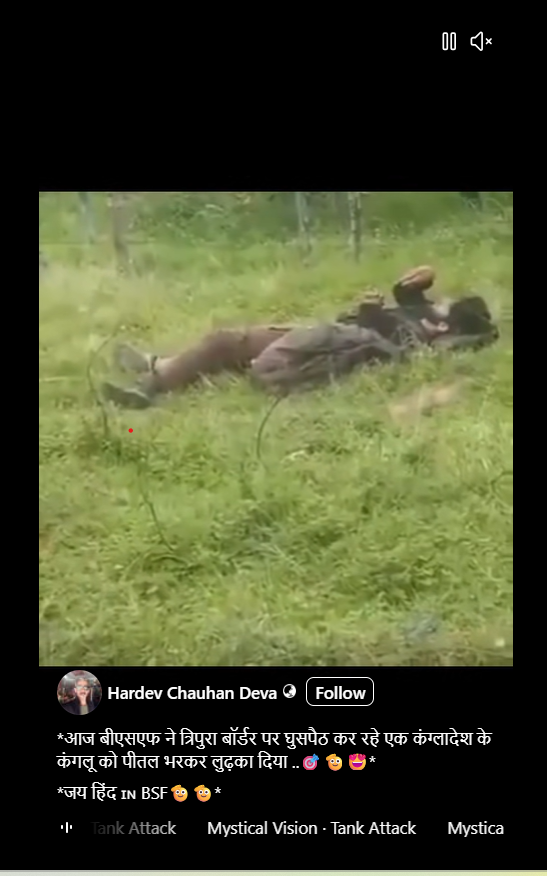
A video showing a body lying on the ground is being widely circulated on social media with the claim that it shows a Bangladeshi infiltrator who was killed by the Border Security Force (BSF) during an infiltration attempt along the Tripura border. CyberPeace Research Wing research found the claim to be misleading. While reports confirm that in June 2026 a Bangladeshi national was killed in BSF firing in Tripura’s Unakoti district, the viral video is unrelated to that incident.
Claim:
A Facebook reel shared the video claiming that BSF recently shot dead a Bangladeshi infiltrator at the Tripura border, and that the visuals depict the same incident. Link: https://www.facebook.com/reel/1561542888951793
Fact Check:
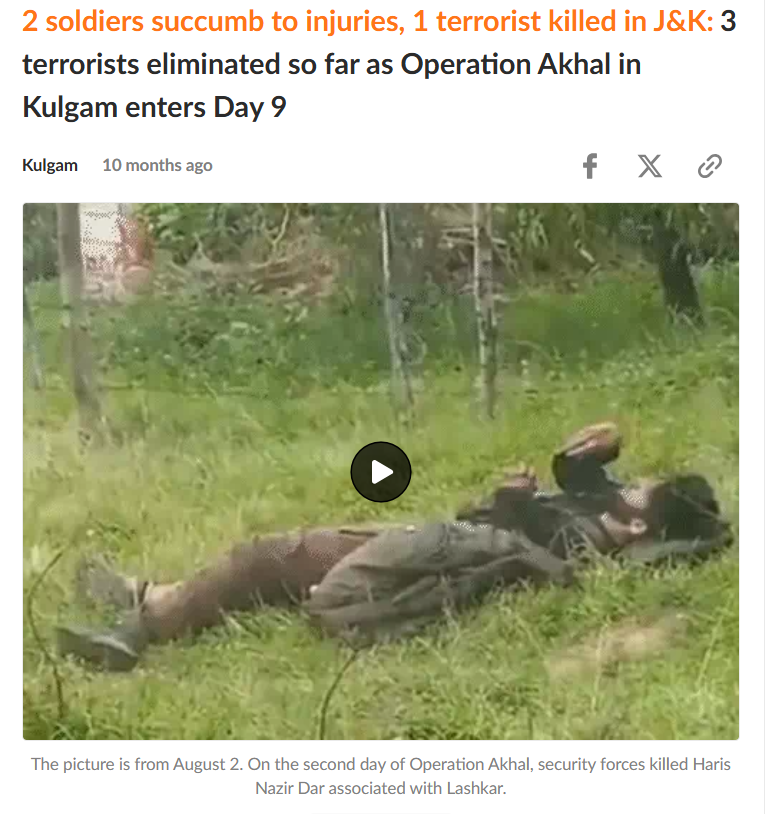
A reverse image search of keyframes from the viral video led to reports published by Bhaskar English, which carried the same visuals. The reports identified the deceased as Haris Nazir Dar, a Lashkar-e-Taiba terrorist, who was killed during Operation Akhal on 2 August 2025 in Jammu and Kashmir. https://www.bhaskarenglish.in/national/news/2-soldiers-martyred-in-jks-kulgam-3-terrorists-killed-135638183.html
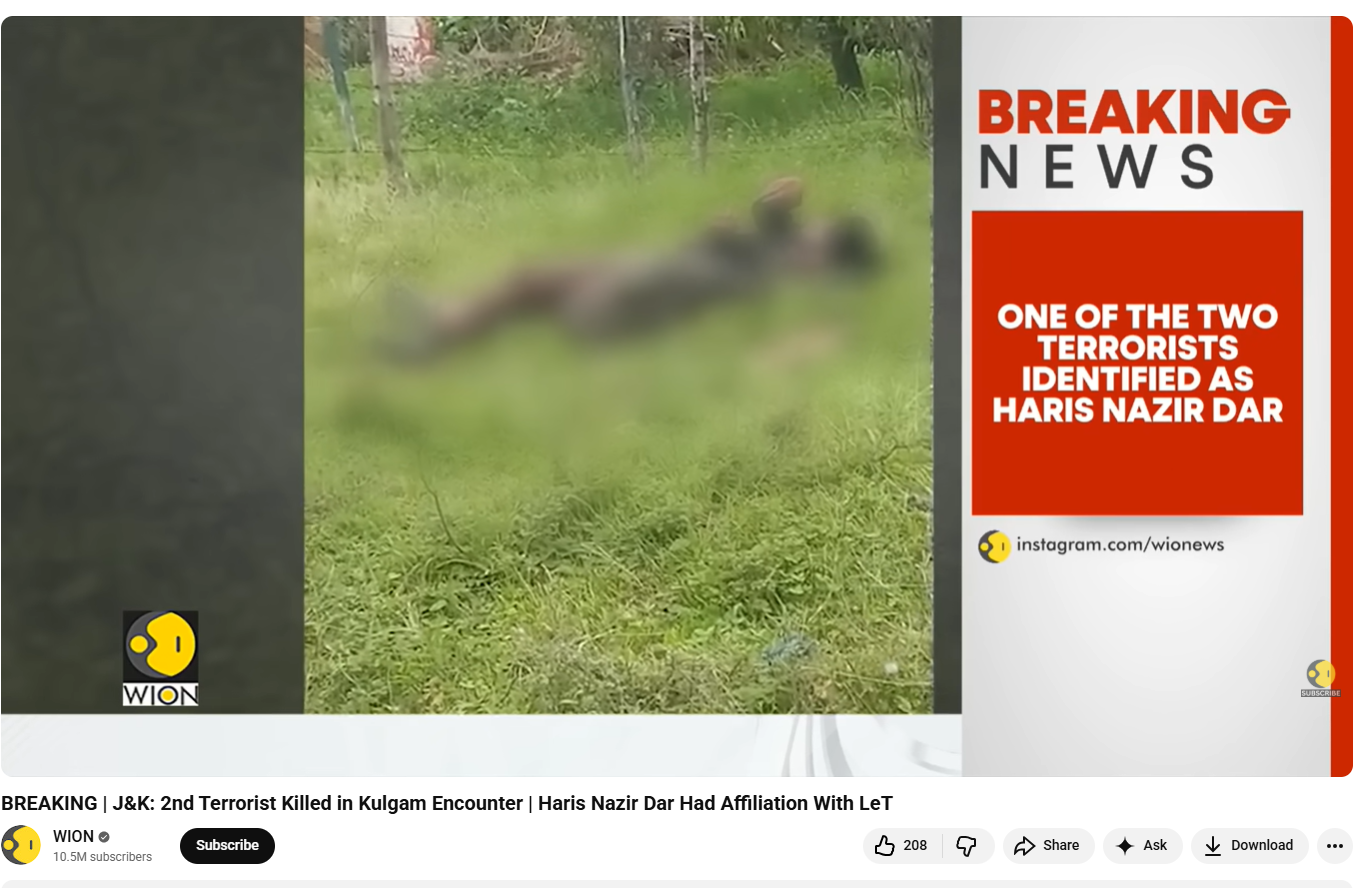
Further verification also found similar coverage on WION, confirming the same context of the incident. https://www.youtube.com/watch?v=Uhk-7QjPKK8
Operation Akhal was a major joint counter-terrorism operation conducted in August 2025 in the Akhal forests of Kulgam district, South Kashmir, by the Indian Army’s Chinar Corps, Jammu and Kashmir Police, and the Special Operations Group (SOG). https://newsonair.gov.in/kulgam-encounter-joint-operation-continues-in-akhal-forests-three-terrorists-killed/

Conclusion:
The research confirms that the viral video claiming to show a Bangladeshi infiltrator killed by the BSF at the Tripura border is misleading. The footage is from an August 2025 counter-terrorism operation in Jammu and Kashmir and shows Lashkar-e-Taiba terrorist Haris Nazir Dar killed during Operation Akhal.

Related Blogs

Executive Summary:
Several videos claiming to show bizarre, mutated animals with features such as seal's body and cow's head have gone viral on social media. Upon thorough investigation, these claims were debunked and found to be false. No credible source of such creatures was found and closer examination revealed anomalies typical of AI-generated content, such as unnatural leg movements, unnatural head movements and joined shoes of spectators. AI material detectors confirmed the artificial nature of these videos. Further, digital creators were found posting similar fabricated videos. Thus, these viral videos are conclusively identified as AI-generated and not real depictions of mutated animals.

Claims:
Viral videos show sea creatures with the head of a cow and the head of a Tiger.


Fact Check:
On receiving several videos of bizarre mutated animals, we searched for credible sources that have been covered in the news but found none. We then thoroughly watched the video and found certain anomalies that are generally seen in AI manipulated images.


Taking a cue from this, we checked all the videos in the AI video detection tool named TrueMedia, The detection tool found the audio of the video to be AI-generated. We divided the video into keyframes, the detection found the depicting image to be AI-generated.


In the same way, we investigated the second video. We analyzed the video and then divided the video into keyframes and analyzed it with an AI-Detection tool named True Media.

It was found to be suspicious and so we analyzed the frame of the video.

The detection tool found it to be AI-generated, so we are certain with the fact that the video is AI manipulated. We analyzed the final third video and found it to be suspicious by the detection tool.


The detection tool found the frame of the video to be A.I. manipulated from which it is certain that the video is A.I. manipulated. Hence, the claim made in all the 3 videos is misleading and fake.
Conclusion:
The viral videos claiming to show mutated animals with features like seal's body and cow's head are AI-generated and not real. A thorough investigation by the CyberPeace Research Team found multiple anomalies in AI-generated content and AI-content detectors confirmed the manipulation of A.I. fabrication. Therefore, the claims made in these videos are false.
- Claim: Viral videos show sea creatures with the head of a cow, the head of a Tiger, head of a bull.
- Claimed on: YouTube
- Fact Check: Fake & Misleading

Introduction
Not every major breach begins with a sophisticated new exploit. Sometimes it begins with a device nobody remembered to update, and this one began exactly that way, at scale. Security researchers have disclosed a campaign that compromised more than 14,530 internet connected cameras made by Dahua Technology, (one of the world's largest surveillance equipment manufacturers), using a mix of stolen credentials, two long known authentication flaws, and a peer to peer relay technique that let attackers reach devices tucked behind home and office routers. The operation, tracked by researchers at Hunt.io, has been named Operation CameraSwarm. It ran between June 17 and July 22, 2026, and was reconstructed almost entirely from an exposed 407 megabyte working directory the attackers themselves left accessible, containing over 2,600 files, campaign logs, shell history, and tooling. Confirmed compromises were concentrated in Ukraine and Russia, and researchers described the operators/attackers as Russian speaking based on language artifacts found in the recovered material, suggesting the campaign was most plausibly built around surveillance or access relevant to the ongoing conflict between the two countries, though no formal attribution to a named threat actor or state entity has been established or claimed. What makes this worth understanding in detail is not just the scale, though 14,500 compromised cameras is a serious number, but how mundane the actual break in methods were. None of this depended on the attackers discovering some brand new, unknown flaw, the kind of vulnerability security researchers call a ‘zero day’. It depended on something far more ordinary: thousands of devices running years-old software that had never been patched, combined with cheap automated tools that could try weak passwords and known exploits at scale.
What is Dahua, and why does this matter
Dahua Technology, founded in Hangzhou in 2001, is a publicly traded, partially state owned Chinese company and the world's second largest video surveillance manufacturer by revenue, trailing only fellow Chinese firm Hikvision. Its cameras, digital video recorders, and network video recorders are sold in roughly 180 countries through more than 2,100 partners, and the company has shipped tens of millions of devices into homes, retail stores, offices, and public infrastructure worldwide. That scale is precisely what makes any systemic vulnerability in Dahua's product line consequential well beyond a single country or sector.
How the attackers actually got in
Hunt.io attributed the compromises to three distinct attack paths. The largest, by far, was straightforward credential attacks, essentially automated login guessing using weak, default, or previously leaked passwords, which researchers traced to 12,324 unique IP addresses across more than 13,000 recorded campaign attempts. The second path exploited two authentication bypass flaws, catalogued as CVE-2021-33044 and CVE-2021-33045, both rated a severe 9.8 out of 10 on the current CVSS severity scale used by the US National Vulnerability Database. These are not new vulnerabilities. They were publicly disclosed back in 2021, and Dahua issued fixed firmware for them years ago, yet both remain listed today on the US Cybersecurity and Infrastructure Security Agency's Known Exploited Vulnerabilities catalog, a designation reserved specifically for flaws still being actively exploited in the wild despite available patches. The third and most technically interesting path involved a peer to peer, or P2P, relay mechanism built into Dahua's own Easy4IP cloud infrastructure, a system designed to let users remotely access their camera without manually configuring network settings. Security firm ITRES Labs, which documented this exposure separately in 2025, found that on firmware released before mid-2024, simply knowing a device's serial number was enough to establish a connection route through Dahua's relay servers before the camera's own login check ever kicked in, a design gap that let attackers reach devices even when they sat behind network address translation, the technical barrier that normally shields home devices from direct internet exposure. Hunt.io's recovered operator logs claimed an extraordinary 89.4 percent of live serial numbers tested returned an open channel without any authentication at all, though it is worth noting that figure comes solely from the attackers' own recovered data and has not been independently verified by Dahua, ITRES Labs, or any public incident response body as of this writing. Beyond the initial break in, the campaign also planted 1,923 cameras with a persistent account, essentially a backdoor login the operators could return to later, and researchers found evidence suggesting parts of the toolkit may have been built specifically to hand off access to a third party, though no confirmed link to a named threat actor or state sponsor has been established.
Why cameras remain such a persistent target
Internet connected cameras occupy an unusual position in the broader device ecosystem. Unlike a laptop or phone, they are rarely patched by an end user paying regular attention, they are often installed once and forgotten, and many owners never change the default credentials shipped from the factory. A compromised camera also offers an attacker something more than a foothold, live or recorded video feeds of homes, businesses, and sometimes sensitive facilities, which carries value well beyond the kind of access a compromised laptop typically provides.
CyberPeace Advisory | What device owners should do now
For anyone running Dahua surveillance equipment, or any internet connected camera system, several concrete steps meaningfully reduce exposure.
For Dahua device owners specifically:
Two steps address the exact mechanisms this campaign exploited.
- First, check the device's firmware version against Dahua's official download portal and apply the latest available update immediately, since the fixes for both 2021 authentication bypass vulnerabilities have existed for years and simply have not been applied on thousands of devices.
- Second, disable the P2P or Easy4IP remote access feature entirely unless it is actively required, since this is the exact mechanism the third attack path, the serial number based relay, relied on to reach cameras without any login check at all.
For any internet connected camera system, including in India:
The remaining precautions apply regardless of manufacturer, and are worth following on any brand of camera, DVR, or NVR connected to the internet.
- Replace default or weak passwords with strong, unique credentials on every camera and recorder, and remove any unused or unrecognised accounts, since the persistent account technique this campaign used depends entirely on unnoticed access surviving unchecked.
- Place surveillance devices on a segmented network separate from computers and phones, so that a compromised camera cannot become a stepping stone into more sensitive systems.
- Periodically audit which devices on a home or office network are internet facing at all, since many cameras end up exposed simply because remote access was left switched on by default and nobody thought to check.
- And where a device offers the option, disable any built in peer to peer or cloud relay convenience feature unless genuinely needed, since the underlying design pattern this campaign exploited, a remote access shortcut that runs before proper authentication.Is not unique to Dahua and has shown up across other camera brands in the past.
The view from India
This disclosure lands at a particularly relevant moment for India, which enforced sweeping new restrictions on Chinese origin CCTV equipment earlier this year. Since April 1, 2026, internet connected surveillance cameras sold in India have been required to carry Standardisation Testing and Quality Certification under Essential Requirements norms first introduced by the Ministry of Electronics and Information Technology in April 2024, It's a country-of-origin requirement under the Essential Requirements norms (introduced by India's Ministry of Electronics and Information Technology in April 2024), manufacturers must disclose the origin of key components like the System-on-Chip (SoC), and devices using Chinese-origin chipsets are reportedly not being granted approval by certifying authorities. Since Dahua's cameras, like Hikvision's and TP-Link's, generally rely on Chinese-made chipsets, the practical effect is that their products haven't received STQC certification, which functions as a blanket exclusion without the government needing to name any single company in the rule text itself. The stated rationale for that policy, concerns over hidden backdoor access, transmission of data to foreign servers, and deployment near sensitive locations, reads almost like a preview of exactly the kind of exposure Operation CameraSwarm has now documented in the wild. It is worth being precise here: the restriction applies to new sales, not existing installations, and CameraSwarm's confirmed victims were concentrated in Ukraine and Russia rather than India. But the underlying lesson travels well beyond any one country's borders. A camera manufactured with a convenience feature that bypasses its own login check, sitting unpatched for years despite a fix being publicly available, is a vulnerability that does not respect national boundaries, and India's decision to tighten certification requirements before an incident of this scale surfaced looks, in hindsight, considerably more prudent than reactive.
References
- The Hacker News, "Hackers Compromised 14,500+ Dahua Devices Using Credential Attacks, Auth Bypasses, and P2P." August 19, 2026. https://thehackernews.com/2026/08/hackers-compromised-14500-dahua-devices.html
- Hunt.io, "Operation CameraSwarm: Dahua Cameras Compromised." https://hunt.io/blog/operation-cameraswarm-dahua-cameras-compromised
- ITRES Labs, "Dahua Beyond CVE-2025-31702: P2P Relay Exposure." October 29, 2025. https://labs.itresit.es/2025/10/29/dahua-beyond-cve-2025-31702-p2p-relay-exposure?
- Dahua Security, "DHCC-SA-202106-001: Security Advisory - Identity Authentication Bypass Vulnerability Found in Some Dahua Products." https://www.dahuasecurity.com/about-dahua/trust-center/dahua-psirt/dhcc-sa-202106-001%3Asecurity-advisory---identity-authentication-bypass-vulnerability-found-in-some-dahua-products
- National Vulnerability Database, "CVE-2021-33044 Detail." https://nvd.nist.gov/vuln/detail/CVE-2021-33044
- CISA, "Known Exploited Vulnerabilities Catalog." https://www.cisa.gov/known-exploited-vulnerabilities-catalog
- Business Standard, "India to ban Chinese CCTV from Apr 1 as security concerns reshape market." https://www.business-standard.com/industry/news/india-ban-chinese-cctv-government-security-concerns-hikvision-dahua-market-126033000316_1.html
- PTC News, "India CCTV ban 2026: Hikvision, Dahua face STQC block as new security rules begin." https://www.ptcnews.tv/amp/nation/india-cctv-ban-hikvision-dahua-stqc-rules-2026-4422961
- Uyghur Human Rights Project, "Surveillance Tech Series: Dahua's Links to Human Rights Abuses in East Turkistan." https://uhrp.org/report/dahuas-links-to-human-rights-abuses-in-east-turkistan/

Executive Summary
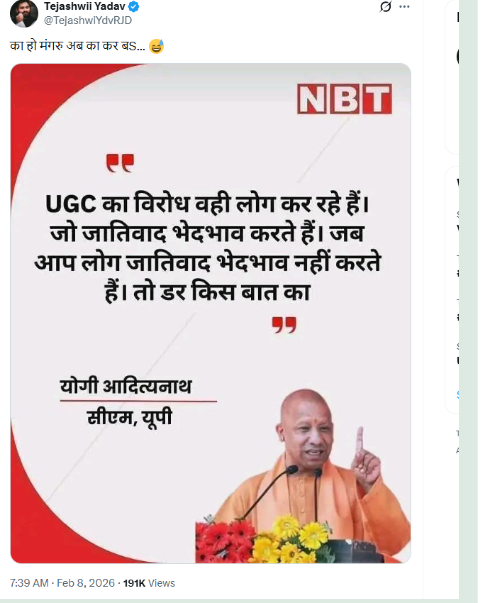
A news graphic is being shared on social media claiming that Uttar Pradesh Chief Minister Yogi Adityanath said,“Those who practice casteism and discrimination are the ones opposing UGC. If you do not indulge in caste-based discrimination, what is there to fear?” The CyberPeace’s research found the viral claim circulating on social media to be false. Our research revealed that Chief Minister Yogi Adityanath never made such a statement. It was also established that the viral news graphic has been digitally edited.
Claim
On February 8, a user on social media platform X (formerly Twitter) shared a news graphic bearing the logo of Navbharat Times, attributing the above statement to CM Yogi Adityanath. The post and its archived version can be seen below, along with screenshots. (Links and screenshots provided)
Fact Check:
To verify the authenticity of the claim, we conducted a keyword-based search on Google. However, we did not find any credible or reliable media report supporting the viral statement. We further examined the official social media accounts of Chief Minister Yogi Adityanath, including his Facebook and Instagram handles. Our review found no post, speech, or statement resembling the claim made in the viral graphic.
Continuing the research , we examined the official social media accounts of Navbharat Times. During this process, we found the original graphic published on the Navbharat Times Facebook page on January 26, 2026. The caption of the original graphic read: “On the occasion of Republic Day 2026, Uttar Pradesh Chief Minister Yogi Adityanath said, ‘No one is above the Constitution.’”
This clearly differs from the claim made in the viral graphic, indicating that the latter was altered.

Conclusion
Our research confirms that Uttar Pradesh Chief Minister Yogi Adityanath did not make the statement being attributed to him on social media. The viral news graphic is digitally edited and misleading. The claim, therefore, is false.


