
#FactCheck-A manipulated image showing Indian cricketer Virat Kohli allegedly watching Rahul Gandhi's media briefing on his mobile phone has been widely shared online.
Executive Summary:
A fake photo claiming to show the cricketer Virat Kohli watching a press conference by Rahul Gandhi before a match, has been widely shared on social media. The original photo shows Kohli on his phone with no trace of Gandhi. The incident is claimed to have happened on March 21, 2024, before Kohli's team, Royal Challengers Bangalore (RCB), played Chennai Super Kings (CSK) in the Indian Premier League (IPL). Many Social Media accounts spread the false image and made it viral.

Claims:
The viral photo falsely claims Indian cricketer Virat Kohli was watching a press conference by Congress leader Rahul Gandhi on his phone before an IPL match. Many Social media handlers shared it to suggest Kohli's interest in politics. The photo was shared on various platforms including some online news websites.


Fact Check:
After we came across the viral image posted by social media users, we ran a reverse image search of the viral image. Then we landed on the original image posted by an Instagram account named virat__.forever_ on 21 March.

The caption of the Instagram post reads, “VIRAT KOHLI CHILLING BEFORE THE SHOOT FOR JIO ADVERTISEMENT COMMENCE.❤️”

Evidently, there is no image of Congress Leader Rahul Gandhi on the Phone of Virat Kohli. Moreover, the viral image was published after the original image, which was posted on March 21.

Therefore, it’s apparent that the viral image has been altered, borrowing the original image which was shared on March 21.
Conclusion:
To sum up, the Viral Image is altered from the original image, the original image caption tells Cricketer Virat Kohli chilling Before the Jio Advertisement commences but not watching any politician Interview. This shows that in the age of social media, where false information can spread quickly, critical thinking and fact-checking are more important than ever. It is crucial to check if something is real before sharing it, to avoid spreading false stories.

Related Blogs

Introduction
National AVGC-XR stands for National Animation, Visual Effects, Gaming, Comics, and Extended Reality. On 21 Aug 2024 Shri Sanjay Jaju, Secretary, Ministry of Information and Broadcasting, Speaking at the 5th Global AVGC and Immersive Media Summit 2024, announced that the National AVGC-XR Policy will be implemented soon. National AVGC-XR policy aims to facilitate investment, foster innovation, ensure skill development, protect intellectual property and help build world-class infrastructure. Additionally, Atul Kumar Tiwari, Secretary of Ministry of Skills and Entrepreneurship, said that the Centre's decision to revamp 1,000 ITIs is pivotal in aligning workforce skills with AVGC industry needs. He called for enhanced intellectual property rights to retain talent and content in India.
Key Highlights of National AVGC-XR Policy
- The policy will be implemented in conjunction with the National AVGC-XR Mission to improve India's AVGC sectors through infrastructure development, skill enhancement, innovation, and regulatory support.
- The policy aims to improve India's international competitiveness in the AVGC industry, specifically by supporting the creation of unique intellectual properties (IPs) that can gain worldwide acclaim.
- The policy acknowledges the significance of adapting and converting content for various international viewers, which has become easier considering technological advancements.
- The government is dedicated to providing strong policies and financial backing to the AVGC industry, ensuring that India continues to be a worldwide leader in the sector.
Tech-driven trends in the AVGC-XR Sector promoting exponential growth
- Advancements in technology specifically when we talk about the Animation and VFX industry, emerging trends such as AR, VR, and real-time 3D technology, are driving the expansion of the metaverse, resulting in a rising need for fresh jobs and broadening uses beyond gaming into education, e-commerce, and entertainment. Moreover, the transition to cloud-oriented production processes and the increase in unique or original content on OTT platforms are improving cooperation and propelling industry growth. To drive expansion, global OTT leaders are commissioning more original content. This has increased the need for VFX, post-production, and animation services.
- Technological advancements in India's gaming industry, like cloud gaming, increased popularity of mobile gaming, the introduction of 5G and 6G, and recognition of e-gaming at national and international forums, are breaking down obstacles and fueling swift growth, positioning India as a key player in growing e-gaming sector worldwide. Furthermore, the integration of gamification and XR in education and training is generating immersive experiences that improve learning and skill building, contributing to the expansion of the AVGC-XR industry.
- The comics industry is being transformed by technological advancements like digital technology and self-publishing, which are increasing access and distribution through online platforms and social media. The rising popularity of graphic novels and the greater use of digital comics, particularly among young audiences with smartphones, are fueling substantial growth in the AVGC-XR industry.
- The use of AR, VR, and MR (Mixed Reality) technologies is rapidly growing due to tech-driven trends in Extended Reality (XR), transforming industries such as healthcare, education, and retail. The rising number of startups in this sector, boosted by higher venture capital funding, is speeding up the uptake of XR services, establishing it as a primary catalyst of innovation and expansion in various industries.
Final Words:
Just like the IT revolution, the Indian AVGC-XR industry along with technological trends and advancements has great potential. With the growth in various sectors within the AVGC industry, the right policy framework in place and government support, it will be forefront of India’s global standing in the AVGC sectoral growth including various Intellectual Property (IP), creations, and outsourcing services. The proposed AVGC-XR policy with a forward-thinking approach will drive the industry growth. Thus, a comprehensive integrated and collaborative approach is essential. Furthermore with rising trends in technological space including the use of AR, VR, cloud spaces, 6G and expansion of the OTT sector, the safe and secure use in terms of cybersecurity is encouraged to ultimately protect the interest of users and establish a safe secure cyber world driven by exponential growth in various sectors including AVGC. We’re at the cusp of a new era, where we’re looking at technological advancements not as a tool but as a way of life, hence safe and secure usage remains a top priority.
References:
- https://www.cii.in/PressreleasesDetail.aspx?enc=IkIXRoaDhS+jXtgjqb7UcbWSnaI7mgIS485nHsQEMbw
- https://www.thehindu.com/sci-tech/technology/avgc-xr-policy-to-be-implemented-in-tandem-with-national-avgc-xr-mission-ib-secretary/article68550433.ece#:~:text=Speaking%20at%20the%20Fifth%20Global,competitiveness%20by%20fostering%20infrastructure%20development%2C
- https://mib.gov.in/sites/default/files/Annexure%20C-AVGC-XR%20-%20Draft%20for%20National%20Policy_16th%20December%202022-AG%20EDIT.pdf
- https://www.drishtiias.com/daily-updates/daily-news-analysis/potential-of-india-s-avgc-xr-sector
Executive Summary
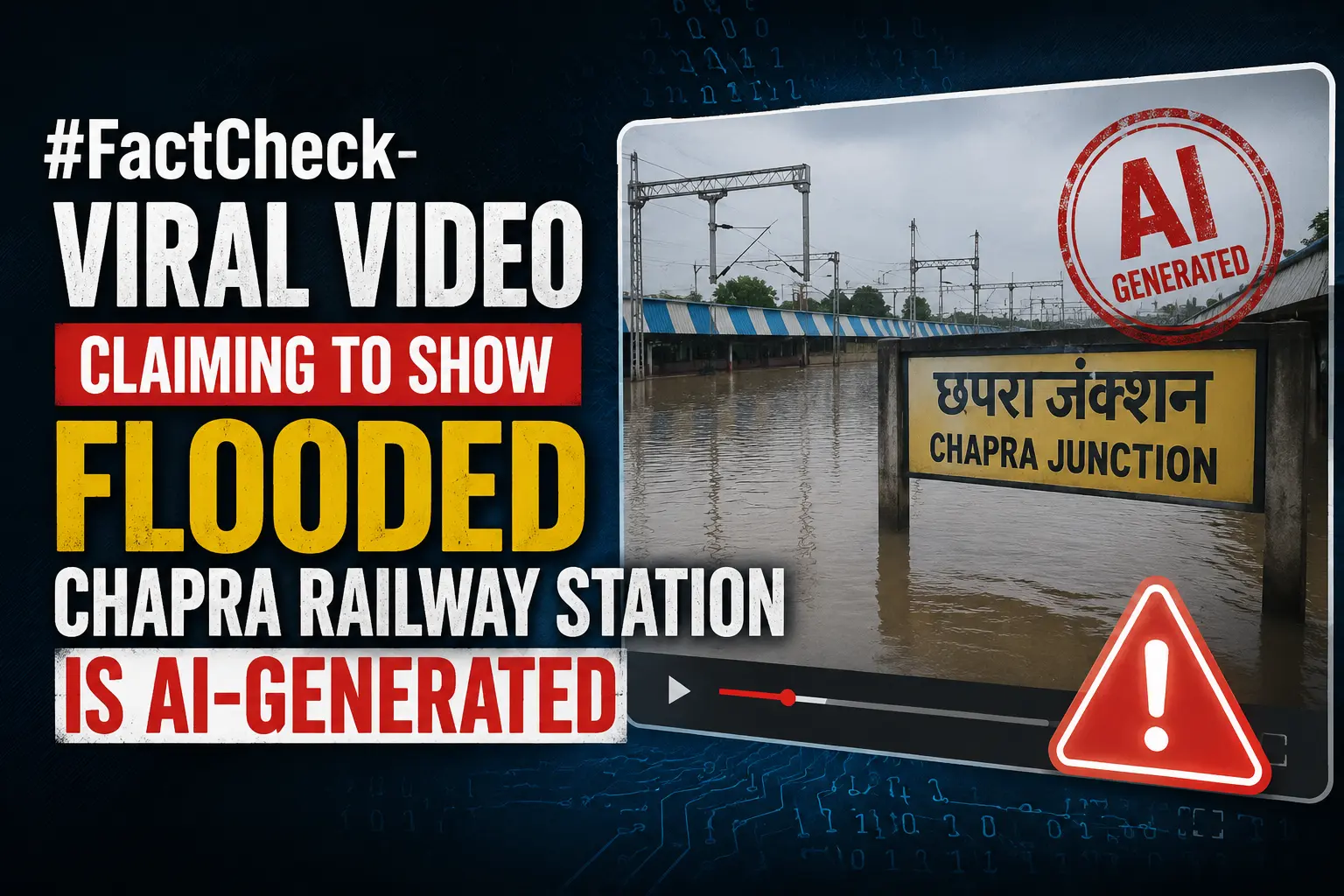
A video is being shared on social media showing a railway station completely submerged in water. The video is being shared with the claim that it shows Chapra Railway Station in Bihar, where severe waterlogging occurred following heavy rainfall. The water level in the video appears so high that even the platforms are not visible. A research done by the Research Wing of the CyberPeace found the viral claim to be false. Our research revealed that the viral video is AI-generated and is being shared on social media with a misleading claim.
Claim:
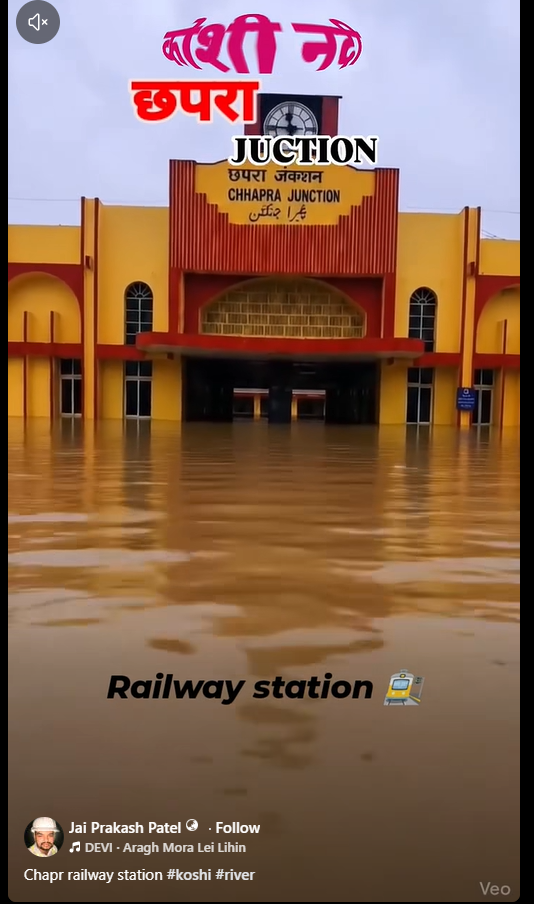
A user on the social media platform Facebook shared the viral video on August 31, 2026, claiming that Chapra Railway Station had been inundated. The link to the post, archived link, and screenshots are provided below.
https://www.facebook.com/reel/1393870102719178
Fact Check
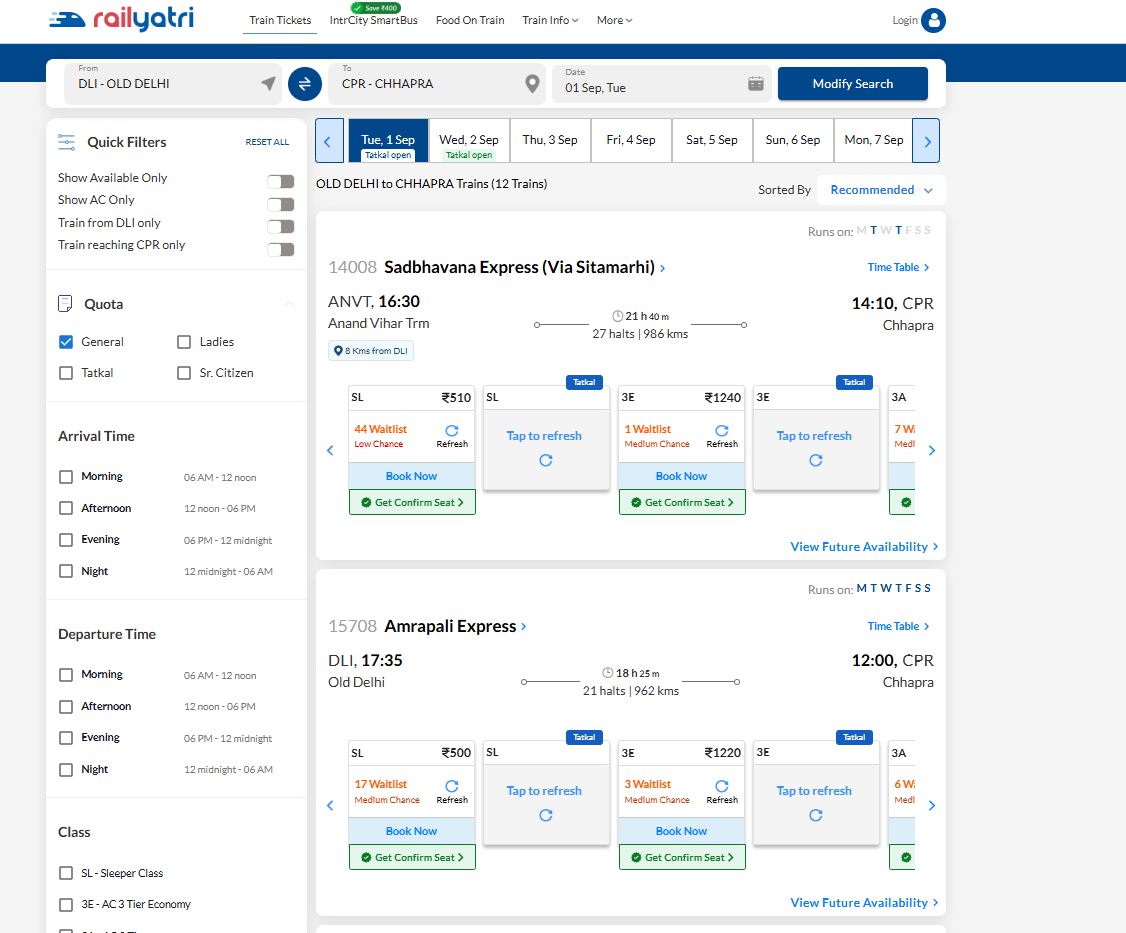
To debunk the viral claim, we searched Google using relevant keywords. However, we could not find any credible media reports confirming the claim. As the next step in our research, we also checked the status of trains arriving at and departing from Chapra Railway Station. We reasoned that if the station had actually been submerged to the extent shown in the video, rail operations would likely have been disrupted and some trains might have been cancelled. However, our research found no information about any train operating from Chapra being cancelled.
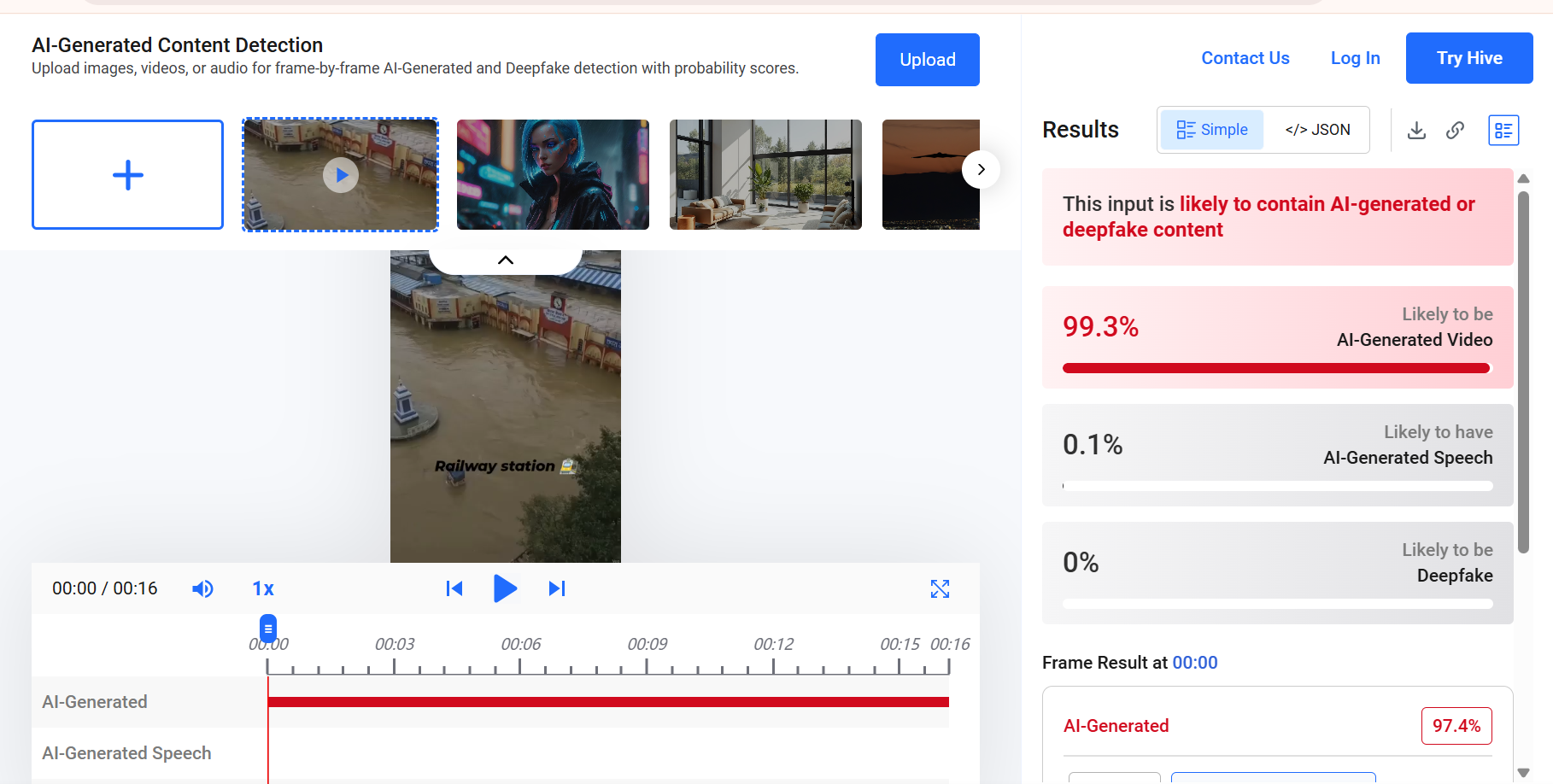
Upon closely examining the viral video, we suspected that it might be AI-generated. We subsequently scanned the video using the AI detection tool Hive Moderation. According to the tool’s results, the viral video was found to be 99 percent AI-generated.
As part of the next step of our research, we scanned the viral video using another AI detection tool, Wasitai AI. According to the tool’s results, the viral video is AI-generated.

Conclusion
Our research found that the viral video is AI-generated and is being shared on social media with a misleading claim.
Introduction
Insurance companies hold a huge amount of sensitive data. Medical history, bank account numbers, identity proofs, years of claims records — all of it sits on insurer servers, waiting. That makes the sector an easy target. India saw close to 370 million malware attacks in a single recent year. Banking, financial services and insurance firms bore the brunt of it. That got the attention of the Insurance Regulatory and Development Authority of India (IRDAI). On 6 April 2026, it released a new set of Information and Cyber Security Guidelines. These replace the old 2023 rules and ask insurers to take much stronger responsibility for protecting their systems, and their customers' data.
Who Must Follow These New Rules
The updated guidelines are not limited to large insurance companies alone. They apply to life, general and health insurers. They also apply to foreign reinsurance branches operating in India, and to intermediaries such as brokers, corporate agents, web aggregators and third-party administrators. Insurance repositories and the Insurance Information Bureau of India fall within scope too. Individual insurance agents, point-of-sale persons and surveyors are not covered directly. But insurers must still make sure these people follow a basic security framework approved by their board. Foreign reinsurance branches get a little more room — they can depart from a specific rule, but only if they can justify it properly to the regulator. Why cast such a wide net in the first place? Because breaches rarely start at the big insurer with the well-staffed Information Technology (IT) team. They start with the small broker or corporate agent who never got around to updating a password policy.
A Stronger Role for the Boardroom
An Independent CISO (Chief Information Security Officer)
The clearest change sits right at the top. A Chief Information Security Officer (CISO) can no longer report to the Head of Information Technology (IT). Nor can the CISO (Chief Information Security Officer) be handed sales targets or any other business goal. Why does this matter so much? Picture a CISO (Chief Information Security Officer) who answers to the same person pushing hard for a product launch next week. Flagging a serious vulnerability suddenly becomes an awkward, career-risking conversation. The IRDAI (Insurance Regulatory and Development Authority of India) has simply removed that awkwardness by rule.
More Frequent Oversight
The Information Security Risk Management Committee used to meet only twice a year. Now it must meet at least once every quarter. A new Information Technology (IT) Steering Committee has also been set up to handle day-to-day technology decisions. This frees the risk committee to focus purely on oversight. There's also a new seat at the table: at least one outside cybersecurity expert must now join the Risk Management Committee. Someone with no stake in internal politics, no department to protect, just technical judgement.
Faster Action When Something Goes Wrong
A Six-Hour Reporting Deadline
No system is completely safe from attack. So the guidelines also focus heavily on how insurers respond once something goes wrong. Every cybersecurity incident now has to reach the Indian Computer Emergency Response Team within six hours of being spotted, with the IRDAI (Insurance Regulatory and Development Authority of India) and other regulators looped in at the same time. Six hours is a tight deadline. It means insurers need detection and escalation systems that work round the clock, not just during office hours.
Testing and Exceptions
Business continuity and disaster recovery plans must be tested at least once a year, and not through some comfortable, pre-planned shutdown either — the test has to feel like a real disaster. Exceptions to security policy are also handled with far more discipline now. A short exception of up to three months can be approved by the CISO (Chief Information Security Officer) alone. One lasting between three months and a year needs sign-off from the risk committee. Anything longer needs approval from the board itself. Gaps found during audits must be closed within twelve months, with the board tracking progress at every stage.
Looking Ahead to Tomorrow's Risks
The guidelines do not stop at today's threats. More insurers are moving their operations to the cloud. So the rules now demand stronger contracts with cloud vendors, and a clear plan for what happens to customer data once a vendor relationship ends. Third-party risk gets close attention too. Many security breaches in the financial sector start with a vendor, not with the insurer's own systems. Before hiring any vendor, insurers must now check their security properly. Every contract must include audit rights and a clause requiring the vendor to report incidents. One of the most forward-looking additions is early preparation for a post-quantum world. Insurers must keep a clear list of their cryptographic assets. In simple terms, this is a map of where and how encryption is used across their systems. It helps them get ready once stronger encryption standards become necessary. Quantum computers capable of breaking today's encryption are still some years away, by most estimates. Mapping out those cryptographic assets now is a lot cheaper than scrambling to do it after the threat has already landed.
Conclusion
Where does all this leave things? Cybersecurity in Indian insurance isn't a server-room problem anymore — it sits squarely in the boardroom now. Directors now own this risk, not just Information Technology (IT) managers tucked away in a basement office. Policyholders benefit too, since their data now sits behind stronger locks, watched more closely and reported on far more often than before. Insurers who treat this as a paperwork exercise will struggle to keep up. Those who actually build these habits into daily operations will likely spend less time firefighting breaches five years from now, and more time competing on service and price instead.
References
3. Medianama, 'IRDAI Updates Cybersecurity Rules, Mandates DPDP Compliance', April 2026.
4. DSCI, brief on IRDAI's Information and Cyber Security Guidelines, 2026, April 2026.
7. Deloitte India, 'IRDAI Tightens Cyber Net: Wake-up Call for Insurers'.
