
#FactCheck - The video of Virat Kohli promoting online casino mobile app is a deep fake.
Executive Summary:
A viral clip where the Indian batsman Virat Kohli is shown endorsing an online casino and declaring a Rs 50,000 jackpot in three days as a guarantee has been proved a fake. In the clip that is accompanied by manipulated captions, Kohli is said to have admitted to being involved in the launch of an online casino during the interview with Graham Bensinger but this is not true. Nevertheless, an investigation showed that the original interview, which was published on YouTube in the last quarter of 2023 by Bensinger, did not have the mentioned words spoken by Kohli. Besides, another AI deepfake analysis tool called Deepware labelled the viral video as a deepfake.

Claims:
The viral video states that cricket star Virat Kohli gets involved in the promotion of an online casino and ensures that the users of the site can make a profit of Rs 50,000 within three days. Conversely, the CyberPeace Research Team has just revealed that the video is a deepfake and not the original and there is no credible evidence suggesting Kohli's participation in such endorsements. A lot of the users are sharing the videos with the wrong info title over different Social Media platforms.


Fact Check:
As soon as we were informed about the news, we made use of Keyword Search to see any news report that could be considered credible about Virat Kohli promoting any Casino app and we found nothing. Therefore, we also used Reverse Image Search for Virat Kohli wearing a Black T-shirt as seen in the video to find out more about the subject. We landed on a YouTube Video by Graham Bensinger, an American Journalist. The clip of the viral video was taken from this original video.

In this video, he discussed his childhood, his diet, his cricket training, his marriage, etc. but did not mention anything regarding a newly launched Casino app by the cricketer.
Through close scrutiny of the viral video we have noticed some inconsistencies in the lip-sync and voice. Subsequently, we executed Deepfake Detection in Deepware tool and identified it to be Deepfake Detected.


Finally, we affirm that the Viral Video Is Deepfakes Video and the statement made is False.
Conclusion:
The video has gone viral and claims that cricketer Virat Kohli is the one endorsing an online casino and assuring you that in three days time you will be a guaranteed winner of Rs 50,000. This is all a fake story. This incident demonstrates the necessity of checking facts and a source before believing any information, as well as remaining sceptical about deepfakes and AI (artificial intelligence), which is a new technology used nowadays for spreading misinformation.

Related Blogs
Executive Summary
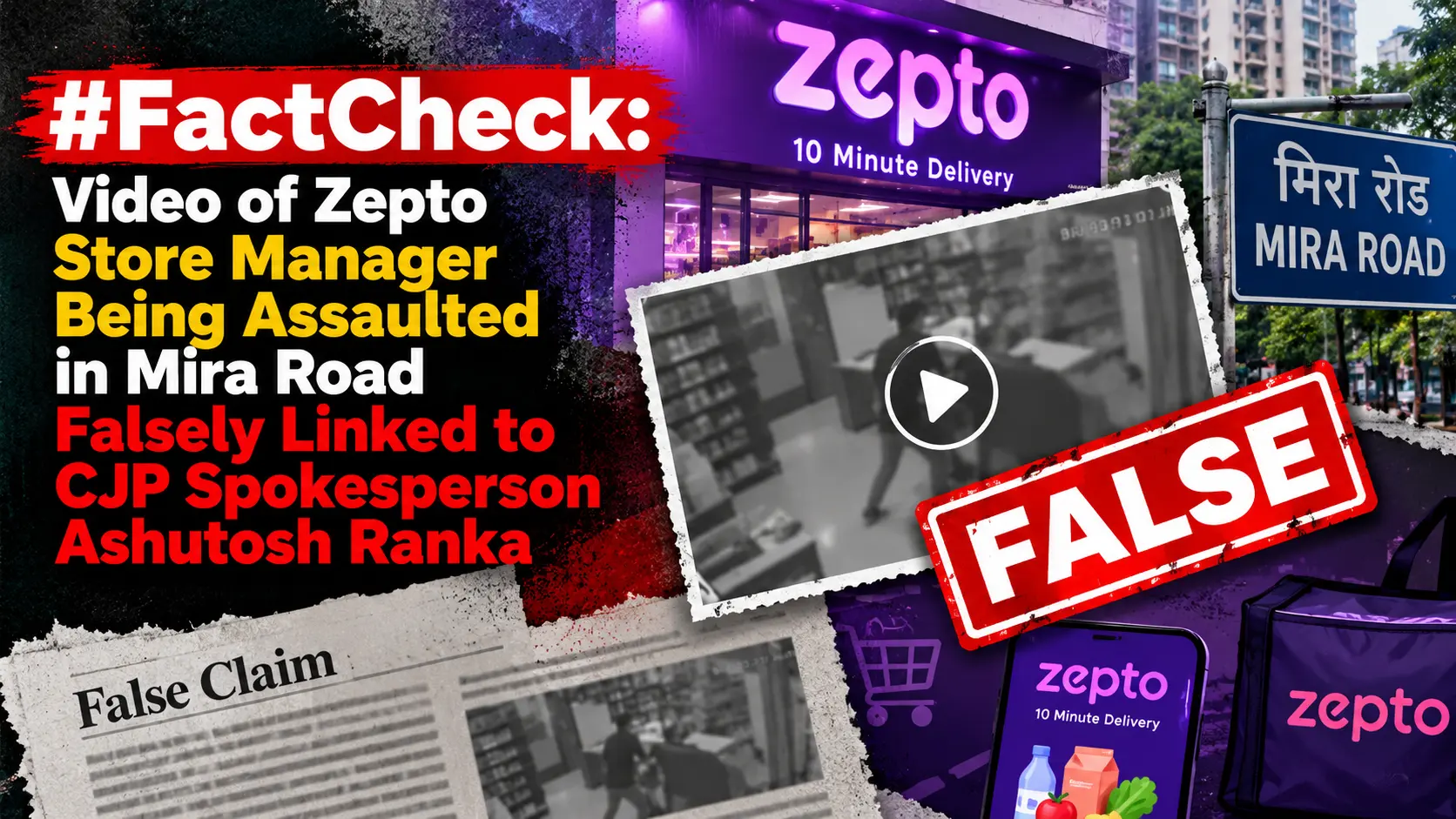
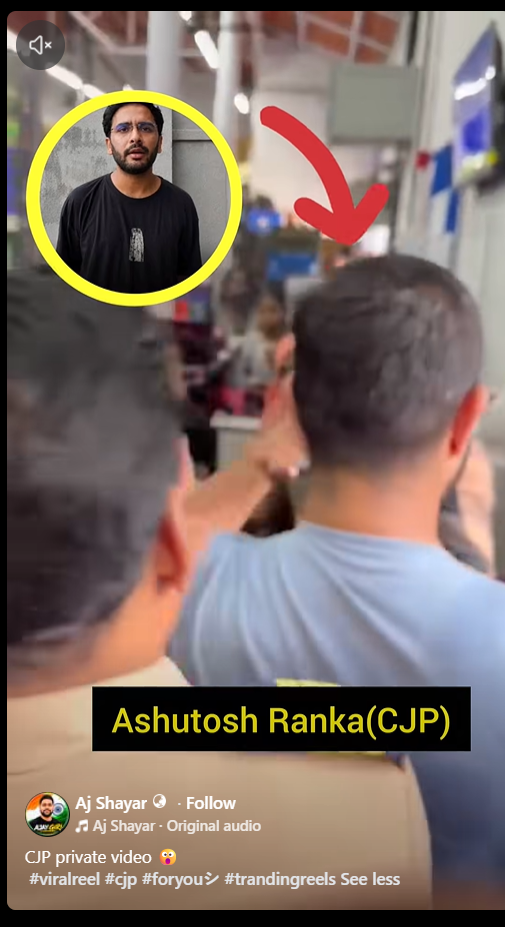
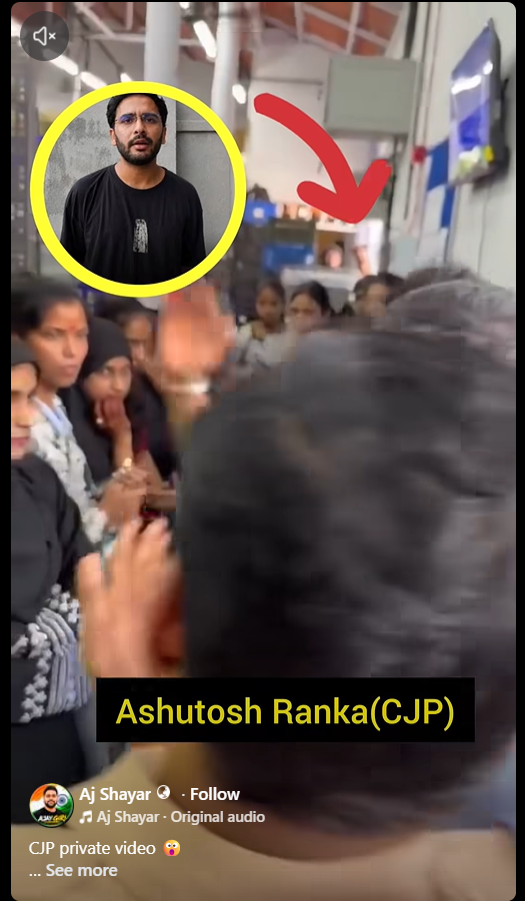
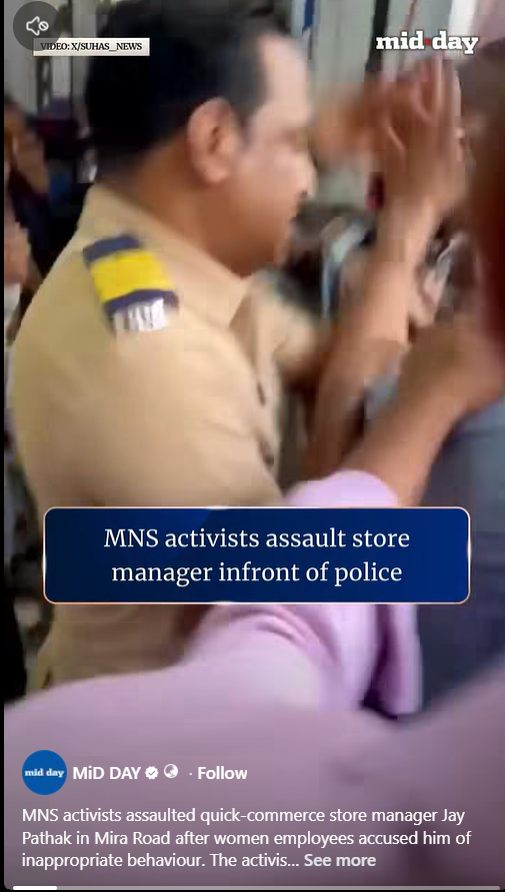
A video is being shared on Facebook with the claim that it shows CJP spokesperson Ashutosh Ranka being assaulted. The video shows several people beating a man. A picture of Ashutosh Ranka has been overlaid on the video along with the text, “CJP Private Video.” Some users commenting on the post also believe that the video genuinely shows Ranka being assaulted. CyberPeace Research found that the video is from Mira Road, where MNS workers had assaulted store manager Jay Pathak.
Claim
A video is being shared on Facebook claiming that it shows a private video of CJP.
https://www.facebook.com/reel/1405149115120742
Fact Check
We first searched Google using keywords such as “CJP spokesperson Ashutosh Ranka assaulted.” However, we did not find any credible media reports mentioning the incident described in the claim.
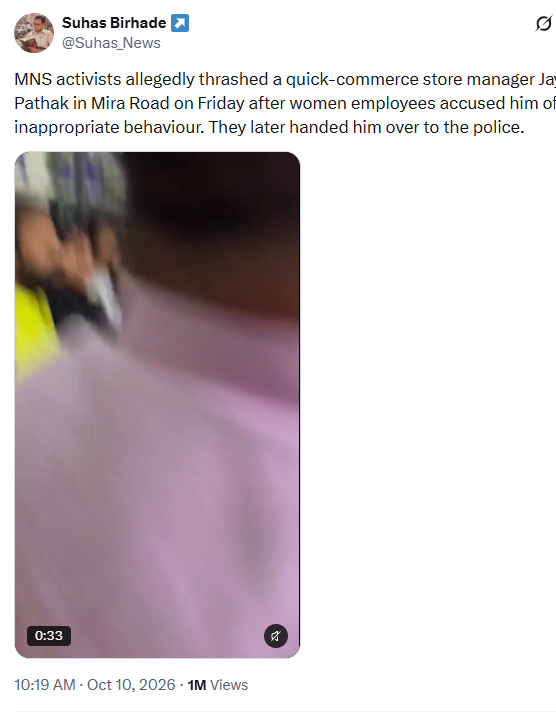
We then conducted a reverse image search of a frame from the viral video using Google Lens. This led us to a longer version of the same video, which was shared on October 10, 2026, by the X account @Suhas_News. According to the accompanying information, Maharashtra Navnirman Sena (MNS) workers assaulted store manager Jay Pathak in Mira Road after female employees alleged that they had been treated inappropriately.
https://www.facebook.com/reel/1405149115120742
https://x.com/Suhas_News/status/2108782017391525953
We also found the same video shared with the same information on the official Facebook page of news agency Midday India on October 10, 2026.
https://www.facebook.com/reel/4737845496451020
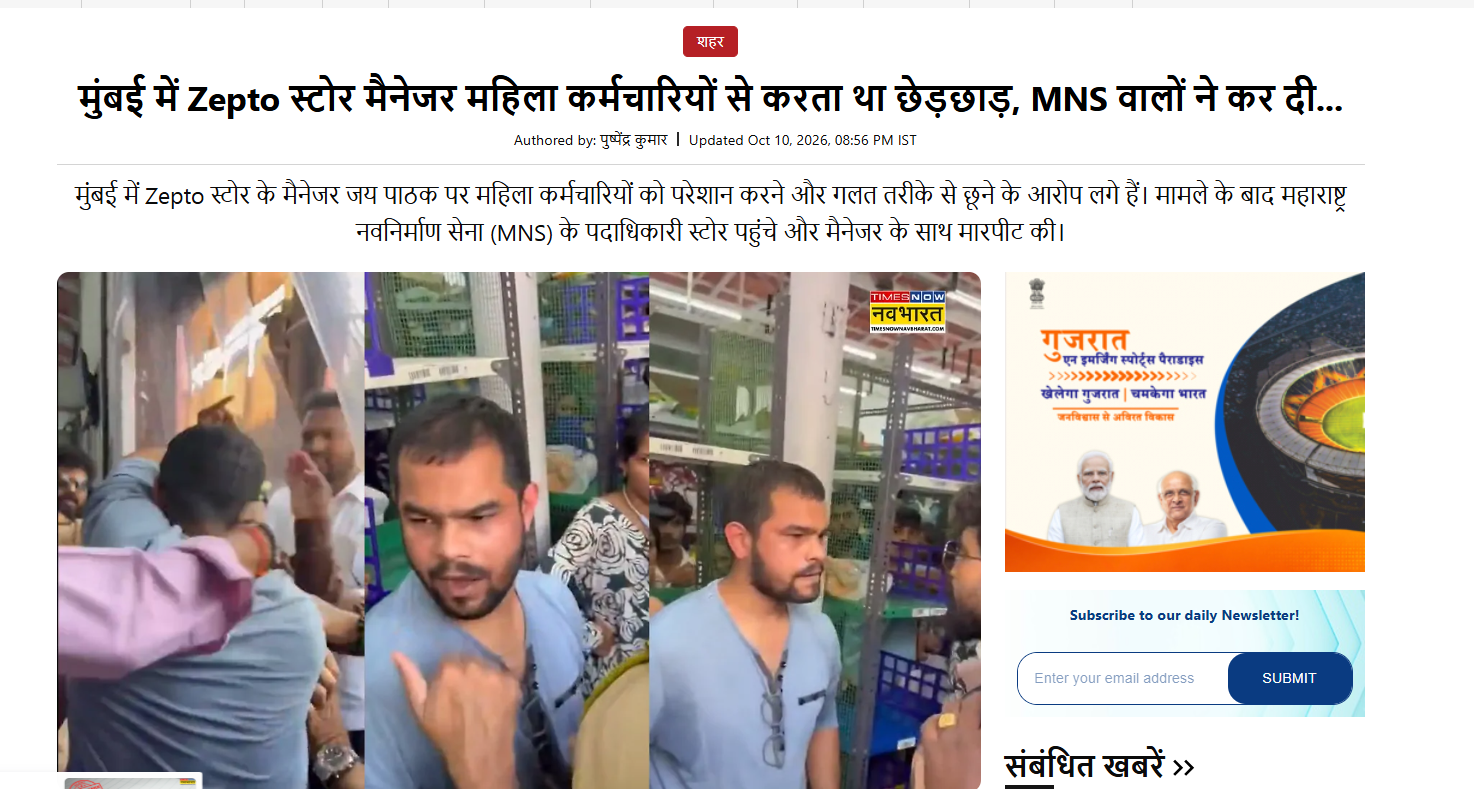
In the next stage of our research, we found a report published by Times Now on October 10, 2026, related to the viral video. According to the report, five female employees of a Zepto store located in the Shivar Garden area of Mira Road had accused their manager, Jai Pathak, of repeatedly touching them inappropriately and sexually harassing them.
Conclusion
Our research found that a video showing the assault of store manager Jai Pathak in Mira Road is being shared with the misleading claim that it shows CJP spokesperson Ashutosh Ranka being beaten.
Introduction
For more than 10 years, WhatsApp has been designed around one seemingly trivial but impactful idea: your phone number is your digital identity. This concept offered simplicity in terms of contact discovery and onboard- ing but inevitably exposed users to fraud, spam and the everyday necessity of sharing personal phone numbers with complete strangers in group chats and conversations. On June 29th Meta finally revealed a major move: you’ll now be able to choose and reservate a WhatsApp username and communicate without sharing your phone number.
This shift to a username based identity marks the company catching up to platforms like Telegram and Signal, which have utilized this functionality for years.
However, while presented as a push towards greater privacy for the millions using its platform, this new change has already created some alarm around impersonation, cybersquatting, and identity theft. The issues became amplified when, according to reports, the Indian Ministry of Electronics and Information Technology advised WhatsApp to halt the implementation of the new features while it clarifies details, shifting a mundane app update into a high-stakes discussion on digital privacy, platform responsibility, and government regulation.
How does the mechanism work?
“WhatsApp’s username is an added pseudonym layer on its current phone number architecture, not a replacement,” Meta said in a statement on Thursday, as reported by TechCrunch. A WhatsApp username is a three to 35-character name containing lower case letters, numbers, periods and underscores that must contain at least one letter and “should not look like a website address.” The feature will allow you to “reserve a unique identifier that you can share as an alternative to your phone number in WhatsApp Settings - Accounts - Username.”
It said the usernames will work in parallel with a username key which can serve as a passphrase to initiate conversation “with a recipient before sending a message for the first time.”
“The change - which will have some additional, protective measures like reserving usernames for people of public interest or those that would cause impersonation, and rate limits on claiming names - can help maintain phone number protection, while offering people more choices,” Meta said. WhatsApp said usernames will replace phone numbers as the primary way to initiate new chats, but will not be publicly searchable: “Anyone you message would need your exact username, and would still need you to respond.”
The Genuine Privacy Case
The upside is real. Phone numbers double as keys to two-factor authentication, banking apps and SIM-swap fraud, so handing one to a new acquaintance, a group chat of strangers or a customer-support bot has always carried quiet risk. Numbers harvested from public groups already fuel spam and scam campaigns, and a username-first model narrows that exposure considerably.
For journalists, small business owners and anyone who fields messages from people they've never met, decoupling identity from a number that also unlocks their bank account is a meaningful, overdue shift – and one that WhatsApp's closest competitors adopted years ago without major incident.
The Scammer's Paradise Scenario
The trouble lies in what a username removes. A phone number was never just an identifier; it was also a rough verification signal and, for law enforcement, a traceable data point. Security reporters testing the reservation system found that lookalike handles mimicking prominent Indian politicians, film stars and the Reserve Bank of India remained available to claim. Crypto executive Changpeng Zhao's own failed bid to capture his desired handle highlighted the first-come, first-served danger of the rollout and led researchers to advise people to manually activate the optional username key that Meta leaves disabled by default.
The Mozilla Foundation was unvarnished about the tradeoff, noting that impersonation from fake accounts and scams are an “inevitable consequence” of a design that abandons the “implicit signal of authenticity” that comes from owning a phone number.
Indian entrepreneur Ankur Warikoo called the rollout a potential “disaster” if robust enforcement against fraud isn’t immediately applied because scammers could register handles a few characters removed from a popular brand or public figure to launch investment and payment schemes, a concern mirrored by cyber security researchers who observed that many users neglect to check verification badges before trusting an account.
India's Regulatory Scrutiny of WhatsApp's Username Feature
So far the strongest reaction comes from New Delhi. The Ministry of Electronics and Information Technology (MeitY) issued an official notice to Meta's compliance office that it should “temporarily suspend the feature” in the country pending further consultations and “provided an explanation in three days”. The cited concerns involve “digital arrest” fraud, a rapid boom category that involves crooks impersonating investigators like those with India's CBI, judges or customs agents to extort victims, in addition to standard concerns around phishing and bank or government impersonation.
A subtler concern, for India’s government anyway, is “traceability.”
At present, say officials, an Indian mobile number is a launching pad to determine whether a given suspect is a domestic or international actor, while a username and foreign SIM would leave authorities nowhere to begin. The Department of Telecommunications independently voiced concerns over how the change intersects with its SIM-binding regulations and over WhatsApp's lag time for such requests. The MeitY notice, the legal basis for which, incidentally, is in contention with some digital rights groups, specifically invokes Section 79 of the IT Act and various IT Rules from 2021 and provisions on identity theft and impersonation that target individual criminals rather than the tech tools. Not everyone, however, shares MeitY’s reading of the legal ground: the Internet Freedom Foundation says that Section 79 “deal with liability of intermediary” and “does not confer on the government power to license the features of a product,” while arguing the relevant criminal statutes were designed to criminalize impersonators, not tech platforms whose services are misused, echoing concerns that killed a similar government advisement about AI models last spring.
In the meantime, Meta says usernames are unavailable in the country for now and the multilayered safeguards it designed were always intended for exactly this level of risk.
Conclusion
WhatsApp's username feature is neither a total privacy upgrade nor a major security problem; instead, it reallocates risk, reducing phone number exposure while adding a risk of identity spoofing and misuse. Whether it pays off will hinge on the strength of Meta's crackdown on fraudulent usernames, the uptake of extra security features like the username key and whether the company can adequately satisfy regulatory concerns about traceability and user safety. Until all those questions are fully settled, users may want to use the feature tentatively, secure a desired username, enable any other protections and be watchful about new contacts.
References
- https://blog.whatsapp.com/its-time-to-reserve-your-whatsapp-username
- https://www.businesstoday.in/technology/news/story/whatsapp-usernames-why-indias-top-creators-fear-scams-impersonation-and-identity-theft-540359-2026-07-02
- https://www.outlookindia.com/national/outlook-explains-why-is-the-indian-government-worried-about-whatsapp-usernames
- https://techcrunch.com/2026/06/29/whatsapp-now-lets-you-reserve-usernames/
- https://bestmediainfo.com/mediainfo/mediainfo-digital/whatsapp-says-username-feature-not-live-yet-after-meity-asks-meta-to-pause-rollout-12124813
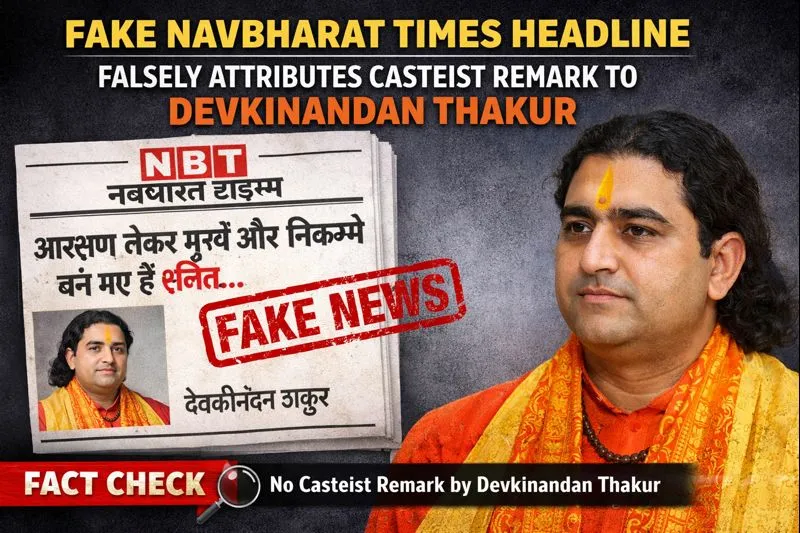
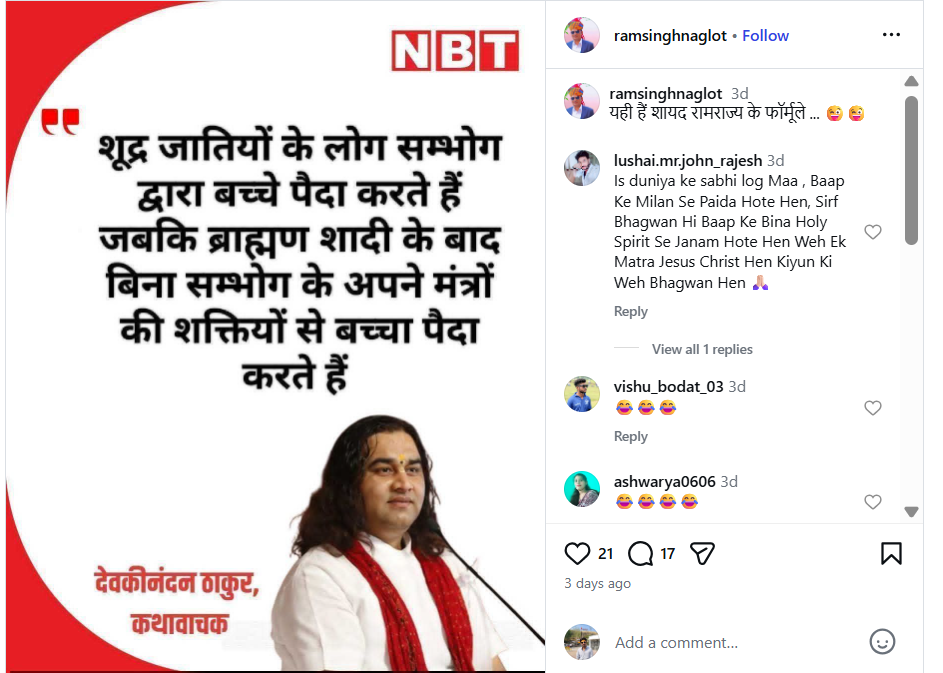
A news graphic bearing the Navbharat Times logo is being widely circulated on social media. The graphic claims that religious preacher Devkinandan Thakur made an extremely offensive and casteist remark targeting the ‘Shudra’ community. Social media users are sharing the graphic and claiming that the statement was actually made by Devkinandan Thakur. Cyber Peace Foundation’s research and verification found that the claim being shared online is misleading. Our research found that the viral news graphic is completely fake and that Devkinandan Thakur did not make any such casteist statement.
Claim
A viral news graphic claims that Devkinandan Thakur made a derogatory and caste-based statement about Shudras.On 17 January 2026, an Instagram user shared the viral graphic with the caption, “This is probably the formula of Ram Rajya.”The text on the graphic reads: “People of Shudra castes reproduce through sexual intercourse, whereas Brahmins give birth to children after marriage through the power of their mantras, without intercourse.” The graphic also carries Devkinandan Thakur’s photograph and identifies him as a ‘Kathavachak’ (religious storyteller).
Fact Check:
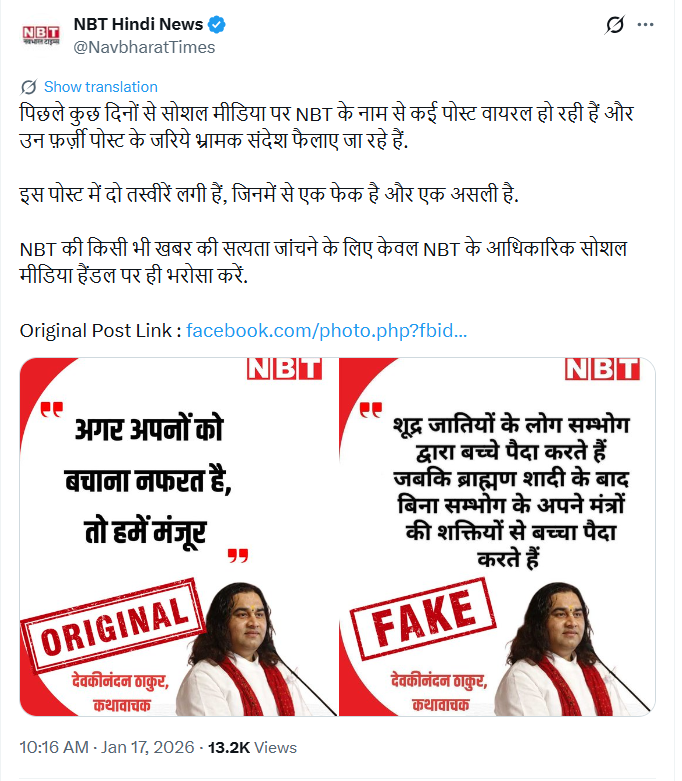
To verify the claim, we first searched for relevant keywords on Google. However, no credible or verified media reports were found supporting the claim. In the next stage of verification, we found a post published by NBT Hindi News (Navbharat Times) on X (formerly Twitter) on 17 January 2026, in which the organisation explicitly debunked the viral graphic. Navbharat Times clarified that the graphic circulating online was fake and also shared the original and authentic post related to the news.
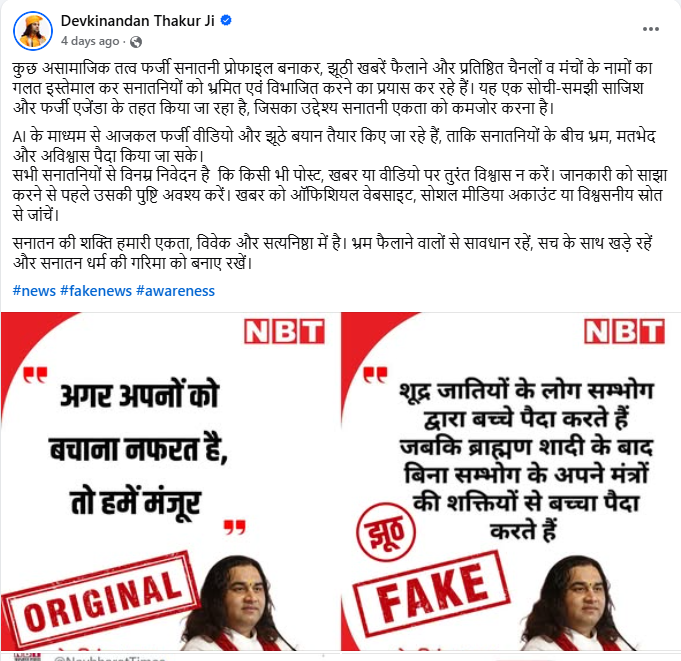
Further research led us to Devkinandan Thakur’s official Facebook account, where he posted a clarification on 17 January 2026. In his post, he stated that anti-social elements are creating fake ‘Sanatani’ profiles and spreading false news, misusing the names of reputed media houses and platforms to mislead and divide people. He described the viral content as part of a deliberate conspiracy and fake agenda aimed at weakening unity. He also warned that AI-generated fake videos and fabricated statements are increasingly being used to create confusion, mistrust and division.
Devkinandan Thakur urged people not to believe or share any post, news or video without verification, and advised checking information through official websites, verified social media accounts or trusted sources.
Conclusion
The viral news graphic attributing a casteist statement to Devkinandan Thakur is completely fake.Devkinandan Thakur did not make the alleged remark, and the graphic circulating with the Navbharat Times logo is fabricated.
