
#FactCheck - Suryakumar Yadav–Salman Ali Agha Handshake Row: Viral Image Found AI-Generated
Executive Summary
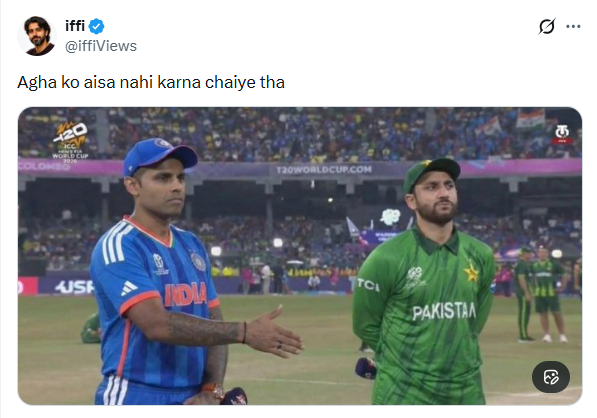
An image circulating on social media claims to show Suryakumar Yadav, captain of the Indian cricket team, extending his hand to greet Pakistan’s skipper Salman Ali Agha, who allegedly refused the gesture during the India–Pakistan T20 World Cup match held on February 15. Users shared the image as evidence of a real incident from the high-profile clash. However, a research by CyberPeace found that the image is AI-generated and was falsely circulated to mislead viewers.
Claim
On February 15, an X account named “@iffiViews,” reportedly operated from Pakistan, shared the image claiming it was taken during the India–Pakistan T20 World Cup match at the R. Premadasa Stadium in Colombo. The viral image appeared to show Yadav attempting to shake hands with Agha, who seemed to decline the gesture. The post quickly gained significant traction online, attracting around one million views at the time of reporting. Here is the link and archive link to the post, along with a screenshot.
- https://x.com/iffiViews/status/2023024665770484206?s=20
- https://archive.ph/xvtBs
Fact Check:
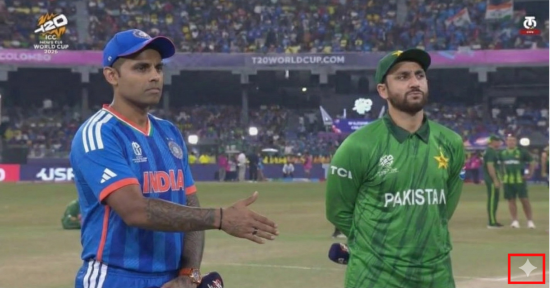
To verify the authenticity of the image, researchers closely examined the visual and identified a watermark associated with an AI image-generation tool. This raised strong indications that the image was digitally created and did not depict an actual event.
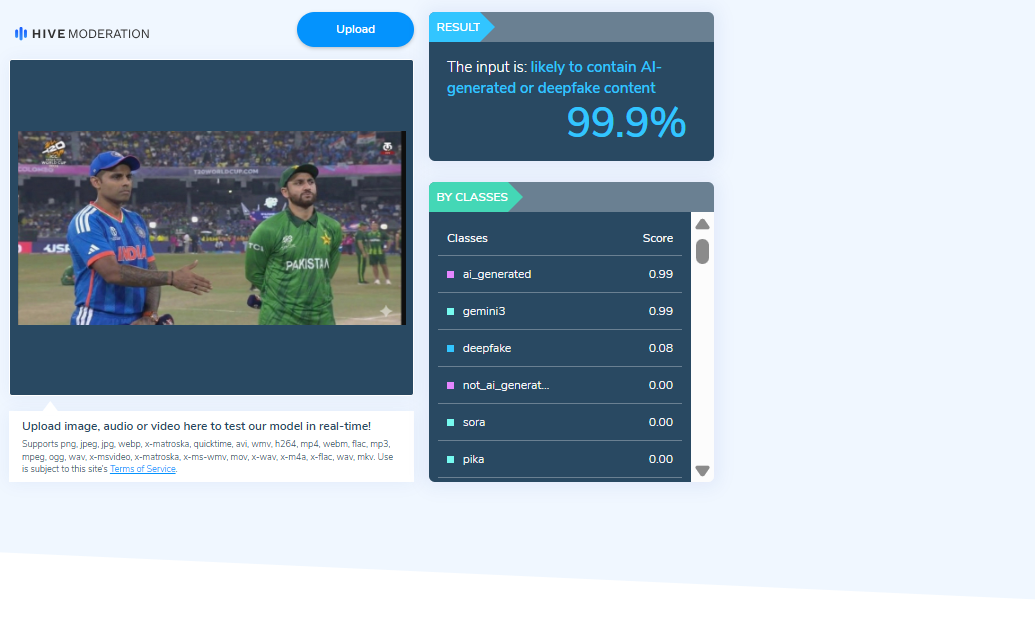
The image was further analysed using an AI detection tool, which indicated a 99.9 percent probability that the content was artificially generated or manipulated.
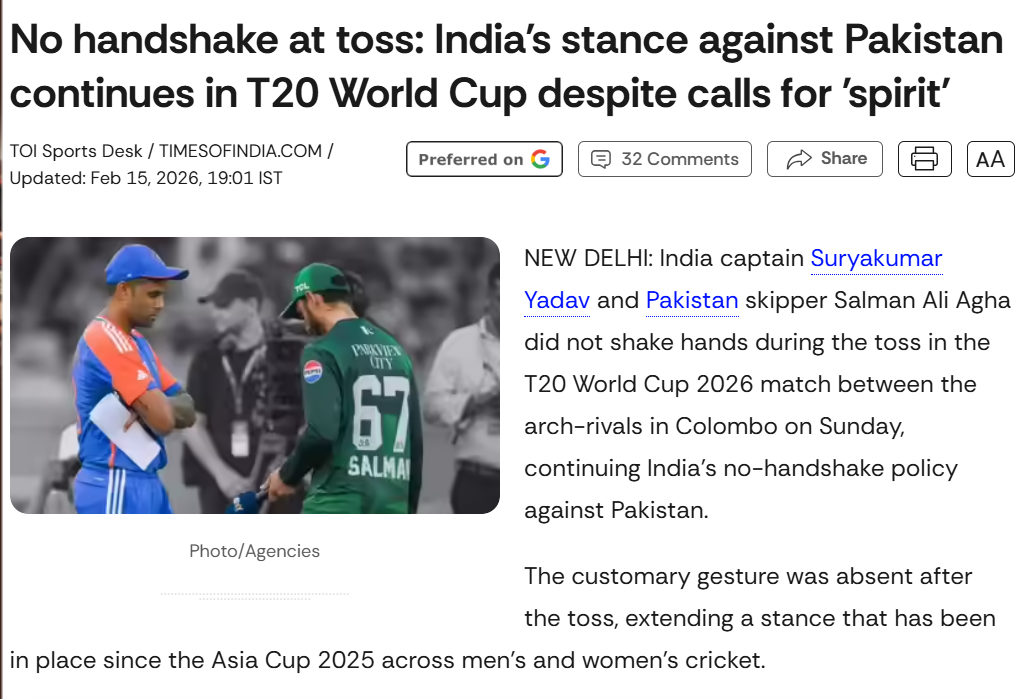
Researchers also conducted keyword searches to check whether the two captains had exchanged a handshake during the match. The search revealed media reports confirming that the traditional handshake between players has been discontinued since the Asia Cup 2025 in both men’s and women’s cricket. A report published by The Times of India on February 15 confirmed that no such customary exchange took place during the match between the two teams in Colombo.
Conclusion
The viral image claiming to show Suryakumar Yadav attempting to shake hands with Salman Ali Agha is not authentic. The visual is AI-generated and has been shared online with misleading claims.

Related Blogs

Executive Summary
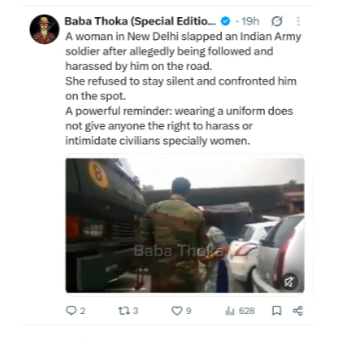
A video is being shared on social media with the claim that a woman in New Delhi slapped an Indian Army soldier who allegedly followed and harassed her on the road. The post claims that the woman confronted the soldier on the spot, linking the incident to harassment of women. CyberPeace Research found the viral claim to be misleading. Our research found that the video is not recent but dates back to an incident in Delhi in September 2017. The video is from a road rage incident that took place in the Vasant Kunj-Rajokari Flyover area of South Delhi in September 2017. According to available reports, the woman allegedly assaulted two Army personnel. The claim that the video shows an incident in which a woman slapped an Army soldier in response to being followed or harassed by him is misleading.
Claim:
A social media user shared the viral video claiming that a woman in New Delhi slapped an Indian Army soldier who allegedly followed and harassed her on the road. The post claimed that instead of remaining silent, the woman confronted the soldier on the spot. The post further stated that the incident sends a strong message that wearing a uniform does not give anyone the right to harass or intimidate civilians, especially women.
https://x.com/OfficialThoka/status/2101989813071307032
Fact Check
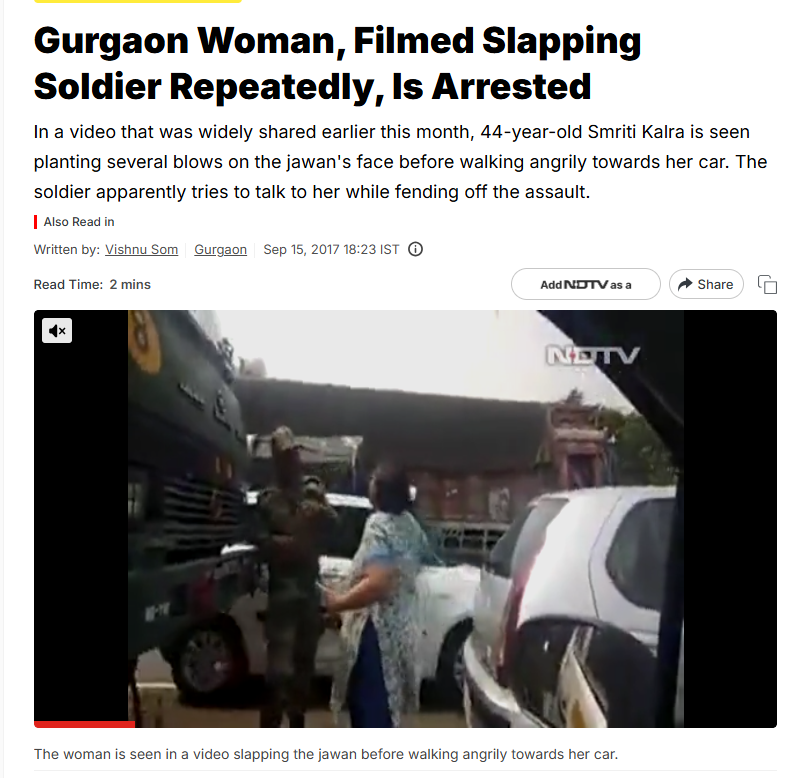
To verify the viral claim, we conducted a Google search using relevant keywords. However, we did not find any credible media reports related to the claim.To further verify the authenticity of the viral claim, we conducted a reverse image search of the keyframes of the video. During the search, we found the same video on the NDTV website, which was published on September 15, 2017. According to the NDTV report, a woman in New Delhi was caught on camera repeatedly slapping an Army personnel. The soldier did not appear to retaliate during the incident. Following a complaint by the Army to the Delhi Police, the woman was arrested. However, she was released within a few hours after a judge granted her bail. The report stated that in a video recorded by a witness on a mobile phone in South Delhi’s Vasant Kunj the previous Saturday, 44-year-old Smriti Kalra was seen repeatedly slapping the soldier on the face before walking angrily towards her car. The soldier appeared to be trying to reason with her while attempting to defend himself against the assault.Smriti Kalra, a resident of Gurgaon, had stopped her Tata Indica car in front of an Army truck carrying soldiers. At first glance, the incident appeared to be a case of road rage, although there was no reported collision or any obvious provocation for the attack.Smriti Kalra, who was divorced, was charged with causing hurt to deter a public servant from performing his duty. She was also accused of obstructing and assaulting a public servant on duty and wrongfully restraining him. Police seized her car.
In the next stage of our research, we found a report on the Aaj Tak website related to the incident, which also featured the viral video. The report included an exclusive interview with the Army personnel involved in the incident. He was identified as Mahavir Singh, who was serving as a Junior Commissioned Officer (JCO) in the Army at the time.
In an exclusive interview with Aaj Tak, Mahavir Singh said that he was deeply saddened by the incident. He questioned how anyone could behave in such a manner with Indian Army personnel, abuse them, or slap them. He said that the Army vehicle was moving slowly when a car suddenly came in front of it and started driving ahead of them. A woman was the only person in the car, and she was allegedly driving in a zigzag manner in front of the Army vehicle.
Conclusion
Our research found that the viral video is being shared with a misleading context. The video is not from a recent incident but from a road rage incident that took place in the Vasant Kunj-Rajokari Flyover area of South Delhi in September 2017. According to available media reports, the woman had allegedly misbehaved with Army personnel and slapped one of the soldiers during the incident. Mahavir Singh, who was serving as a JCO in the Army at the time, also spoke to the media about the incident. Our research found no credible information confirming that the Army personnel had followed or harassed the woman. Therefore, the claim that the video from the 2017 incident shows a woman slapping a soldier in response to being allegedly followed or harassed by him is misleading.

Executive Summary
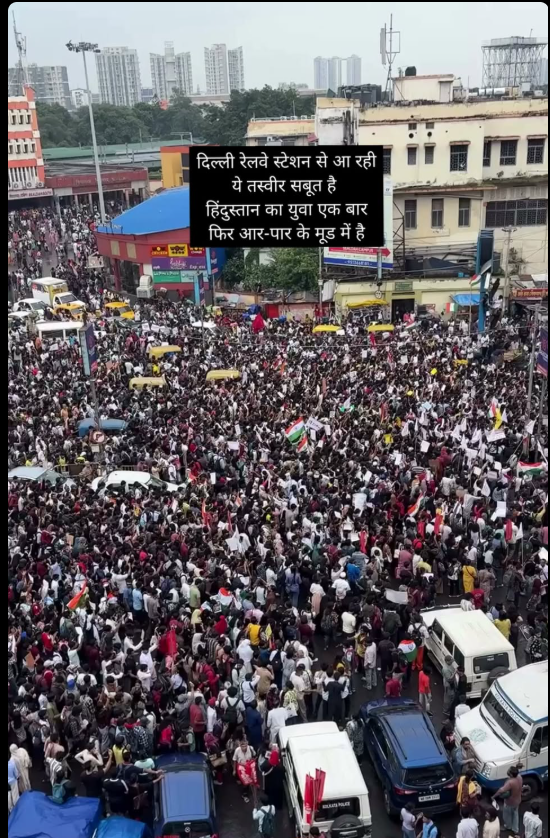
A video is going viral on social media in the name of the protests organised by the ‘Cockroach Janata Party’ (CJP) in Delhi on October 10 and 11. The video is being shared as footage from Delhi Railway Station, with the claim that the protests led to a massive traffic jam outside the station. CyberPeace Research conducted a detailed analysis of the viral video and found the claim to be misleading. The video is not from Delhi but from Sealdah Railway Station in Kolkata, where students held a protest in July 2026. The old video from that time is now being circulated in connection with the protests in Delhi, falsely linking the two events.
Claim
On October 10, 2026, the Facebook page ‘Atrangi Khabar’ shared a video with the following caption:“Massive Protest and Traffic Jam: Huge Crowd Gathers Outside Delhi Railway Station, Several Passengers Miss Their Trains! A massive traffic jam occurred outside Delhi Railway Station on Saturday due to a large-scale protest.
As a result, railway passengers faced severe difficulties reaching the station, and several passengers even missed their trains because of the traffic congestion. The video clearly shows a huge crowd filling the roads and an atmosphere of chaos all around.”
https://www.facebook.com/reel/2176543963241315/?s=single_unit
Fact Check
To verify the authenticity of the viral video, we first extracted several keyframes and searched them using Google Lens. We found that the video had been uploaded on multiple platforms on earlier dates. An Instagram account named ‘Faruk Biswas’ (faruk.biswas.581730) had shared the video on July 24, 2026, identifying it as footage of a student protest in Kolkata.
https://www.instagram.com/reels/DbLd3N3of7a/

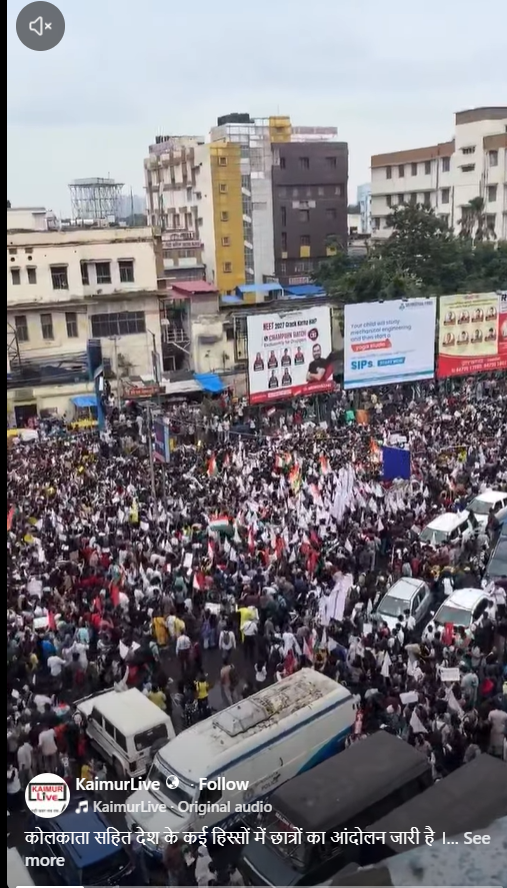
During our search, we also found the same video on a Facebook page named ‘KaimurLive’. The caption accompanying the video read, “Student protests continue in Kolkata and several other parts of the country. Today, a massive gathering of students was seen on the streets of Kolkata. #NEETPaperLeak”
http://facebook.com/reel/2024661971511084
Conclusion
Our research found the viral post to be misleading. An old video from Sealdah Railway Station in Kolkata is being falsely shared as footage from Delhi Railway Station. The original video dates back to July 2026 and has no connection to the protests held in Delhi on October 10 and 11, 2026.

Introduction
The unprecedented cyber espionage attempt on the Indian Air Force has shocked the military fraternity in the age of the internet where innovation is vital to national security. The attackers have shown a high degree of expertise in their techniques, using a variant of the infamous Go Stealer and current military acquisition pronouncements as a cover to obtain sensitive information belonging to the Indian Air Force. In this recent cyber espionage revelation, the Indian Air Force faces a sophisticated attack leveraging the infamous Go Stealer malware. The timing, coinciding with the Su-30 MKI fighter jets' procurement announcement, raises serious questions about possible national security espionage actions.
A sophisticated attack using the Go Stealer malware exploits defense procurement details, notably the approval of 12 Su-30 MKI fighter jets. Attackers employ a cunningly named ZIP file, "SU-30_Aircraft_Procurement," distributed through an anonymous platform, Oshi, taking advantage of heightened tension surrounding defense procurement.
Advanced Go Stealer Variant:
The malware, coded in Go language, introduces enhancements, including expanded browser targeting and a unique data exfiltration method using Slack, showcasing a higher level of sophistication.
Strategic Targeting of Indian Air Force Professionals:
The attack strategically focuses on extracting login credentials and cookies from specific browsers, revealing the threat actor's intent to gather precise and sensitive information.
Timing Raises Espionage Concerns:
The cyber attack coincides with the Indian Government's Su-30 MKI fighter jets procurement announcement, raising suspicions of targeted attacks or espionage activities.
The Deceitful ZIP ArchiveSU-30 Aircraft Acquisition
The cyberattack materialised as a sequence of painstakingly planned actions. Using the cleverly disguised ZIP file "SU-30_Aircraft_Procurement," the perpetrators took benefit of the authorisation of 12 Su-30 MKI fighter jets by the Indian Defense Ministry in September 2023. Distributed via the anonymous file storage network Oshi, the fraudulent file most certainly made its way around via spam emails or other forms of correspondence.
The Spread of Infection and Go Stealer Payload:
The infiltration procedure progressed through a ZIP file to an ISO file, then to a.lnk file, which finally resulted in the Go Stealer payload being released. This Go Stealer version, written in the programming language Go, adds sophisticated capabilities, such as a wider range of browsing focussed on and a cutting-edge technique for collecting information using the popular chat app Slack.
Superior Characteristics of the Go Stealer Version
Different from its GitHub equivalent, this Go Stealer version exhibits a higher degree of complexity. It creates a log file in the machine owned by the victim when it is executed and makes use of GoLang utilities like GoReSym for in-depth investigation. The malware focuses on cookies and usernames and passwords from web browsers, with a particular emphasis on Edge, Brave, and Google Chrome.
This kind is unique in that it is more sophisticated. Its deployment's cyber enemies have honed its strengths, increasing its potency and detection resistance. Using GoLang tools like GoReSym for comprehensive evaluation demonstrates the threat actors' careful planning and calculated technique.
Go Stealer: Evolution of Threat
The Go Stealer first appeared as a free software project on GitHub and quickly became well-known for its capacity to stealthily obtain private data from consumers who aren't paying attention. Its effectiveness and stealthy design rapidly attracted the attention of cyber attackers looking for a sophisticated tool for clandestine data exfiltration. It was written in the Go programming language.
Several cutting-edge characteristics distinguish the Go Stealer from other conventional data thieves. From the beginning, it showed a strong emphasis on browser focusing on, seeking to obtain passwords and login information from particular websites including Edge, Brave, and Google Chrome.The malware's initial iteration was nurtured on the GitHub database, which has the Go Stealer initial edition. Threat actors have improved and altered the code to serve their evil goals, even if the basic structure is freely accessible.
The Go Stealer version that has been discovered as the cause of the current internet spying by the Indian Air Force is not limited to its GitHub roots. It adds features that make it more dangerous, like a wider range of browsers that may be targeted and a brand-new way to exfiltrate data via Slack, a popular messaging app.
Secret Communications and Information Expulsion
This variation is distinguished by its deliberate usage of the Slack API for secret chats. Slack was chosen because it is widely used in company networks and allows harmful activity to blend in with normal business traffic. The purpose of the function "main_Vulpx" is specifically to upload compromised information to the attacker's Slack route, allowing for covert data theft and communication.
The Time and Strategic Objective
There are worries about targeted assaults or espionage activities due to the precise moment of the cyberattack, which coincides with the Indian government's declaration of its acquisition of Su-30 MKI fighter fighters. The deliberate emphasis on gathering cookies and login passwords from web browsers highlights the threat actor's goal of obtaining accurate and private data from Indian Air Force personnel.
Using Caution: Preventing Possible Cyber Espionage
- Alertness Against Misleading Techniques: Current events highlight the necessity of being on the lookout for files that appear harmless but actually have dangerous intent. The Su-30 Acquisition ZIP file is a stark illustration of how these kinds of data might be included in larger-scale cyberespionage campaigns.
- Potentially Wider Impact: Cybercriminals frequently plan coordinated operations to target not just individuals but potentially many users and government officials. Compromised files increase the likelihood of a serious cyber-attack by opening the door for larger attack vectors.
- Important Position in National Security: Recognize the crucial role people play in the backdrop of national security in the age of digitalisation. Organised assaults carry the risk of jeopardising vital systems and compromising private data.
- Establish Strict Download Guidelines: Implement a strict rule requiring file downloads to only come from reputable and confirmed providers. Be sceptical, particularly when you come across unusual files, and make sure the sender is legitimate before downloading any attachments.
- Literacy among Government Employees: Acknowledge that government employees are prime targets as they have possession of private data. Enable people by providing them with extensive cybersecurity training and awareness that will increase their cognition and fortitude.
Conclusion
Indian Air Force cyber surveillance attack highlights how sophisticated online dangers have become in the digital era. Threat actors' deliberate and focused approach is demonstrated by the deceptive usage of a ZIP archive that is camouflaged and paired with a sophisticated instance of the Go Stealer virus. An additional level of complication is introduced by integrating Slack for covert communication. Increased awareness, strict installation guidelines, and thorough cybersecurity education for government employees are necessary to reduce these threats. In the digital age, protecting national security necessitates ongoing adaptation as well as safeguards toward ever-more potent and cunning cyber threats.
References
- https://www.overtoperator.com/p/indianairforcemalwaretargetpotential
- https://cyberunfolded.in/blog/indian-air-force-targeted-in-sophisticated-cyber-attack-with-su-30-procurement-zip-file#go-stealer-a-closer-look-at-its-malicious-history
- https://thecyberexpress.com/cyberattack-on-the-indian-air-force/https://therecord.media/indian-air-force-infostealing-malware
