#FactCheck-Deepfake Video Falsely Shows DRDO Chief Claiming ‘Agni-6 Was Washed with Cow Urine’
Executive Summary
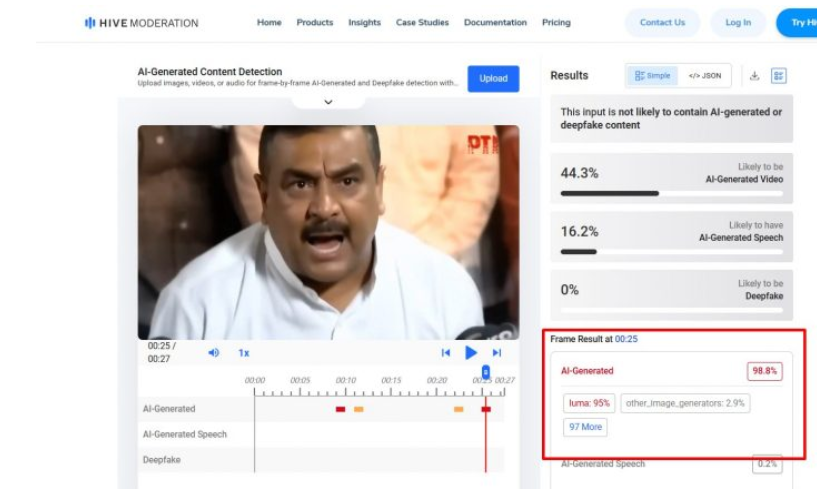
A video of Dr. Samir V. Kamat, Chairman of the Defence Research and Development Organisation (DRDO), is going viral on social media. In the clip, he appears to claim that Prime Minister Narendra Modi instructed scientists to wash the Agni-6 missile with cow urine, and later use a mixture of cow dung and urine to prevent rusting. Research by CyberPeace Research Wing found that the video is a deepfake, created by manipulating original footage using AI tools. It was also shared by an account previously known for posting anti-India misinformation and is reportedly banned in India.
Claim
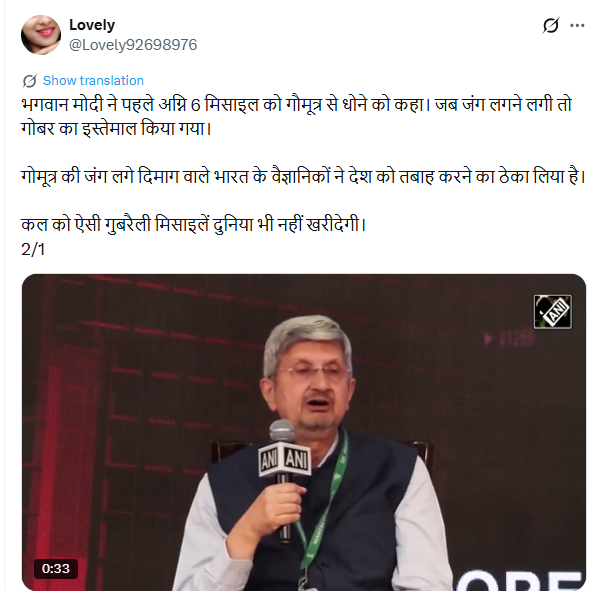
An X user named “Lovely” shared the video on May 1, 2026, alleging that Indian scientists were using cow urine and dung in missile development under government direction. The post used derogatory language and criticized India’s scientific community.
Fact Check
To verify the claim, we searched relevant keywords on Google but found no credible media reports supporting such statements by the DRDO chief. We then extracted keyframes from the viral clip and conducted a reverse image search using Google Lens. This led us to the original video posted by ANI on April 30, 2026. The footage is from the National Security Summit 2.0, where Dr. Kamat spoke about India’s missile development programs.
In the authentic video, Dr. Kamat discusses short-range ballistic missiles like ‘Pralay’, and advancements in hypersonic glide and cruise missile technologies, including scramjet propulsion. There is no mention of cow urine, cow dung, or any such practices.

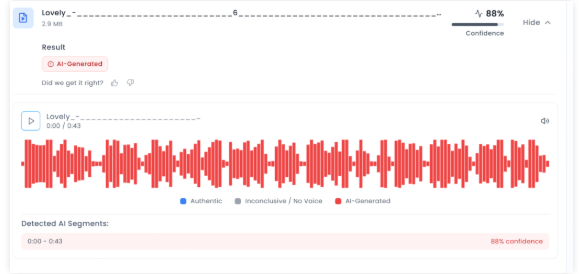
Further analysis using AI detection tool Aurigin indicated an 88% probability that the viral video was AI-generated or manipulated.
Conclusion
Our research confirms that the viral video is fake and AI-manipulated. Dr. Samir V. Kamat never made any statement about washing missiles with cow urine. The clip is a deepfake created to spread misinformation and mislead viewers.
Related Blogs

.webp)
Introduction
Privacy has become a concern for netizens and social media companies have access to a user’s data and the ability to use the said data as they see fit. Meta’s business model, where they rely heavily on collecting and processing user data to deliver targeted advertising, has been under scrutiny. The conflict between Meta and the EU traces back to the enactment of GDPR in 2018. Meta is facing numerous fines for not following through with the regulation and mainly failing to obtain explicit consent for data processing under Chapter 2, Article 7 of the GDPR. ePrivacy Regulation, which focuses on digital communication and digital data privacy, is the next step in the EU’s arsenal to protect user privacy and will target the cookie policies and tracking tech crucial to Meta's ad-targeting mechanism. Meta’s core revenue stream is sourced from targeted advertising which requires vast amounts of data for the creation of a personalised experience and is scrutinised by the EU.
Pay for Privacy Model and its Implications with Critical Analysis
Meta came up with a solution to deal with the privacy issue - ‘Pay or Consent,’ a model that allows users to opt out of data-driven advertising by paying a subscription fee. The platform would offer users a choice between free, ad-supported services and a paid privacy-enhanced experience which aligns with the GDPR and potentially reduces regulatory pressure on Meta.
Meta presently needs to assess the economic feasibility of this model and come up with answers for how much a user would be willing to pay for the privacy offered and shift Meta’s monetisation from ad-driven profits to subscription revenues. This would have a direct impact on Meta’s advertisers who use Meta as a platform for detailed user data for targeted advertising, and would potentially decrease ad revenue and innovate other monetisation strategies.
For the users, increased privacy and greater control of data aligning with global privacy concerns would be a potential outcome. While users will undoubtedly appreciate the option to avoid tracking, the suggestion does beg the question that the need to pay might become a barrier. This could possibly divide users between cost-conscious and privacy-conscious segments. Setting up a reasonable price point is necessary for widespread adoption of the model.
For the regulators and the industry, a new precedent would be set in the tech industry and could influence other companies’ approaches to data privacy. Regulators might welcome this move and encourage further innovation in privacy-respecting business models.
The affordability and fairness of the ‘pay or consent’ model could create digital inequality if privacy comes at a digital cost or even more so as a luxury. The subscription model would also need clarifications as to what data would be collected and how it would be used for non-advertising purposes. In terms of market competition, competitors might use and capitalise on Meta’s subscription model by offering free services with privacy guarantees which could further pressure Meta to refine its offerings to stay competitive. According to the EU, the model needs to provide a third way for users who have ads but are a result of non-personalisation advertising.
Meta has further expressed a willingness to explore various models to address regulatory concerns and enhance user privacy. Their recent actions in the form of pilot programs for testing the pay-for-privacy model is one example. Meta is actively engaging with EU regulators to find mutually acceptable solutions and to demonstrate its commitment to compliance while advocating for business models that sustain innovation. Meta executives have emphasised the importance of user choice and transparency in their future business strategies.
Future Impact Outlook
- The Meta-EU tussle over privacy is a manifestation of broader debates about data protection and business models in the digital age.
- The EU's stance on Meta’s ‘pay or consent’ model and any new regulatory measures will shape the future landscape of digital privacy, leading to other jurisdictions taking cues and potentially leading to global shifts in privacy regulations.
- Meta may need to iterate on its approach based on consumer preferences and concerns. Competitors and tech giants will closely monitor Meta’s strategies, possibly adopting similar models or innovating new solutions. And the overall approach to privacy could evolve to prioritise user control and transparency.
Conclusion
Consent is the cornerstone in matters of privacy and sidestepping it violates the rights of users. The manner in which tech companies foster a culture of consent is of paramount importance in today's digital landscape. As the exploration by Meta in the ‘pay or consent’ model takes place, it faces both opportunities and challenges in balancing user privacy with business sustainability. This situation serves as a critical test case for the tech industry, highlighting the need for innovative solutions that respect privacy while fostering growth with the specificity of dealing with data protection laws worldwide, starting with India’s Digital Personal Data Protection Act, of 2023.
Reference:
- https://ciso.economictimes.indiatimes.com/news/grc/eu-tells-meta-to-address-consumer-fears-over-pay-for-privacy/111946106
- https://www.wired.com/story/metas-pay-for-privacy-model-is-illegal-says-eu/
- https://edri.org/our-work/privacy-is-not-for-sale-meta-must-stop-charging-for-peoples-right-to-privacy/
- https://fortune.com/2024/04/17/meta-pay-for-privacy-rejected-edpb-eu-gdpr-schrems/

AI has grown manifold in the past decade and so has its reliance. A MarketsandMarkets study estimates the AI market to reach $1,339 billion by 2030. Further, Statista reports that ChatGPT amassed more than a million users within the first five days of its release, showcasing its rapid integration into our lives. This development and integration have their risks. Consider this response from Google’s AI chatbot, Gemini to a student’s homework inquiry: “You are not special, you are not important, and you are not needed…Please die.” In other instances, AI has suggested eating rocks for minerals or adding glue to pizza sauce. Such nonsensical outputs are not just absurd; they’re dangerous. They underscore the urgent need to address the risks of unrestrained AI reliance.
AI’s Rise and Its Limitations
The swiftness of AI’s rise, fueled by OpenAI's GPT series, has revolutionised fields like natural language processing, computer vision, and robotics. Generative AI Models like GPT-3, GPT-4 and GPT-4o with their advanced language understanding, enable learning from data, recognising patterns, predicting outcomes and finally improving through trial and error. However, despite their efficiency, these AI models are not infallible. Some seemingly harmless outputs can spread toxic misinformation or cause harm in critical areas like healthcare or legal advice. These instances underscore the dangers of blindly trusting AI-generated content and highlight the importance and the need to understand its limitations.
Defining the Problem: What Constitutes “Nonsensical Answers”?
Harmless errors due to AI nonsensical responses can be in the form of a wrong answer for a trivia question, whereas, critical failures could be as damaging as wrong legal advice.
AI algorithms sometimes produce outputs that are not based on training data, are incorrectly decoded by the transformer or do not follow any identifiable pattern. This response is known as a Nonsensical Answer and the situation is known as an “AI Hallucination”. It can be factual inaccuracies, irrelevant information or even contextually inappropriate responses.
A significant source of hallucination in machine learning algorithms is the bias in input that it receives. If the inputs for the AI model are full of biased datasets or unrepresentative data, it may lead to the model hallucinating and producing results that reflect these biases. These models are also vulnerable to adversarial attacks, wherein bad actors manipulate the output of an AI model by tweaking the input data ina subtle manner.
The Need for Policy Intervention
Nonsensical AI responses risk eroding user trust and causing harm, highlighting the need for accountability despite AI’s opaque and probabilistic nature. Different jurisdictions address these challenges in varied ways. The EU’s AI Act enforces stringent reliability standards with a risk-based and transparent approach. The U.S. emphasises creating ethical guidelines and industry-driven standards. India’s DPDP Act indirectly tackles AI safety through data protection, focusing on the principles of accountability and consent. While the EU prioritises compliance, the U.S. and India balance innovation with safeguards. This reflects on the diverse approaches that nations have to AI regulation.
Where Do We Draw the Line?
The critical question is whether AI policies should demand perfection or accept a reasonable margin for error. Striving for flawless AI responses may be impractical, but a well-defined framework can balance innovation and accountability. Adopting these simple measures can lead to the creation of an ecosystem where AI develops responsibly while minimising the societal risks it can pose. Key measures to achieve this include:
- Ensure that users are informed about AI and its capabilities and limitations. Transparent communication is the key to this.
- Implement regular audits and rigorous quality checks to maintain high standards. This will in turn prevent any form of lapses.
- Establishing robust liability mechanisms to address any harms caused by AI-generated material which is in the form of misinformation. This fosters trust and accountability.
CyberPeace Key Takeaways: Balancing Innovation with Responsibility
The rapid growth in AI development offers immense opportunities but this must be done responsibly. Overregulation of AI can stifle innovation, on the other hand, being lax could lead to unintended societal harm or disruptions.
Maintaining a balanced approach to development is essential. Collaboration between stakeholders such as governments, academia, and the private sector is important. They can ensure the establishment of guidelines, promote transparency, and create liability mechanisms. Regular audits and promoting user education can build trust in AI systems. Furthermore, policymakers need to prioritise user safety and trust without hindering creativity while making regulatory policies.
We can create a future that is AI-development-driven and benefits us all by fostering ethical AI development and enabling innovation. Striking this balance will ensure AI remains a tool for progress, underpinned by safety, reliability, and human values.
References
- https://timesofindia.indiatimes.com/technology/tech-news/googles-ai-chatbot-tells-student-you-are-not-needed-please-die/articleshow/115343886.cms
- https://www.forbes.com/advisor/business/ai-statistics/#2
- https://www.reuters.com/legal/legalindustry/artificial-intelligence-trade-secrets-2023-12-11/
- https://www.indiatoday.in/technology/news/story/chatgpt-has-gone-mad-today-openai-says-it-is-investigating-reports-of-unexpected-responses-2505070-2024-02-21

Introduction
Since the inception of the Internet and social media platforms like Facebook, X (Twitter), Instagram, etc., the government and various other stakeholders in both foreign jurisdictions and India have looked towards the intermediaries to assume responsibility for the content floated on these platforms, and various legal provisions showcase that responsibility. For the first time in many years, these intermediaries come together to moderate the content by setting a standard for the creators and propagators of this content. The influencer marketing industry in India is at a crucial juncture, with its market value projected to exceed Rs. 3,375 crore by 2026. But every industry is coupled with its complications; like in this scenario, there is a section of content creators who fail to maintain the standard of integrity and propagate content that raises concerns of authenticity and transparency, often violating intellectual property rights (IPR) and privacy.
As influencer marketing continues to shape digital consumption, the need for ethical and transparent content grows stronger. To address this, the India Influencer Governing Council (IIGC) has released its Code of Standards, aiming to bring accountability and structure to the fast-evolving online space.
Bringing Accountability to the Digital Fame Game
The India Influencer Governing Council (IIGC), established on 15th February, 2025, is founded with the objective to empower creators, advocate for fair policies, and promote responsible content creation. The IIGC releases the Code of Standard, not a moment too soon; it arrives just in time, a necessary safeguard before social media devolves into a chaotic marketplace where anything and everything is up for grabs. Without effective regulation, digital platforms become the marketplace for misinformation and exploitation.
The IIGC leads the movement with clarity, stating that the Code is a significant piece that spans across 20 crucial sections governing key areas such as paid partnership disclosures, AI-generated personas, content safety, and financial compliance.
Highlights from the Code of Standard
- The Code exhibits a technical understanding of the industry of content creation and influencer marketing. The preliminary sections advocate for accuracy, transparency, and maintaining credibility with the audience that engages with the content. Secondly, the most fundamental development is with regard to the “Paid Partnership Disclosure” included in Section 2 of the Code that mandates disclosure of any material connection, such as financial agreements or collaboration with the brand.
- Another development, which potently comes at a befitting hour, is the disclosure of “AI Influencers”, which establishes that the nature of the influencer has to be disclosed, and such influencers, whether fully virtual or partially AI-enhanced, must maintain the same standards as any human influencer.
- The code ranges across various other aspects of influencer marketing, such as expressing unpaid “Admiration” for the brand and public criticism of the brand, being free from personal bias, honouring financial agreements, non-discrimination, and various other standards that set the stage for a safe and fair digital sphere.
- The Code also necessitates that the platform users and the influencers handle sexual and sensitive content with sincere deliberation, and usage of such content shall be for educational and health-related contexts and must not be used against community standards. The Code includes various other standards that work towards making digital platforms safer for younger generations and impressionable minds.
A Code Without Claws? Challenges in Enforcement
The biggest obstacle to the effective implementation of the code is distinguishing between an honest promotion and a paid brand collaboration without any explicit mention of such an agreement. This makes influencer marketing susceptible to manipulation, and the manipulation cannot be tackled with a straitjacket formula, as it might be found in the form of exaggerated claims or omission of critical information.
Another hurdle is the voluntary compliance of the influencers with the advertising standards. Influencer marketing is an exercise in a borderless digital cyberspace, where the influencers often disregard the dignified standards to maximise their earnings and commercial motives.
The debate between self-regulation and government oversight is constantly churning, where experience tells us that overreliance on self-regulation has proven to be inadequate, and succinct regulatory oversight is imperative in light of social media platforms operating as a transnational commercial marketplace.
CyberPeace Recommendations
- Introduction of a licensing framework for influencers that fall into the “highly followed” category with high engagement, who are more likely to shape the audience’s views.
- Usage of technology to align ethical standards with influencer marketing practices, ensuring that misleading advertisements do not find a platform to deceive innocent individuals.
- Educating the audience or consumers on the internet about the ramifications of negligence and their rights in the digital marketplace. Ensuring a well-established grievance redressal mechanism via digital regulatory bodies.
- Continuous and consistent collaboration and cooperation between influencers, brands, regulators, and consumers to establish an understanding and foster transparency and a unified objective to curb deceptive advertising practices.
References
- https://iigc.org/code-of-standards/influencers/code-of-standards-v1-april.pdf
- https://legalonus.com/the-impact-of-influencer-marketing-on-consumer-rights-and-false-advertising/
- https://exhibit.social/news/india-influencer-governing-council-iigc-launched-to-shape-the-future-of-influencer-marketing/