
#Fact Check: Viral Footage from Bangladesh Incorrectly Portrayed as Immigrant March for Violence in Assam.
Executive Summary:
As we researched a viral social media video we encountered, we did a comprehensive fact check utilizing reverse image search. The video circulated with the claim that it shows illegal Bangladeshi in Assam's Goalpara district carrying homemade spears and attacking a police and/or government official. Our findings are certain that this claim is false. This video was filmed in the Kishoreganj district, Bangladesh, on July 1, 2025, during a political argument involving two rival factions of the Bangladesh Nationalist Party (BNP). The footage has been intentionally misrepresented, putting the report into context regarding Assam to disseminate false information.

Claim:
The viral video shows illegal Bangladeshi immigrants armed with spears marching in Goalpara, Assam, with the intention of attacking police or officials.

Fact Check:
To establish if the claim was valid, we performed a reverse image search on some of the key frames from the video. We did our research on a number of news articles and social media posts from Bangladeshi sources. This led us to a reality check as the events confirmed in these reports took place in Ashtagram, Kishoreganj district, Bangladesh, in a violent political confrontation between factions of the Bangladesh Nationalist Party (BNP) on July 1, 2025, that ultimately resulted in about 40 injuries.
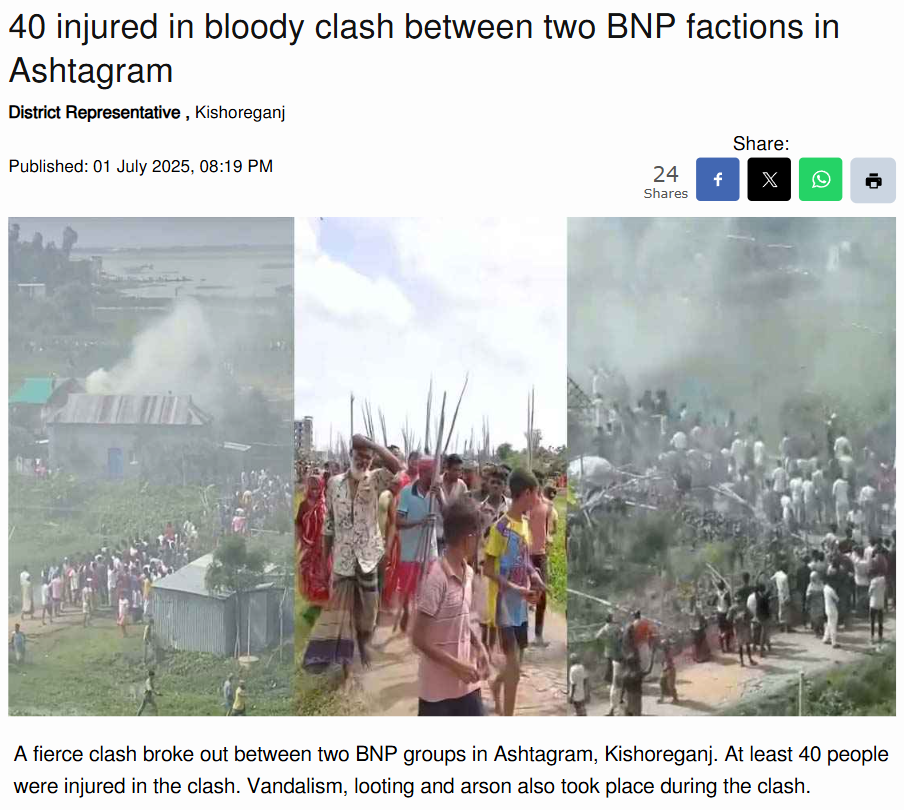
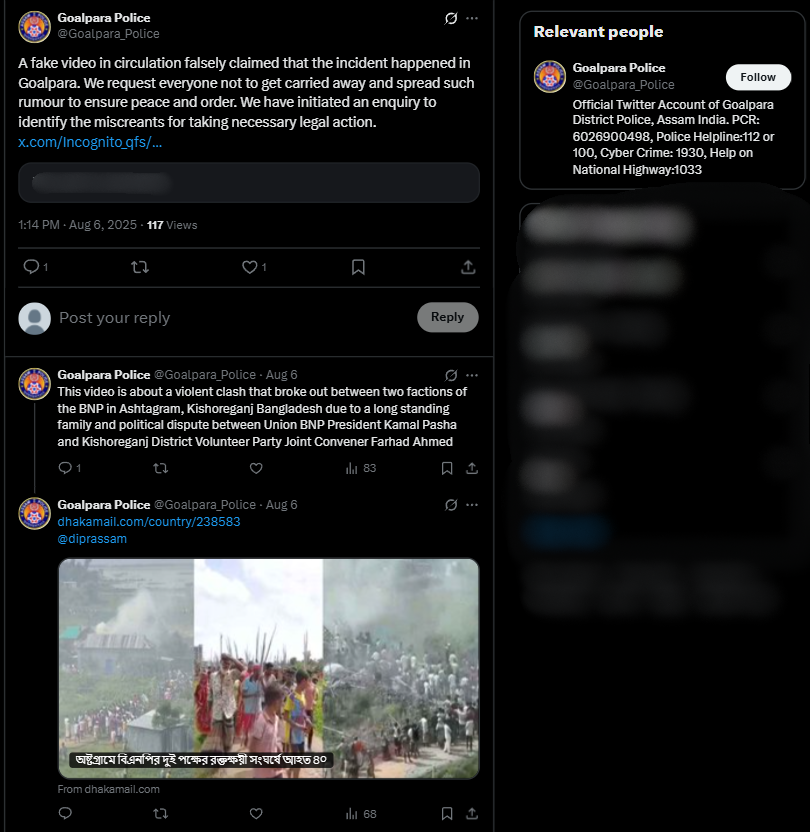
We also found on local media, in particular, Channel i News reported full accounts of the viral report and showed images from the video post. The individuals seen in the video were engaged in a political fight and wielding makeshift spears rather than transitioning into a cross-border attack. The Assam Police issued an official response on X (formerly Twitter) that denied the claim, while noting that nothing of that nature occurred in Goalpara nor in any other district of Assam.

Conclusion:
Based on our research, we conclude that the viral video does not show unlawful Bangladeshi immigrants in Assam. It depicts a political clash in Kishoreganj, Bangladesh, on July 1, 2025. The claim attached to the video is completely untrue and is intended to mislead the public as to where and what the incident depicted is.
Claim: Video shows illegal migrants with spears moving in groups to assault police!
Claimed On: Social Media
Fact Check: False and Misleading

Related Blogs

Introduction
The advancement of technology has brought about remarkable changes in the aviation industry, including the introduction of inflight internet access systems. While these systems provide passengers with connectivity during their flights, they also introduce potential vulnerabilities that can compromise the security of aircraft systems.
Inflight Internet Access Systems
Inflight internet access systems have become integral to the modern air travel experience, allowing passengers to stay connected even at 30,000 feet. However, these systems can also be attractive targets for hackers, raising concerns about the safety and security of aircraft operations.
The Vulnerabilities of Inflight Internet Access Systems:
Securing Networked Avionics
Avionics, the electronic systems that support aircraft operation, play a crucial role in flight safety and navigation. While networked avionics are designed with robust security measures, they are not invulnerable to cyber threats. Therefore, it is essential to implement comprehensive security measures to protect these critical systems.
- Ensuring Robust Architecture: Networked avionics should be designed with a strong focus on security. Implementing secure network architectures, such as segmentation and isolation, can minimise the risk of unauthorised access and limit the potential impact of a breach.
- Rigorous Security Testing: Avionics systems should undergo rigorous security testing to identify vulnerabilities and weaknesses. Regular assessments, penetration testing, and vulnerability scanning are essential to proactively address any security flaws.
- Collaborative Industry Efforts: Collaboration between manufacturers, airlines, regulatory bodies, and security researchers is crucial in strengthening the security of networked avionics. Sharing information, best practices, and lessons learned can help identify and address emerging threats effectively.
- Continuous Monitoring and Updtes: Networked avionics should be continuously monitored for any potential security breaches. Prompt updates and patches should be applied to address newly discovered vulnerabilities and protect against known attack vectors.
Best practices to be adopted for the security of Aircraft Systems
- Holistic Security Approach: Recognizing the interconnectedness of inflight internet access systems and networked avionics is essential. A holistic security approach should be adopted to address vulnerabilities in both systems and protect the overall aircraft infrastructure.
- Comprehensive Security Measures: The security of inflight internet access systems should be on par with any other internet-connected device. Strong authentication, encryption, intrusion detection, and prevention systems should be implemented to mitigate risks and ensure the integrity of data transmissions.
- Responsible Practices and Industry Collaboration: Encouraging responsible practices and fostering collaboration between security researchers and industry stakeholders can accelerate the identification and remediation of vulnerabilities. Open communication channels and a cooperative mindset are vital in addressing emerging threats effectively.
- Robust Access Controls: Strong access controls, such as multi-factor authentication and role-based access, should be implemented to limit unauthorised access to avionics systems. Only authorised personnel should have the necessary privileges to interact with these critical systems.
Conclusion
Inflight internet access systems bring convenience and connectivity to air travel but also introduce potential risks to the security of aircraft systems. It is crucial to understand and address the vulnerabilities associated with these systems to protect networked avionics and ensure passenger safety. By implementing robust security measures, conducting regular assessments, fostering collaboration, and adopting a comprehensive approach to aircraft cybersecurity, the aviation industry can mitigate the risks and navigate the sky with enhanced safety and confidence. Inflight internet access systems and networked avionics are vital components of modern aircraft, providing connectivity and supporting critical flight operations. Balancing connectivity and cybersecurity is crucial to ensure the safety and integrity of aircraft systems.

Introduction
Targeting airlines and airports, airline hoax threats are fabricated alarms which intend to disrupt normal day-to-day activities and create panic among the public. Security of public settings is of utmost importance, making them a vulnerable target. The consequences of such threats include the financial loss incurred by parties concerned, increased security protocols to be followed immediately after and in preparation, flight delays and diversions, emergency landings and passenger inconvenience and emotional distress. The motivation behind such threats is malicious intent of varying degrees, breaching national security, integrity and safety. However, apart from the government, airline and social media authorities which already have certain measures in place to tackle such issues, the public, through responsible consumption and verified sharing has an equal role in preventing the spread of misinformation and panic regarding the same.
Hoax Airline Threats
The recent spate of bomb hoax threats to Indian airlines has witnessed false reports about threats to (over) 500 flights since 14/10/2024, the majority being traced to posts on social media handles which are either anonymous or unverified. Some recent incidents include a hoax threat on Air India's flights from Delhi to Mumbai via Indore which was posted on X, 30/10/2024 and a flight from Nepal (Kathmandu) to Delhi on November 2nd, 2024.
As per reports by the Indian Express, steps are being taken to address such incidents by tweaking the assessment criteria for threats (regarding bombs) and authorities such as the Bomb Threat Assessment Committees (BTAC) are being selective in categorising them as specific and non-specific. Some other consideration factors include whether a VIP is onboard and whether the threat has been posted from an anonymous account with a similar history.
CyberPeace Recommendations
- For Public
- Question sensational information: The public should scrutinise the information they’re consuming not only to keep themselves safe but also to be responsible to other citizens. Exercise caution before sharing alarming messages, posts and pieces of information
- Recognising credible sources: Rely only on trustworthy, verified sources when sharing information, especially when it comes to topics as serious as airline safety.
- Avoiding Reactionary Sharing: Sharing in a state of panic can contribute to the chaos created upon receiving unverified news, hence, it is suggested to refrain from reactionary sharing.
- For the Authorities & Agencies
- After a series of hoax bomb threats, the Government of India has issued an advisory to social media platforms calling for them to make efforts for the removal of such malicious content. Adherence to obligations such as the prompt removal of harmful content or disabling access to such unlawful information has been specified under the IT Rules, 2021. They are also obligated under the Bhartiya Nagarik Suraksha Sanhita 2023 to report certain offences on their platform. The Ministry of Civil Aviation’s action plan consists of plans regarding hoax bomb threats being labelled as a cognisable offence, and attracting a no-flyers list as a penalty, among other things.
These plans also include steps such as :
- Introduction of other corrective measures that are to be taken against bad actors (similar to having a non-flyers list).
- Introduction of a reporting mechanism which is specific to such threats.
- Focus on promoting awareness, digital literacy and critical thinking, fact-checking resources as well as encouraging the public to report such hoaxes
Conclusion
Preventing the spread of airline threat hoaxes is a collective responsibility which involves public engagement and ownership to strengthen safety measures and build upon the trust in the overall safety ecosystem (here; airline agencies, government authorities and the public). As the government and agencies take measures to prevent such instances, the public should continue to share information only from and on verified and trusted portals. It is encouraged that the public must remain vigilant and responsible while consuming and sharing information.
References
- https://indianexpress.com/article/business/flight-bomb-threats-assessment-criteria-serious-9646397/
- https://www.wionews.com/world/indian-airline-flight-bound-for-new-delhi-from-nepal-receives-hoax-bomb-threat-amid-rise-in-similar-incidents-772795
- https://www.newindianexpress.com/nation/2024/Oct/26/centre-cautions-social-media-platforms-to-tackle-misinformation-after-hoax-bomb-threat-to-multiple-airlines
- https://economictimes.indiatimes.com/industry/transportation/airlines-/-aviation/amid-rising-hoax-bomb-threats-to-indian-airlines-centre-issues-advisory-to-social-media-companies/articleshow/114624187.cms
.webp)
Introduction
The Indian government has introduced initiatives to enhance data sharing between law enforcement and stakeholders to combat cybercrime. Union Home Minister Amit Shah has launched the Central Suspect Registry, Cyber Fraud Mitigation Center, Samanvay Platform and Cyber Commandos programme on the Indian Cyber Crime Coordination Centre (I4C) Foundation Day celebration took place on the 10th September 2024 at Vigyan Bhawan, New Delhi. The ‘Central Suspect Registry’ will serve as a central-level database with consolidated data on cybercrime suspects nationwide. The Indian Cyber Crime Coordinating Center will share a list of all repeat offenders on their servers. Shri Shah added that the Suspect Registry at the central level and connecting the states with it will help in the prevention of cybercrime.
Key Highlights of Central Suspect Registry
The Indian Cyber Crime Coordination Centre (I4C) has established the suspect registry in collaboration with banks and financial intermediaries to enhance fraud risk management in the financial ecosystem. The registry will serve as a central-level database with consolidated data on cybercrime suspects. Using data from the National Cybercrime Reporting Portal (NCRP), the registry makes it possible to identify cybercriminals as potential threats.
Central Suspect Registry Need of the Hour
The Union Home Minister of India, Shri Shah, has emphasized the need for a national Cyber Suspect Registry to combat cybercrime. He argued that having separate registries for each state would not be effective, as cybercriminals have no boundaries. He emphasized the importance of connecting states to this platform, stating it would significantly help prevent future cyber crimes.
CyberPeace Outlook
There has been an alarming uptick in cybercrimes in the country highlighting the need for proactive approaches to counter the emerging threats. The recently launched initiatives under the umbrella of the Indian Cyber Crime Coordination Centre will serve as significant steps taken by the centre to improve coordination between law enforcement agencies, strengthen user awareness, and offer technical capabilities to target cyber criminals and overall aim to combat the growing rate of cybercrime in the country.
References:
