
#Fact Check – Analysis of Viral Claims Regarding India's UNSC Permanent Membership
Executive Summary:
Recently, there has been a massive amount of fake news about India’s standing in the United Security Council (UNSC), including a veto. This report, compiled scrupulously by the CyberPeace Research Wing, delves into the provenance and credibility of the information, and it is debunked. No information from the UN or any relevant bodies has been released with regard to India’s permanent UNSC membership although India has swiftly made remarkable progress to achieve this strategic goal.

Claims:
Viral posts claim that India has become the first-ever unanimously voted permanent and veto-holding member of the United Nations Security Council (UNSC). Those posts also claim that this was achieved through overwhelming international support, granting India the same standing as the current permanent members.


Factcheck:
The CyberPeace Research Team did a thorough keyword search on the official UNSC official website and its associated social media profiles; there are presently no official announcements declaring India's entry into permanent status in the UNSC. India remains a non-permanent member, with the five permanent actors- China, France, Russia, United Kingdom, and USA- still holding veto power. Furthermore, India, along with Brazil, Germany, and Japan (the G4 nations), proposes reform of the UNSC; yet no formal resolutions have come to the surface to alter the status quo of permanent membership. We then used tools such as Google Fact Check Explorer to uncover the truth behind these viral claims. We found several debunked articles posted by other fact-checking organizations.

The viral claims also lack credible sources or authenticated references from international institutions, further discrediting the claims. Hence, the claims made by several users on social media about India becoming the first-ever unanimously voted permanent and veto-holding member of the UNSC are misleading and fake.
Conclusion:
The viral claim that India has become a permanent member of the UNSC with veto power is entirely false. India, along with the non-permanent members, protests the need for a restructuring of the UN Security Council. However, there have been no official or formal declarations or commitments for alterations in the composition of the permanent members and their powers to date. Social media users are advised to rely on verified sources for information and refrain from spreading unsubstantiated claims that contribute to misinformation.
- Claim: India’s Permanent Membership in UNSC.
- Claimed On: YouTube, LinkedIn, Facebook, X (Formerly Known As Twitter)
- Fact Check: Fake & Misleading.

Related Blogs
Introduction
The way we interact, go about our daily lives and manage our financial resources has completely changed in this digital age. Tasks that were earlier done manually (and were extremely time-consuming) now happen in just minutes and seconds. As this convenience expands, so do the risks that come with it. The proliferation of digital technology has opened up a wide arena where we, as users, are getting exposed to a complex environment of emerging cyber threats at every step. This has become especially true for our senior citizens, who face heightened vulnerabilities owing to their age and situational factors. Therefore, getting an understanding of these risks and knowing how to respond to them is no longer optional.
Cybercrime against senior citizens is rising every year. The elderly today are using and depending on smartphones, net banking, UPI (Unified Payments Interface) and social media more than ever. Scammers are preying on this circumstance and perpetrating well-planned cyber attacks on the senior population. A 2024 report from the United States Federal Trade Commission (FTC) that analysed cybercrime data for the year 2023 found that older adults lost more money per incident as opposed to the younger population.
This blog aims at providing practical and easy-to-follow cyber safety tips for senior citizens and a clear action plan on how to respond if they ever fall victim to a scam.
Safe and Smart Browsing for the Elderly: Essential Cybersecurity Tips
- Device safety: Cybersecurity can be ensured with one simple rule, which is securing your device first. This is the first line of defence against cybercrime and can go a long way in preventing online attacks and scams. This device security can be established by using screen locks such as setting up a PIN, lock patterns, fingerprints, or even applying the face lock feature on smartphones and tablets.
The next step is to install a reputable antivirus on your device (such as laptops and desktops) and keep updating it from time to time. Enabling additional security features in your devices, such as ‘automatic updates’, further ensures that the phone’s Operating System (OS) and the Applications (apps) remain up to date. This guarantees that the device’s OS and the apps are fully upgraded to catch and fix any new security threats. Users should also beware of any unauthorised software. Suspicious links or messages that offer free software or updates should be avoided at all costs.
The Government of India’s 2024 cyber safety booklet also stresses the importance of keeping devices and apps equipped with the latest security patches to prevent exploitation of any known vulnerabilities.
- Robust Passwords and 2FA: Weak passwords are one of the easiest entry points for cybercriminals. This is why it is crucial to have strong and robust passwords to keep accounts and devices absolutely secure. It is also important to make sure to avoid using very basic PINs, such as date of birth or predictable ascending digits such as ‘12345’. Also, similar passwords should not be used across various bank, email or social media accounts. While creating a strong password, ideally, one should use a combination of upper case and lower case letters along with mixed digits and special characters. If need be, one can jot down these complex passwords in a separate physical diary to keep a record and refer to it in case of forgetfulness.
Enabling two-factor authentication adds an extra layer of protection. Whenever and wherever possible, users should enable OTP (one-time password) based verification or app-based authentication codes. In case someone does end up stealing the user’s password, they would still need the second factor to log in.
The Government of India supported the Information Security Education and Awareness (ISEA) initiative, which also provides guidelines that recommend the use of passwords and secure authentication as key cyber safety practices for senior citizens.
- Handle messages with caution: Most cybercrime instances against senior citizens are initiated with a phone call, an SMS or a WhatsApp message. Personal details such as OTPs, CVV (3-digit number on the back of a debit/credit card), ATM or UPI PIN, full debit/credit card number, net banking ID and password, etc., should never be shared over a call or a chat. Also, people need to be aware of the fact that genuine officials will never make any demands for such details over calls or messages. ISEA has specifically warned about frauds like phishing, where fraudsters call or message their victims pretending to be from banks, courier companies, telecom operators or from the government to trick seniors into revealing their personal details.
A caller might say ‘Your KYC can get blocked, give OTP now’ or ‘Your card will get deactivated, click this link’. Hang up immediately! Do not click any links, do not share any number and do not install any app that they suggest (eg. remote access apps).
- Banking without worries: Online banking is truly a boon, especially for senior citizens. It eliminates the need to visit the bank in person for every small requirement. But this comfort and ease can serve us well only if we use it with a certain sense of vigilance and responsibility.
Users are advised to use only official banking apps that are downloaded from Google Play Store or the Apple App Store. It is also prudent to activate SMS or email alerts for all online transactions so that the user receives timely notifications of any withdrawal or transfer. Users should also avoid using public Wi-Fi connections for banking or UPI payments. It is better to use your own mobile data or a home Wi-Fi with a strong password. This safeguards your financial transactions. India has a system in place called the Citizen Financial Cyber Fraud Reporting and Management System (CFCFRMS) that quickly responds to online financial fraud, especially with regards to UPI and net banking frauds.
- Think before you share: Beyond online banking and other essential activities on the web, lies the world of social media which has seamlessly woven itself into our daily routines. Therefore, gaining awareness about the safe usage of social media is extremely important. For starters, users should keep the privacy settings of their social media accounts as ‘Private’. They should also be mindful of accepting friend requests from strangers or unknown profiles, even if they claim that they know the user. Users must also avoid ‘oversharing’ on public platforms and social media accounts. It is always best to refrain from posting about personal details on social media such as finances, travel schedules or addresses. If a user receives urgent messages from a close friend or a relative asking for money, then it is better to first call them up directly to verify that the request is genuine.
The older generation should also be wary of fraudsters who, under false identities, build emotional relationships online and then start demanding money, gifts or even private photos from their victims.
- Stay a step ahead: Lastly, senior users can stay a step ahead in this game by familiarising themselves with the typical scams that are targeted towards their age group. This know-how will prepare them to identify scam patterns and early warning signs. Discussing experiences or sharing knowledge with family members or peers can also help seniors bridge the gap between awareness and action.
Fallen for a scam? Don’t panic! Here’s what seniors should do next: An action plan for recovery and protection
We are all human at the end of the day. Anyone can fall for a scam, even the most careful people. The important thing is how to ‘respond’ after getting scammed. As per the 2023 Internet Crime Complaint Center (IC3) Elder Fraud Report, prompt reporting after a scam can improve the chances of either freezing or retrieving the stolen money. If you have fallen for a scam, here is what you should do:
- Keep calm and disconnect: Though it may feel challenging, but the first instinct that victims should display is to keep their calm and hang up the phone. The victim should then block the number and refrain from responding to any further emails or messages. Any remote access app, screen sharing app or a support tool that were installed at the request of the caller, should be instantly uninstalled.
- Alert your bank right away: Time is of the essence when it comes to online financial frauds. If a user has been scammed and he is aware of it, then he should immediately call the official customer care number of his bank. It is to be noted here that this number should be verified from the bank’s website or from the user’s credit/debit card. Once the user is connected to the bank’s support staff, he should inform them clearly that he has been a victim of an online fraud. The support staff may guide the user regarding the options that he can undertake. These can be: blocking the cards, freezing the account or an attempt from the bank’s interface to try and stop or recall the recent transaction.
The Reserve Bank of India (RBI) has laid down certain guidelines on unauthorised electronic banking transactions that encourage quick reporting and provide a steady framework for customer liability. Also, if in case a victim feels that the bank’s response has been unsatisfactory, the complaints can be further escalated to the RBI Ombudsman.
- Reset online credentials: Once the victim has spoken to the bank and taken all necessary steps in that regard, the next step is to reset the passwords. Passwords for netbanking, UPI apps, email accounts, social media, shopping platforms, etc., should all be changed. The victim can also turn on two factor authentication for all important accounts. Incase some critical information like PAN (Permanent Account Number) or Aadhar or SSN (Social Security Number ) has been shared, the victim should be on the lookout for any identity theft in the form of unknown loans, new cards or credit enquiries.
- Notify official cybercrime portals or authorities: The next step is to inform the relevant cybercrime authorities in your region. In India there is a government backed National Cyber Crime Helpline which is a part of the Financial Cyber Fraud Reporting and Management System. The aim of the helpline is to prevent further losses in digital payment frauds. Victims can also file a complaint on the National Cyber Crime Reporting portal. Other than these options, the victim can visit the nearest police station along with copies of their online complaint, bank statements, transaction receipts and ID proofs.
In the US, such complaints can be lodged with the IC3 which runs a specialised elder fraud program. The IC3 also publishes the annual Elder Fraud Report and lays down latest guidelines and trends regarding cybercrime.
- Preserve proofs of the scam: The IC3’s 2023 report notes that detailed and prompt reporting by the victim enables law enforcement and financial institutions to deploy ‘Financial Fraud Kill Chain’ procedures that help in tracing or freezing stolen funds. This is why it is very important to preserve the evidence of a cyber scam. Proper documentation can help banks and law enforcement agencies to properly investigate a case. If possible, the victim should save all messages, WhatsApp chats, emails, screenshots and voice recordings. Establishing a clear timeline of the events also helps. Minute details such as: when the first call was received, what was said and when the money exited the victim’s account, significantly help in piecing together the full picture. Victims should also keep a record of all bank statements and transaction alert messages related to the fraudulent activity.
- Helping seniors heal: Apart from monetary damage, the emotional impact of a scam should also be acknowledged. Getting scammed can be deeply humiliating for senior citizens, especially at their age where everyday life may already feel quite overwhelming. Also, when it comes to their lifelong savings, the ramifications of becoming a victim of an online financial scam can be quite distressing for seniors. The US Department of Justice’s elder fraud content emphasises on the fact that senior victims need ample emotional support and should not be blamed or shamed for their predicament.
Families and caregivers can guide the elderly victims step by step through the recovery process which includes taking the necessary technical steps, filling out forms and following up with banks or authorities. For large value frauds, repeated targeting or cases that involve identity theft, getting a legal consult for the victim is highly advisable. This kind of support and reassurance can help seniors reduce their anxiety and regain their inner strength.
Secure today, safe tomorrow
The rate of cybercrime against senior citizens isn’t showing any signs of slowing down. Scammers are refining their techniques every day. Therefore, the best long standing defence against cybercrime is to make cyber safety a regular habit. This can be achieved with the support of families, caregivers and communities. Beyond the practical steps, spreading awareness and maintaining an open dialogue is equally important. Senior citizens should feel comfortable asking questions, sharing concerns and continue learning from experiences, be it theirs or of others. Reinforcement of safe online practices should become ingrained at the core of every society. When cybersecurity practices merge with everyday life, seniors gain both protection and confidence. Simple and steady digital safety practices that come with guidance and reassurance empower the seniors to enjoy the benefits of technology without fear.
Simply put, the habits that are adopted today will lay the foundation for a secure and safer digital tomorrow.
References
- https://bankingjournal.aba.com/2024/11/ftc-older-adults-lost-up-to-61-5b-to-fraud-in-2023/
- https://www.cert-in.org.in/PDF/CSH_Booklet.pdf
- https://infosecawareness.in/concept/cyber-security-tips-for-senior-citizens
- https://cybercrime.gov.in/UploadMedia/instructions_citizenreportingcyberfrauds.pdf
- https://www.ic3.gov/annualreport/reports/2023_ic3elderfraudreport.pdf
- https://www.arklegal.in/post/how-to-report-cyber-crime-in-india
- https://www.pib.gov.in/Pressreleaseshare.aspx?PRID=1814120
- https://cybercrime.gov.in/Webform/crmcondi.aspx
- https://www.justice.gov/archives/stopfraud-archive/elder-fraud-and-financial-exploitation
- https://www.ftc.gov/system/files/ftc_gov/pdf/federal-trade-commission-protecting-older-adults-report_102024.pdf
- https://www.unionbankofindia.bank.in/pdf/cyber-security-customer-awareness-guide-vol-v.pdf
- https://cdnbbsr.s3waas.gov.in/s371e09b16e21f7b6919bbfc43f6a5b2f0/uploads/2024/11/20241111752149945.pdf
- https://www.dsci.in/files/content/documents/2024/CSAM24-Infographic_Cyber-Safety-Essentials-for-Senior-Citizens-v1.pdf

Executive Summary
A video featuring Uttar Pradesh Chief Minister Yogi Adityanath is being widely shared on social media. In the video, Adityanath can be heard saying, “Let me become the Prime Minister, and Pakistan-occupied Kashmir will also become a part of India.” The video also carries an on-screen text that reads “Next PM 2029.” By sharing this clip, social media users are claiming that Yogi Adityanath is set to become India’s Prime Minister in 2029.
However, CyberPeace research found the viral claim to be misleading. Our research revealed that the video circulating online has been edited and is being shared out of context. The original video dates back to May 2024. In the original footage, Yogi Adityanath is not speaking about himself. Instead, he is referring to Prime Minister Narendra Modi.
In the original statement, Adityanath says:
“Let Modi ji become Prime Minister for the third time, and within the next six months, Pakistan-occupied Kashmir will also become a part of India.”
It is evident that the video has been trimmed and misleading text has been added to falsely portray the statement as a declaration about Yogi Adityanath becoming Prime Minister in 2029.
Claim
A YouTube user shared the viral video on January 29, 2026, claiming that Yogi Adityanath said, “Let me become Prime Minister, and Pakistan-occupied Kashmir will be part of India.” The video carries the caption “Next PM 2029,” suggesting that Adityanath is set to become the Prime Minister in 2029.
Link to the post n archive

Fact Check:
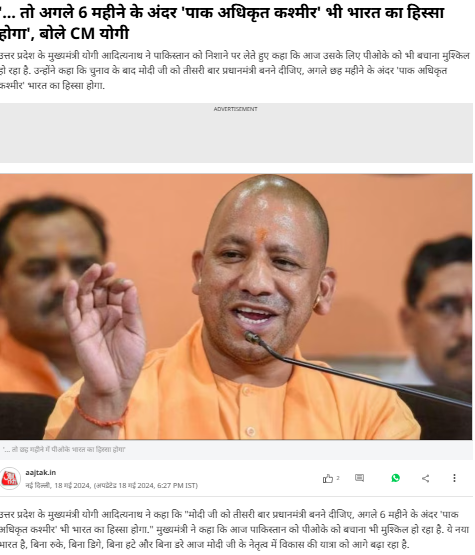
To verify the viral claim, we first conducted a keyword search on Google. During this process, we found a report published by Aaj Tak on May 18, 2024. According to the report, Yogi Adityanath stated that if Narendra Modi becomes Prime Minister for the third time, Pakistan-occupied Kashmir would become part of India within six months.
Report link:
Next, we extracted keyframes from the viral video and ran them through Google Lens. This led us to the official YouTube channel of Yogi Adityanath, where the same video was uploaded on May 18, 2024.
Original video link:
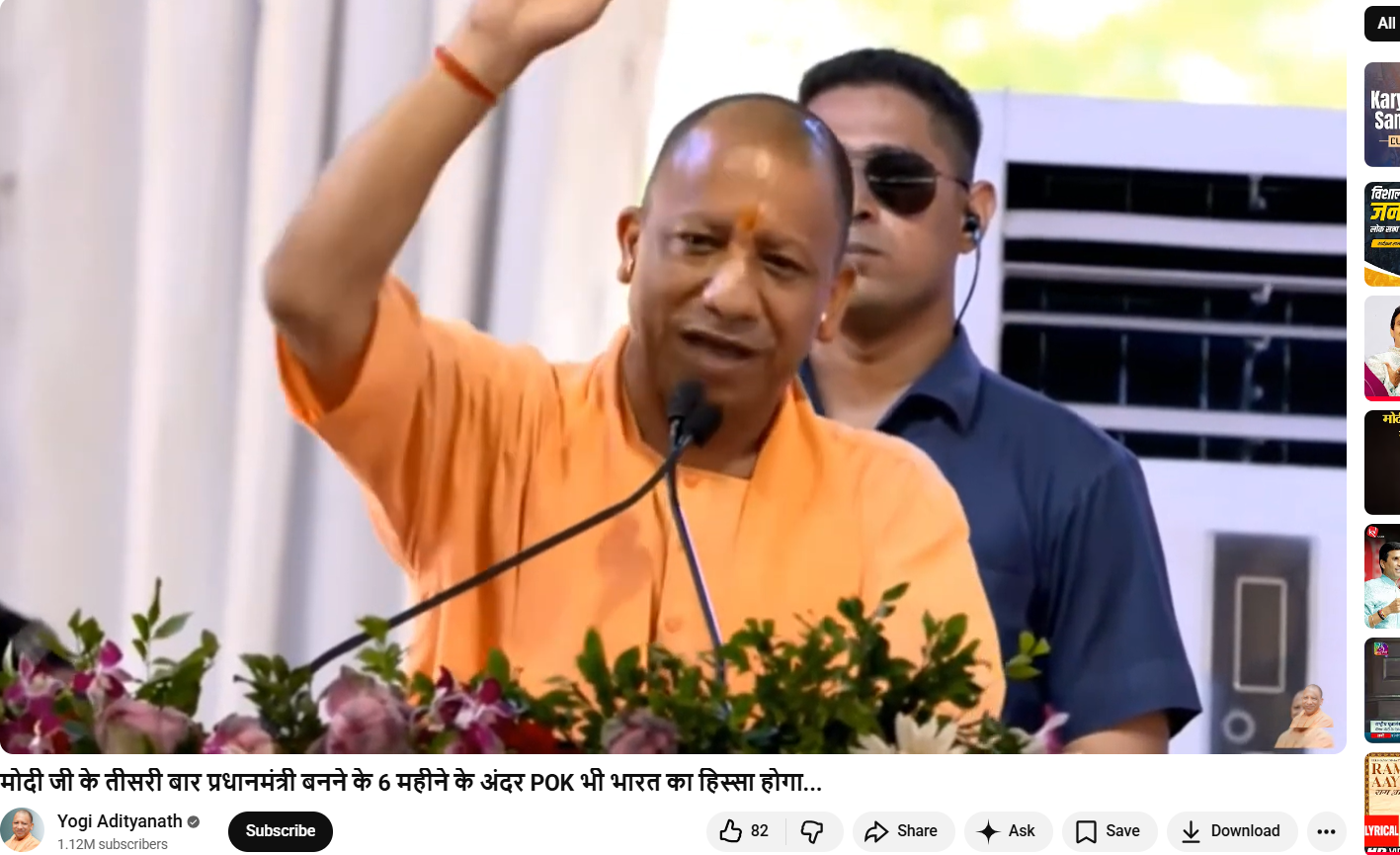
In the original video, Yogi Adityanath clearly makes the statement in reference to Prime Minister Narendra Modi, not himself.Finally, we compared the viral clip with the original footage. The visuals in both videos are identical; however, the viral version has been edited and overlaid with misleading text to change the meaning of the statement.
Conclusion
Our research confirms that the viral video is edited and misleading. The original video is from May 2024, in which Yogi Adityanath was speaking about Prime Minister Narendra Modi, not about himself becoming Prime Minister in 2029. The video has been falsely altered and shared with a deceptive claim on social media.

Introduction:
This report examines ongoing phishing scams targeting "State Bank of India (SBI)" customers, India's biggest public bank using fake SelfKYC APKs to trick people. The image plays a part in a phishing plan to get users to download bogus APK files by claiming they need to update or confirm their "Know Your Customer (KYC)" info.
Fake Claim:
A picture making the rounds on social media comes with an APK file. It shows a phishing message that says the user's SBI YONO account will stop working because of their "Old PAN card." It then tells the user to install the "WBI APK" APK (Android Application Package) to check documents and keep their account open. This message is fake and aims to get people to download a harmful app.
Key Characteristics of the Scam:
- The messages "URGENTLY REQUIRED" and "Your account will be blocked today" show how scammers try to scare people into acting fast without thinking.
- PAN Card Reference: Crooks often use PAN card verification and KYC updates as a trick because these are normal for Indian bank customers.
- Risky APK Downloads: The message pushes people to get APK files, which can be dangerous. APKs from places other than the Google Play Store often have harmful software.
- Copying the Brand: The message looks a lot like SBI's real words and logos to seem legit.
- Shady Source: You can't find the APK they mention on Google Play or SBI's website, which means you should ignore the app right away.
Modus Operandi:
- Delivery Mechanism: Typically, users of messaging services like "WhatsApp," "SMS," or "email" receive identical messages with an APK link, which is how the scam is distributed.
- APK Installation: The phony APK frequently asks for a lot of rights once it is installed, including access to "SMS," "contacts," "calls," and "banking apps."
- Data Theft: Once installed, the program may have the ability to steal card numbers, personal information, OTPs, and banking credentials.
- Remote Access: These APKs may occasionally allow cybercriminals to remotely take control of the victim's device in order to carry out fraudulent financial activities.
While the user installs the application on their device the following interface opens:


It asks the user to allow the following:
- SMS is used to send and receive info from the bank.
- User details such as Username, Password, Mobile Number, and Captcha.
Technical Findings of the Application:
Static Analysis:
- File Name: SBI SELF KYC_015850.apk
- Package Name: com.mark.dot.comsbione.krishn
- Scan Date: Sept. 25, 2024, 6:45 a.m.
- App Security Score: 52/100 (MEDIUM RISK)
- Grade: B
File Information:
- File Name: SBI SELF KYC_015850.apk
- Size: 2.88MB
- MD5: 55fdb5ff999656ddbfa0284d0707d9ef
- SHA1: 8821ee6475576beb86d271bc15882247f1e83630
- SHA256: 54bab6a7a0b111763c726e161aa8a6eb43d10b76bb1c19728ace50e5afa40448
App Information:
- App Name: SBl Bank
- Package Name:: com.mark.dot.comsbione.krishn
- Main Activity: com.mark.dot.comsbione.krishn.MainActivity
- Target SDK: 34
- Min SDK: 24
- Max SDK:
- Android Version Name:: 1.0
- Android Version Code:: 1
App Components:
- Activities: 8
- Services: 2
- Receivers: 2
- Providers: 1
- Exported Activities: 0
- Exported Services: 1
- Exported Receivers: 2
- Exported Providers:: 0
Certificate Information:
- Binary is signed
- v1 signature: False
- v2 signature: True
- v3 signature: False
- v4 signature: False
- X.509 Subject: CN=PANDEY, OU=PANDEY, O=PANDEY, L=NK, ST=NK, C=91
- Signature Algorithm: rsassa_pkcs1v15
- Valid From: 20240904 07:38:35+00:00
- Valid To: 20490829 07:38:35+00:00
- Issuer: CN=PANDEY, OU=PANDEY, O=PANDEY, L=NK, ST=NK, C=91
- Serial Number: 0x1
- Hash Algorithm: sha256
- md5: 4536ca31b69fb68a34c6440072fca8b5
- sha1: 6f8825341186f39cfb864ba0044c034efb7cb8f4
- sha256: 6bc865a3f1371978e512fa4545850826bc29fa1d79cdedf69723b1e44bf3e23f
- sha512:05254668e1c12a2455c3224ef49a585b599d00796fab91b6f94d0b85ab48ae4b14868dabf16aa609c3b6a4b7ac14c7c8f753111b4291c4f3efa49f4edf41123d
- PublicKey Algorithm: RSA
- Bit Size: 2048
- Fingerprint: a84f890d7dfbf1514fc69313bf99aa8a826bade3927236f447af63fbb18a8ea6
- Found 1 unique certificate
App Permission

1. Normal Permissions
- Access_network_state: Allows the App to View the Network Status of All Networks.
- Foreground_service: Enables Regular Apps to Use Foreground Services.
- Foreground_service_data_sync: Allows Data Synchronization With Foreground Services.
- Internet: Grants Full Internet Access.
2. Signature Permission:
- Broadcast_sms: Sends Sms Received Broadcasts. It Can Be Abused by Malicious Apps to Forge Incoming Sms Messages.
3. Dangerous Permissions:
- Read_phone_numbers: Grants Access to the Device’s Phone Number(S).
- Read_phone_state: Reads the Phone’s State and Identity, Including Phone Features and Data.
- Read_sms: Allows the App to Read Sms or Mms Messages Stored on the Device or Sim Card. Malicious Apps Could Use This to Read Confidential Messages.
- Receive_sms: Enables the App to Receive and Process Sms Messages. Malicious Apps Could Monitor or Delete Messages Without Showing Them to the User.
- Send_sms: Allows the App to Send Sms Messages. Malicious Apps Could Send Messages Without the User’s Confirmation, Potentially Leading to Financial Costs.
On further analysis on virustotal platform using md5 hash file, the following results were retrieved where there are 24 security vendors out of 68, marked this apk file as malicious and the graph represents the distribution of malicious file in the environment.


Key Takeaways:
- Normal Permissions: Generally Safe for Accessing Basic Functionalities (Network State, Internet).
- Signature Permissions: May Pose Risks When Misused, Especially Related to Sms Broadcasts.
- Dangerous Permissions: Provide Sensitive Data Access, Such as Phone Numbers and Device Identity, Which Can Be Exploited by Malicious Apps.
- The Dangerous Permissions Pose Risks Regarding the Reading, Receiving, and Sending of Sms, Which Can Lead to Privacy Breaches or Financial Consequences.
How to Identify the Scam:
- Official Statement: SBI never asks clients to download unauthorized APKs for upgrades related to KYC or other services. All formal correspondence takes place via the SBI YONO app, which may be found in reputable app shops.
- No Immediate Threats: Bank correspondence never employs menacing language or issues harsh deadlines, such as "your account will be blocked today."
- Email Domain and SMS Number: Verified email addresses or phone numbers are used for official SBI correspondence. Generic, unauthorized numbers or addresses are frequently used in scams.
- Links and APK Files: Steer clear of downloading APK files from unreliable sources at all times. For app downloads, visit the Apple App Store or Google Play Store instead.
CyberPeace Advisory:
- The Research team recommends that people should avoid opening such messages sent via social platforms. One must always think before clicking on such links, or downloading any attachments from unauthorised sources.
- Downloading any application from any third party sources instead of the official app store should be avoided. This will greatly reduce the risk of downloading a malicious app, as official app stores have strict guidelines for app developers and review each app before it gets published on the store.
- Even if you download the application from an authorised source, check the app's permissions before you install it. Some malicious apps may request access to sensitive information or resources on your device. If an app is asking for too many permissions, it's best to avoid it.
- Keep your device and the app-store app up to date. This will ensure that you have the latest security updates and bug fixes.
- Falling into such a trap could result in a complete compromise of the system, including access to sensitive information such as microphone recordings, camera footage, text messages, contacts, pictures, videos, and even banking applications and could lead users to financial loss.
- Do not share confidential details like credentials, banking information with such types of Phishing scams.
- Never share or forward fake messages containing links on any social platform without proper verification.
Conclusion:
Fake APK phishing scams target financial institutions more often. This report outlines safety steps for SBI customers and ways to spot and steer clear of these cons. Keep in mind that legitimate banks never ask you to get an APK from shady websites or threaten to close your account right away. To stay safe, use SBI's official YONO app on both systems and get apps from trusted places like Google Play or the Apple App Store. Check if the info is true before you do anything turn on 2FA for all your bank and money accounts, and tell SBI or your local cyber police about any scams you see.
