
#FactCheck - AI-Generated Image Falsely Shows Mohammed Siraj Offering Namaz During Net Practice
A photo circulating on social media claims to show Indian cricketer Mohammed Siraj offering namaz during net practice, while teammates Rohit Sharma, Virat Kohli and Shubman Gill are seen taking a selfie with him. Several users are sharing the image as a “beautiful moment,” portraying it as a symbol of faith, unity and sportsmanship. However, research by the Cyber Peace Foundation has found that the viral image is not genuine and has been AI-generated.
Claim
On January 14, 2026, multiple Facebook users shared the viral image with captions describing it as a touching scene from Rajkot’s Saurashtra Stadium. The posts claim that Mohammed Siraj took time out during net practice to offer prayers, reflecting his strong faith, while fellow cricketers Rohit Sharma, Virat Kohli and Shubman Gill respectfully captured the moment on camera.
Users praised the image as a rare blend of spirituality, discipline, teamwork and mutual respect, calling it a “beautiful confluence of sport and faith.”(Links to the post, archived version and screenshots are provided below.)
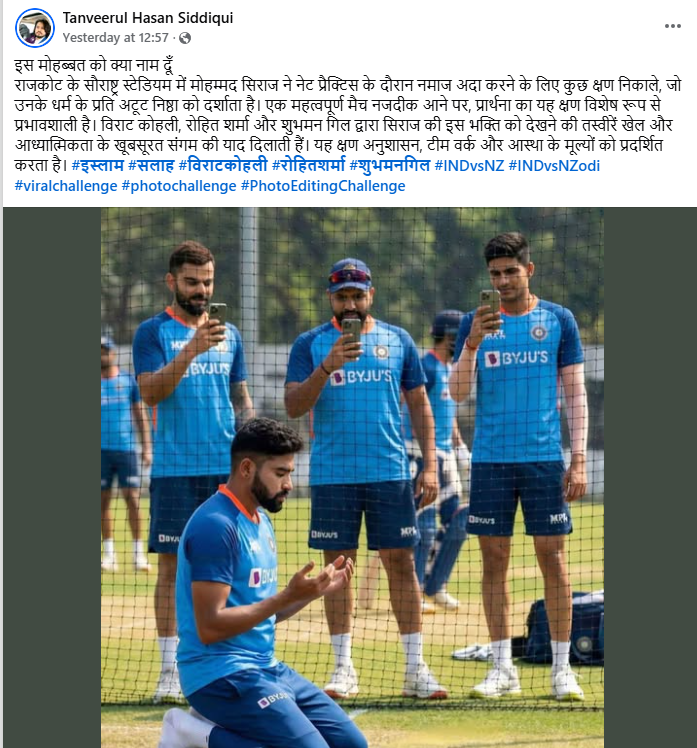
Fact Check:
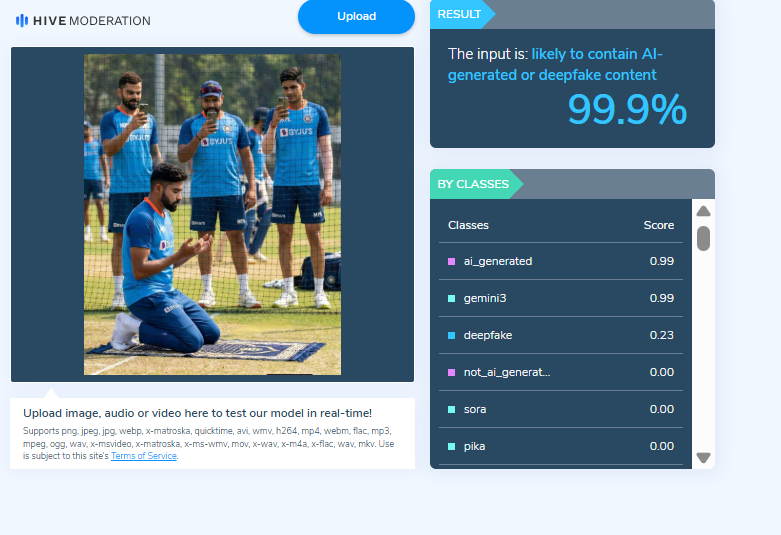
On closely examining the viral image, several visual inconsistencies and unnatural elements were observed, raising suspicion that the picture may not be authentic.To verify this, the Cyber Peace Foundation analysed the image using the AI detection tool Hive Moderation. According to the tool’s assessment, the image showed a 99% likelihood of being AI-generated.
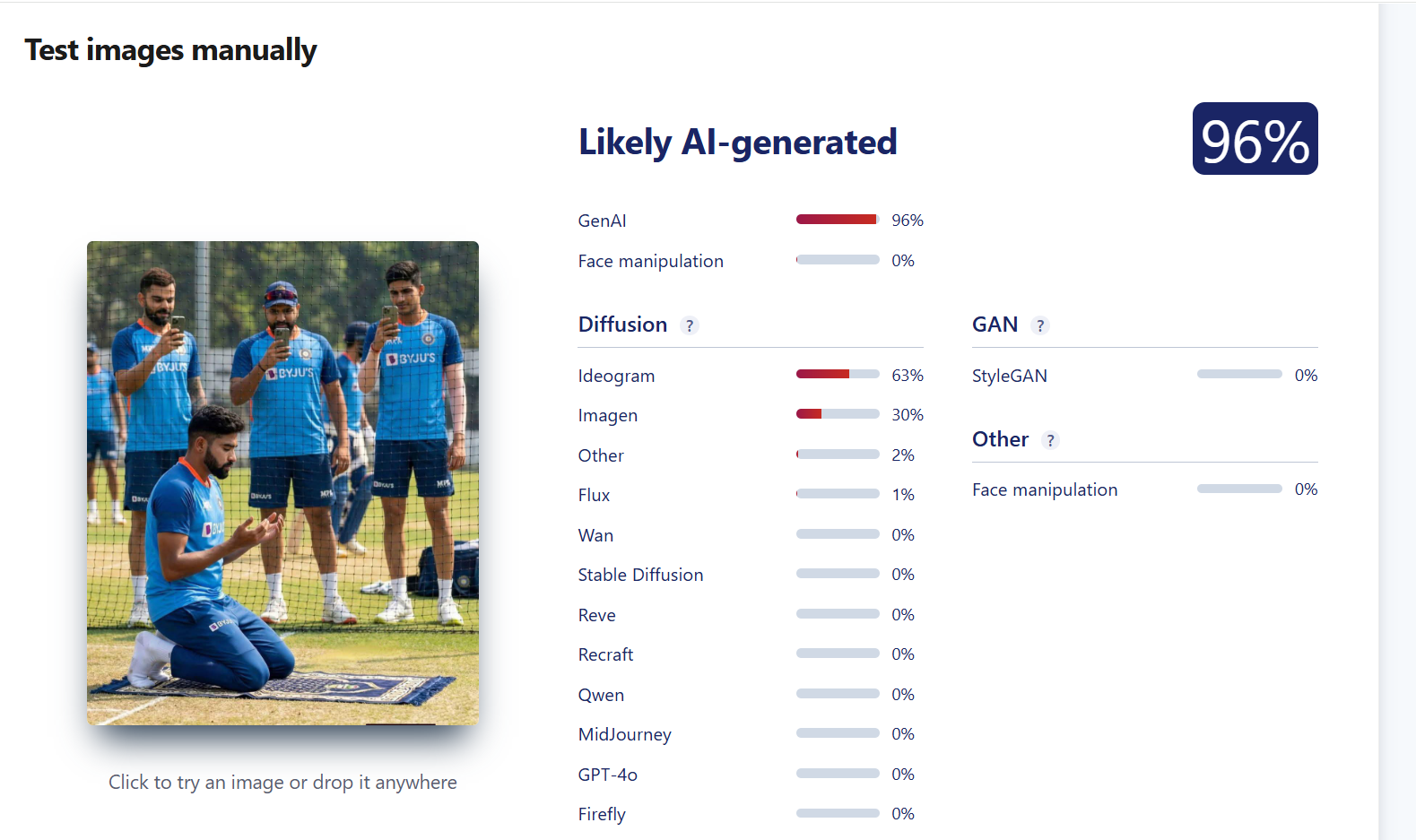
To further strengthen the verification, the image was also scanned using another AI detection platform, Sightengine. The results indicated a 96% probability that the image was generated using artificial intelligence.
Conclusion:
The research confirms that the viral image claiming to show Mohammed Siraj offering namaz during net practice, with Rohit Sharma, Virat Kohli and Shubman Gill taking a selfie, is not real.The photograph has been created using AI tools and falsely shared on social media, misleading users by presenting a fabricated scene as an authentic moment.

Related Blogs

Introduction
Whatsapp is one of the leading OTT messaging platforms, which has been owned by the tech giant Meta since 2013. WhatsApp enjoys a user base of nearly 2.24 billion people globally, with almost 487 million users in India. Since the advent of Whatsapp, it has been the most commonly used messaging app, and it has made an impact to such an extent that it is used for professional as well as personal purposes. Meta powers the platform and follows similar guidelines and policies as its parent company.
The New Feature
Users of WhatsApp on the web and desktop can now access one account from various devices. One WhatsApp account may now be used on up to four handsets thanks to a new update from Meta. Be aware that the multi-device capability has been planned for some time and is finally being made available to stable WhatsApp users. Each linked device (up to four devices can be linked) will function independently, and the independent devices will continue to receive messages even if the central device’s network connection is lost. Remember that WhatsApp will automatically log out of all the companion devices if the primary smartphone is dormant for an extended period. Four more gadgets may be a mix of four PCs and smartphones or four smartphones. This feature is now available for updates and downloads on Android as well as iOS platforms.
Potential issues
As we go deeper into the digital age, it is the responsibility of the tech giants to pilot innovation with features of security by design. Thus such new features should be accompanied by coherent safety and security policies or advisories to ensure the users understand the implications of the new features. Convenience over conditions is an essential part of cyberspace. It points to the civic duty of netizens to go through the conditions of any app rather than only focus on the convenience it creates. The following potential issues may arise from the new features on Whatsapp –
- Increased cybercrime- The bad actors now do not need to access SIM cards to commit frauds over the platforms as now on a single number 4 devices can be used hence the cybercriminal activity can increase over the platform. It is also pertinent for the platform to create SoPs for fake accounts which use multiple devices, as they pose a direct threat to the users and their interests.
- Difficulty in identifying and tracing- The LEAs will face a significant issue in identifying the bad actors and tracing them as the individual’s involvement through a linked device needs to be given legal validity and scope for investigation. This may also cause issues in evidence handling and analysis.
- Surge in Misinformation and Disinformation- With access to multiple devices, the screen time of an individual is also bound to increase. This leads to more time spent online, thus causing a rise in instances of misinformation and disinformation by bad actors. Thus the aspect of fack checking is of prime importance.
- Potential Oversharing of Personal Data- With the increased accessibility on different devices, it is very easy for the app to seek data from all devices on which the app is running, thus leading to a bigger reservoir of personal data for the platforms and data fiduciaries.
- Higher risk of Phishing, Ransomware and Malware Attacks- As the devices under the same login credentials and mobile number will increase, the message can be viewed on all the devices, thus increasing the risk of widespread embedded ransomware and malware in multiple devices is and ever-present threat.
- One number, more criminals- This feature will allow cybercriminals to operate using one device only, earlier they used to forge Adhaar cards to get new sims, but this feature will enable the bad actors to commit crimes and attacks from one single SIM using 4 different devices.
- Rise in Digital Footprint- As the number of devices increases, the users will generate more digital footprints. As a tech giant, Meta will have access to a bigger database, which increases the risk of data breaches by third-party actors.
Conclusion
In the fast-paced digital world, it is important to remain updated about new software, technologies and policies for our applications or forms of tech. This was a long-awaited feature from WhatsApp, and its value of it doesn’t lie in technological advancement only but also in the formulation of policies to govern this technology towards the trust and safety aspect of users. The platforms, in synergy with the policy makers, need to create a robust framework to accommodate the new features and add-ons on apps vehicle, staying in compliance with the laws of the land. Awareness about new features and vulnerabilities is a must for all netizens, and it is a shared responsibility for all netizens to spread the word about safety and security mechanisms.

Introduction
Google.org is committed to stepping ahead to enhance Internet safety and responsible online behaviour. ‘Google for INDIA 2023’, an innovative conclave, took place on 19th October 2023. Google.org has embarked on its vision for a safer Internet and combating misinformation, financial frauds and other threats that come from bad actors. Alphabet Big Tech is committed to leading this charter and engaging with all stakeholders, including government agencies. Google.org has partnered with CyberPeace Foundation to foster a safer online environment and empower users on informed decisions on the Internet. CyberPeace will run a nationwide awareness and capacity-building Initiative equipping more than 40 Million Indian netizens with fact-checking techniques, tools, SoPs, and guidance for responsible and safe online behaviour. The campaign will be deployed in 15 Indian regional languages as a comprehensive learning outcome for the whole nation. Together, Google.org and CyberPeace Foundation aim to make the Internet safer for everyone and work in a direction to ensure that progress for everyone is built on a strong foundation of trusted information available on the Internet and pursuing the true spirit of “Technology for Good”.
Google.org and CyberPeace together for enhanced online safety
A new $4 million grant to CyberPeace Foundation will support a nationwide awareness-building program and comprehensive multilingual digital resource hub with content available in up to 15 Indian languages to empower nearly 40 million underserved people across the country in building resilience against misinformation and practice responsible online behaviour. Together, Google.org and CyberPeace are on their way to creating a strong pathway of trusted Internet and a safer digital environment. The said campaign will be undertaken for a duration of 3 years, and the following key components will run at the core of the same:
- CyberPeace Corps Volunteers: This will be a pan India volunteer engagement initiative to create a community of 9 million CyberPeace Ambassadors/First Responders/Volunteers to fight misinformation and promote responsible online behaviour going far into the rural, marginalised and most vulnerable strata of society.
- Digital Resource Hub: In pursuance of the campaign, CyberPeace is developing a cutting-edge platform offering a wealth of resources on media literacy, responsible content creation, and cyber hygiene translated into 15 Indian regional languages for a widespread impact on the ground.
- Public Sensitisation: CyberPeace will be conducting an organic series of online and offline events focusing on empowering netizens to discern fact from fiction. These sensitisation drives will be taken on by start master trainers from different regions of India to ensure all states and UTs are impacted.
- CyberPeace Quick Reaction Team: A specialised team of tech enthusiasts that will work closely with platforms to rapidly address new-age cyber threats and misinformation campaigns in real-time and establish best practices and SoPs for the diverse elements in the industries.
- Engaging Multimedia Content: With CyberPeace’s immense expertise in E-Course and digital content, the campaign will produce a range of multilingual multimedia resources, including informative videos, posters, games, contests, infographics, and more.
- Fact-check unit: Fact-check units will play a crucial role in monitoring, identifying, and doing fact analysis of the suspected information and overall busting the growing incidents of misinformation. Fake news or misinformation has negative consequences on society at large. The fact-check units play a significant role in controlling the widespread of misinformation.
Fight Against Misinformation
Misinformation is rampant all across the world and requires attention. With the increasing penetration of social media and the internet, this remains a global issue. Google.org has taken up the initiative to address this issue in India and, in collaboration with CyberPeace Foundation taken a proactive step to multiple avenues for mass-scale awareness and upskilling campaigns have been piloted to make an impact on the ground with the vision of upskilling over 40 Million people in the country and building resilience against misinformation and practicing responsible online behavior.
Maj Vineet Kumar, Founder of CyberPeace, said,
"In an era in which digital is deeply intertwined with our lives, knowing how to discern, act on, and share the credible from the wealth of information available online is critical to our well-being, and of our families and communities. Through this initiative, we’re committing to help Internet users across India become informed, empowered and responsible netizens leading through conversations and actions. Whether it’s in fact-checking information before sharing it, or refraining from sharing unverified news, we all play an important role in building a web that is a safe and inclusive space for everyone, and we are extremely grateful to Google.org for propelling us forward in this mission with their grant support.”
Annie Lewin, Senior Director of Global Advocacy and Head of Asia Pacific, Google.org said:
“We have a longstanding commitment to supporting changemakers using technology to solve humanity's biggest challenges. And, the innovation and zeal of Indian nonprofit organisations has inspired us to deepen our commitment in India. With the new grant to CyberPeace Foundation, we are proud to support solutions that speak directly to Google’s DNA, helping first-time internet users chart their path in a digital world with confidence. Such solutions give us pride and hope that each step, built on a strong foundation of trusted information, will translate into progress for all.”
Conclusion
Google.org has partnered with government agencies and other Indian organisations with the vision of future-proof India for digital public infrastructure and staying a step ahead for Internet safety, keeping the citizens safe online. Google.org is taking its largest step yet towards online safety in India. There is widespread misinformative content and information in the digital media space or on the internet. This proactive initiative of Google.org in collaboration with CyberPeace is a commendable step to prevent the spread of misinformation and empower users to act responsibly while sharing any information and making informed decisions while using the Internet, hence creating a safe digital environment for everyone.
References:
- https://www.youtube.com/live/-b4lTVjOsXY?feature=shared
- https://blog.google/intl/en-in/products/google-for-india-2023-product-announcements/
- https://blog.google/intl/en-in/partnering-indias-success-in-a-new-digital-paradigm/
- https://telecom.economictimes.indiatimes.com/news/internet/google-to-debut-credit-in-india-announces-a-slew-of-ai-powered-launches/104547623
- https://theprint.in/economy/google-for-india-2023-tech-giant-says-it-removed-2-million-violative-videos-in-q2-2023/1810201/

Introduction
THE DIGITAL PERSONAL DATA PROTECTION BILL, 2022 Released for Public Consultation on November 18, 2022THE DIGITAL PERSONAL DATA PROTECTION BILL, 2023Tabled at LokSabha on August 03. 2023Personal data may be processed only for a lawful purpose for which an individual has given consent. Consent may be deemed in certain cases.The 2023 bill imposes reasonable obligations on data fiduciaries and data processors to safeguard digital personal data.There is a Data Protection Board under the 2022 bill to deal with the non-compliance of the Act.Under the 2023 bill, there is the Establishment of a new Data Protection Board which will ensure compliance, remedies and penalties.
Under the new bill, the Board has been entrusted with the power of a civil court, such as the power to take cognisance in response to personal data breaches, investigate complaints, imposing penalties. Additionally, the Board can issue directions to ensure compliance with the act.The 2022 Bill grants certain rights to individuals, such as the right to obtain information, seek correction and erasure, and grievance redressal.The 2023 bill also grants More Rights to Individuals and establishes a balance between user protection and growing innovations. The bill creates a transparent and accountable data governance framework by giving more rights to individuals. In the 2023 bill, there is an Incorporation of Business-friendly provisions by removing criminal penalties for non-compliance and facilitating international data transfers.
The new 2023 bill balances out fundamental privacy rights and puts reasonable limitations on those rights.Under the 2022 bill, Personal data can be processed for a lawful purpose for which an individual has given his consent. And there was a concept of deemed consent.The new data protection board will carefully examine the instance of non-compliance by imposing penalties on non-compiler.The bill does not provide any express clarity in regards to compensation to be granted to the Data Principal in case of a Data Breach.Under 2023 Deemed consent is there in its new form as ‘Legitimate Users’.The 2022 bill allowed the transfer of personal data to locations notified by the government.There is an introduction of the negative list, which restricts cross-data transfer.
