
#FactCheck: Phishing Scam on Jio is offering a ₹700 Holi reward through a promotional link
Executive Summary:
A viral post currently circulating on various social media platforms claims that Reliance Jio is offering a ₹700 Holi gift to its users, accompanied by a link for individuals to claim the offer. This post has gained significant traction, with many users engaging in it in good faith, believing it to be a legitimate promotional offer. However, after careful investigation, it has been confirmed that this post is, in fact, a phishing scam designed to steal personal and financial information from unsuspecting users. This report seeks to examine the facts surrounding the viral claim, confirm its fraudulent nature, and provide recommendations to minimize the risk of falling victim to such scams.
Claim:
Reliance Jio is offering a ₹700 reward as part of a Holi promotional campaign, accessible through a shared link.

Fact Check:
Upon review, it has been verified that this claim is misleading. Reliance Jio has not provided any promo deal for Holi at this time. The Link being forwarded is considered a phishing scam to steal personal and financial user details. There are no reports of this promo offer on Jio’s official website or verified social media accounts. The URL included in the message does not end in the official Jio domain, indicating a fake website. The website requests for the personal information of individuals so that it could be used for unethical cyber crime activities. Additionally, we checked the link with the ScamAdviser website, which flagged it as suspicious and unsafe.


Conclusion:
The viral post claiming that Reliance Jio is offering a ₹700 Holi gift is a phishing scam. There is no legitimate offer from Jio, and the link provided leads to a fraudulent website designed to steal personal and financial information. Users are advised not to click on the link and to report any suspicious content. Always verify promotions through official channels to protect personal data from cybercriminal activities.
- Claim: Users can claim ₹700 by participating in Jio's Holi offer.
- Claimed On: Social Media
- Fact Check: False and Misleading

Related Blogs

Introduction
Attacks by cybercriminals targeting national critical infrastructure are increasing at an unsettling rate. Such attacks have the potential to do severe damage by upsetting transportation networks, utilities, financial services, and other vital infrastructure. The physical and digital systems that underpin a nation's economy are known as critical infrastructure thus if they were to be disrupted, there would be serious risks to the economy and public health and safety. Establishing proper cybersecurity measures and protecting those digital systems from possible threats or cyberattacks is necessary. Both public and private sector assets are included in these essential infrastructure categories.
Nationwide alert:
Recently one of the biggest hacker organizations has warned of an upcoming cyberattack on the critical infrastructure and websites in India, causing a countrywide alert. A gang of hackers from Indonesia and Pakistan, celebrating 4,000 members, announced a planned “Cyber Party” on 11 December 2023. The event’s claimed goal is to compromise and disrupt India's digital infrastructure. They disclosed this information on their Telegram channel.
This hacker organization holds a record of launching extensive cyberattacks; in the past, it sent out a "red notice" that was intended to target 12,000 websites run by the Indian government. They have previously attacked other nations, such as Israel, Sweden, and the United States. Their reasons are varied and might include anything from assaults on certain groups to religious disagreements.
The gang has also been acclaimed for hacking into a New York City police agency, obtaining health and social media data from Israel, and exposing information from Swedish social media users. These alarming events show how urgently strong and all-encompassing cybersecurity measures are needed, not only in India but throughout the world.
Effect(s) on India
1. Central Agencies Are Alert, Expect Health Sector Attacks: The cyberinfrastructure of the health sector has been a common target of assaults, particularly in the aftermath of the COVID-19 epidemic, which has authorities particularly concerned. Relevant ministries have received notifications from central authorities advising them to take precautions against unwanted access. The security of digital infrastructure is seriously challenged by the constantly changing panorama of cyber-attacks, according to those who are aware of the warning and threat.
2. National security concerns: Because of the interconnectedness of critical national infrastructure, a cyberattack may have an impact on national security. Attacks against defense networks, intelligence organizations health infrastructure, or military systems, for instance, might make it more difficult for the nation to respond to threats from outside.
3. Concerns for Public Safety and Health: Cyberattacks on healthcare systems run the risk of compromising patient data, stopping medical procedures, and even endangering the general public's health. This might have potentially fatal results in urgent circumstances.
4. Data Breach and Privacy Issues: Stealing confidential data is a common component of cybersecurity assaults. A breach of critical infrastructure systems might result in sensitive data, including personal information, being misused and accessed without authorization, raising privacy issues.
Preventive and protective measures
1. The plan for responding to incidents: Make sure a clear incident response strategy is in place, with a focus on healthcare systems, and that it is especially designed to handle cyber-attacks on critical infrastructure.
2. Better Tracking: Observing vital networks, systems, and data flows more closely, especially in the healthcare industry. Using cutting-edge threat detection technologies to spot odd or questionable activity.
3. Critical System Isolation: Cutting off vital healthcare systems from the wider network to reduce the chance of attackers moving laterally.
4. Continual Backups: Make sure that backup copies of important data and systems are kept in a safe, isolated location by regularly backing them up. In the event of a ransomware attack or data breach, this makes recovery easier.
5. Update and patch systems: Make sure that all operating systems and apps utilized in the infrastructure of the healthcare industry are updated with the most recent security updates.
6. Protocols for Communication: In the case of a cyber-incident, establishing explicit communication mechanisms to guarantee that pertinent parties are notified as soon as possible. This covers correspondence with law enforcement, the public, and other members of the healthcare industry as needed.
Conclusion
Urgent preventative actions are essential in response to an impending cyber threat revealed by a large hacker organization that is targeting India's key infrastructure, specifically the healthcare sector. The interconnectedness of this infrastructure puts public safety, privacy, and national security in danger. A crucial defensive approach is formed by the proactive measures mentioned, which include communication protocols, system isolation, improved monitoring, incident response preparation, and frequent backups. The dangers underline the necessity of international collaboration in tackling cybersecurity issues and the requirement for shared responsibility of everyone to safeguard digital networks. To reduce risks and guarantee the resilience of vital national infrastructure in the face of changing cyber threats, authorities must continue to develop and adapt their cybersecurity tactics.
References:
- https://www.cnbctv18.com/technology/exclusive--nationwide-alert-sounded-as-hacker-group-plans-cyber-party-to-attack-indias-critical-digital-infra-18520021.htm
- https://www.the420.in/ndian-authorities-high-alert-hacker-groups-threaten-cyber-assault/
- https://www.cnbctv18.com/technology/exclusive--nationwide-alert-sounded-as-hacker-group-plans-cyber-party-to-attack-indias-critical-digital-infra-18520021.htm#:~:text=By%20News18.com%20Dec%208,%3A58%20AM%20IST%20(Published)&text=A%20nationwide%20alert%20has%20been,Indian%20websites%20and%20critical%20infrastructure
- https://verveindustrial.com/resources/blog/critical-infrastructure-cyber-security/

Executive Summary
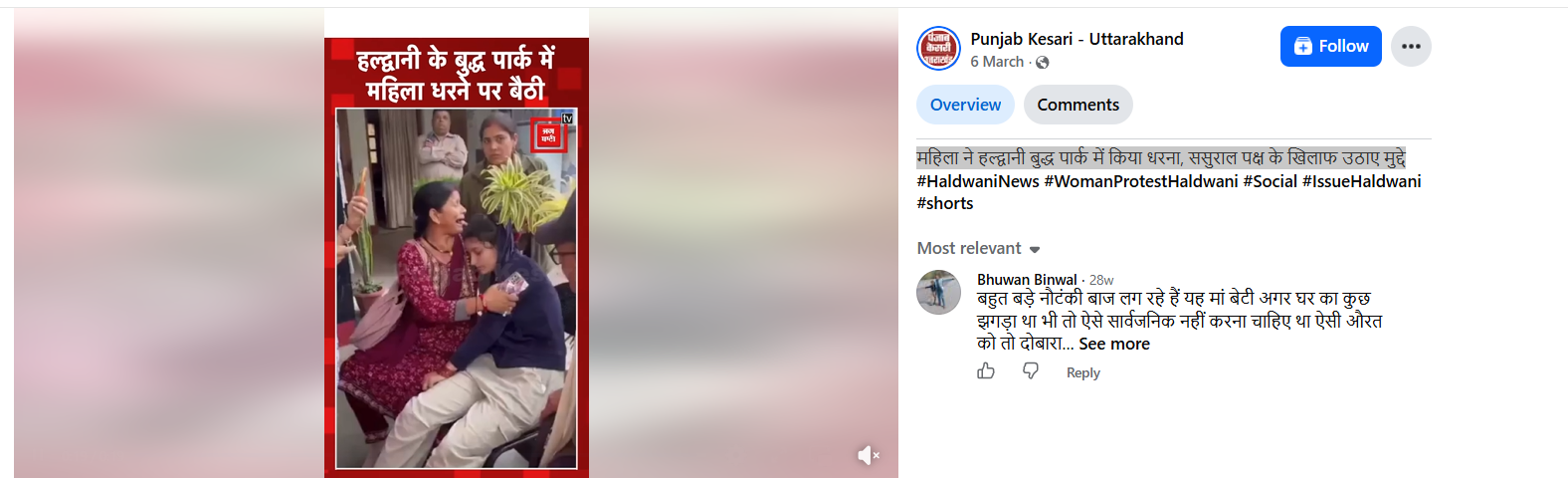
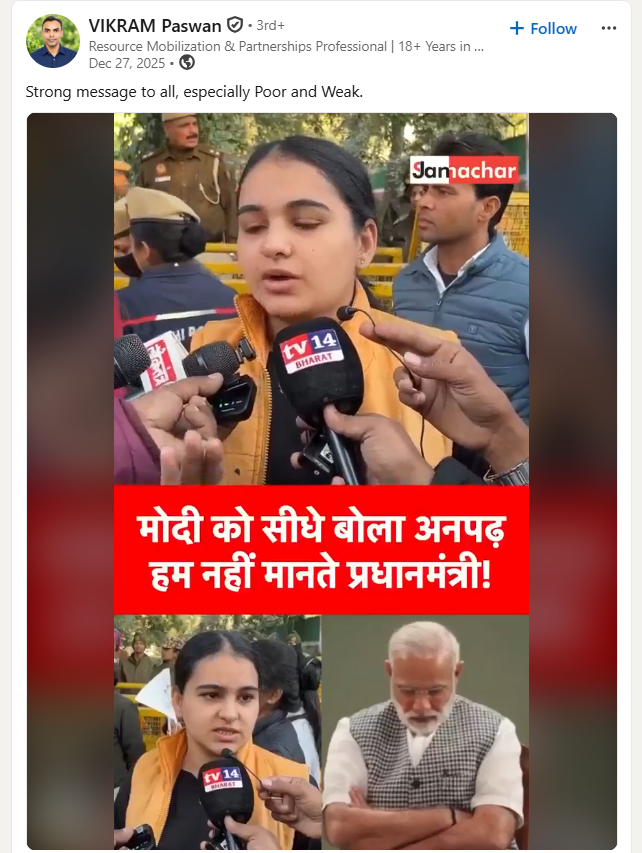
A video is being shared on social media with the claim that a Dalit woman was raped inside the Ram Temple in Ayodhya. In the video, two women can be seen crying, while some people around them appear to be consoling them. CyberPeace Research Wing’s research found the viral claim to be false. Our research found that the viral video has been created by combining two separate clips. In the first part of the video, a woman can be seen staging a protest at Buddha Park in Haldwani and raising issues related to her in-laws. The second part shows a girl expressing her anger. Our research found that this clip has been available on the internet since December 27, 2025. Neither of the two videos is related to the alleged rape of a Dalit woman inside the Ram Temple in Ayodhya.
Claim:
A Facebook user shared the viral video on September 21, 2026, with the caption, “Dalit woman raped inside the Ram Temple.”The post link, archive link and screenshot are provided below.
https://www.facebook.com/watch/?v=1420442086956519
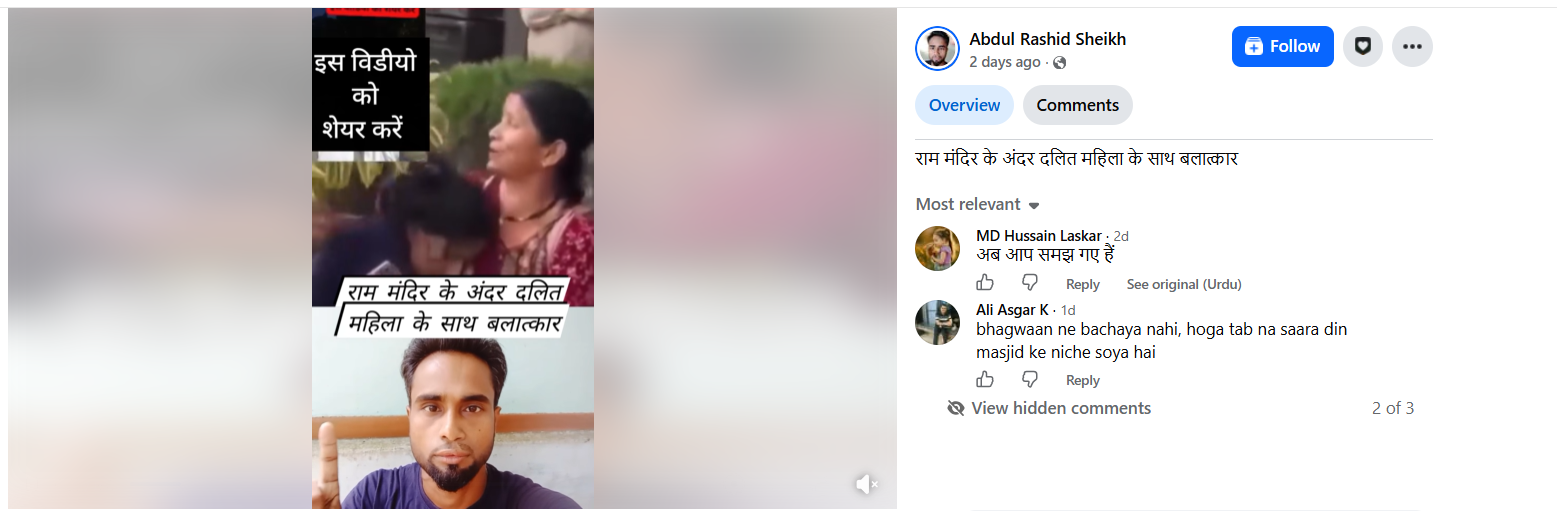
Fact Check
To verify the authenticity of the viral image, we conducted a Google search using relevant keywords. However, we did not find any credible media report related to the viral image during the search. To verify the claim, we conducted a reverse image search of the keyframes from the video. During the search, we found the same video on the Facebook page of Punjab Kesari - Uttarakhand, where it was published on March 6, 2026. According to the post, the woman staged a protest at Buddha Park in Haldwani and raised issues related to her in-laws. The link and screenshot of the relevant post are provided below.
https://www.facebook.com/watch/?v=897776589732940
Meanwhile, we found the second part of the viral video on LinkedIn, where the video was published on December 27, 2025.
Our research makes it clear that two old and unrelated videos are being shared with a misleading claim linking them to the Ram Temple in Ayodhya. The videos have no connection with the alleged incident on the temple premises, and based on the available evidence, there is no confirmation of any such incident taking place at the Ram Temple. Our research found that the viral video was created by combining two separate clips. In the first part of the video, a woman can be seen staging a protest at Buddha Park in Haldwani and raising issues related to her in-laws. In the second part, a girl can be seen expressing her anger. Our research found that this clip has been available on the internet since December 27, 2025. Neither of the two videos is related to the alleged rape of a Dalit woman inside the Ram Temple in Ayodhya.

Executive Summary
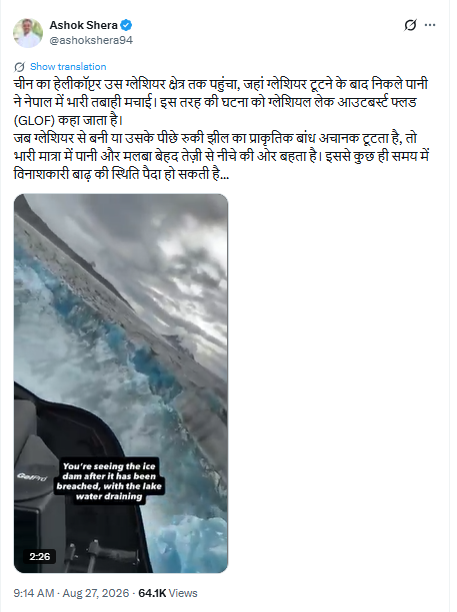
A video purportedly showing a glacier breaking apart while being filmed from a helicopter is being shared on social media with the claim that a Chinese helicopter has reached the site where a glacier broke apart, triggering floods in Nepal. A research by the Research Wing of the CyberPeace found that the video is actually from Alaska, USA. It was uploaded on Instagram and YouTube by an American pilot, Leigh Kotes, before the recent floods in Nepal, and is unrelated to the incident.
Claim
The video is being shared on X with a caption claiming: “A Chinese helicopter reached the glacier region where water released after the glacier broke apart caused massive destruction in Nepal. Such an event is known as a Glacial Lake Outburst Flood (GLOF).”
https://x.com/ashokshera94/status/2092820484811538681
Fact Check
To verify the viral video claiming that a Chinese helicopter reached the site of the glacier break after the floods in Nepal, we conducted a reverse image search using keyframes from the clip. During the search, we found a video featuring the same visuals uploaded on a YouTube account named “Heli Pilot Leigh” on January 16, 2025. The location mentioned with the video identified it as Alaska, USA.
https://www.youtube.com/shorts/floh1LkZT7o

We also found several videos featuring scenes similar to those in the viral video on Ligh Kotes’ YouTube account. Among them, a nearly two-minute-long video uploaded on January 16, 2025, also contains visuals similar to those seen in the viral clip. Recorded from a helicopter, the video shows Ligh extending her mobile phone outside the helicopter to capture footage of water rushing out at high speed following the breaking of a glacier. https://www.youtube.com/watch?v=5vQP5HlyMMY

Additionally, our research found that the Columbia Glacier featured in Ligh’s video is located near Valdez, Alaska.
https://www.alaska.org/detail/columbia-glacier

Conclusion
The evidence gathered during our research makes it clear that the viral video, which is being shared with the claim that a Chinese helicopter reached the site of a glacier collapse following floods in Nepal, is actually from the Columbia Glacier in Alaska, USA. The video was recorded by an American pilot, Ligh Kotes.
