
#FactCheck: Old clip of Greenland tsunami depicts as tsunami in Japan
Executive Summary:
A viral video depicting a powerful tsunami wave destroying coastal infrastructure is being falsely associated with the recent tsunami warning in Japan following an earthquake in Russia. Fact-checking through reverse image search reveals that the footage is from a 2017 tsunami in Greenland, triggered by a massive landslide in the Karrat Fjord.

Claim:
A viral video circulating on social media shows a massive tsunami wave crashing into the coastline, destroying boats and surrounding infrastructure. The footage is being falsely linked to the recent tsunami warning issued in Japan following an earthquake in Russia. However, initial verification suggests that the video is unrelated to the current event and may be from a previous incident.

Fact Check:
The video, which shows water forcefully inundating a coastal area, is neither recent nor related to the current tsunami event in Japan. A reverse image search conducted using keyframes extracted from the viral footage confirms that it is being misrepresented. The video actually originates from a tsunami that struck Greenland in 2017. The original footage is available on YouTube and has no connection to the recent earthquake-induced tsunami warning in Japan

The American Geophysical Union (AGU) confirmed in a blog post on June 19, 2017, that the deadly Greenland tsunami on June 17, 2017, was caused by a massive landslide. Millions of cubic meters of rock were dumped into the Karrat Fjord by the landslide, creating a wave that was more than 90 meters high and destroying the village of Nuugaatsiaq. A similar news article from The Guardian can be found.

Conclusion:
Videos purporting to depict the effects of a recent tsunami in Japan are deceptive and repurposed from unrelated incidents. Users of social media are urged to confirm the legitimacy of such content before sharing it, particularly during natural disasters when false information can exacerbate public anxiety and confusion.
- Claim: Recent natural disasters in Russia are being censored
- Claimed On: Social Media
- Fact Check: False and Misleading

Related Blogs
.webp)
Introduction
Search engines have become indispensable in our daily lives, allowing us to find information instantly by entering keywords or phrases. Using the prompt "search Google or type a URL" reflects just how seamless this journey to knowledge has become. With millions of searches conducted every second, and Google handling over 6.3 million searches per minute as of 2023 (Statista), one critical question arises: do search engines prioritise results based on user preferences and past behaviours, or are they truly unbiased?
Understanding AI Bias in Search Algorithms
AI bias is also known as machine learning bias or algorithm bias. It refers to the occurrence of biased results due to human biases that deviate from the original training data or AI algorithm which leads to distortion of outputs and creation of potentially harmful outcomes. The sources of this bias are algorithmic bias, data bias and interpretation bias which emerge from user history, geographical data, and even broader societal biases in training data.
Common biases include excluding certain groups of people from opportunities because of AI bias. In healthcare, underrepresenting data of women or minority groups can skew predictive AI algorithms. While AI helps streamline the automation of resume scanning during a search to help identify ideal candidates, the information requested and answers screened out can result in biased outcomes due to a biased dataset or any other bias in the input data.
Case in Point: Google’s "Helpful" Results and Its Impact
Google optimises results by analysing user interactions to determine satisfaction with specific types of content. This data-driven approach forms ‘filter bubbles’ by repeatedly displaying content that aligns with a user’s preferences, regardless of factual accuracy. While this can create a more personalised experience, it risks confining users to a limited view, excluding diverse perspectives or alternative viewpoints.
The personal and societal impacts of such biases are significant. At an individual level, filter bubbles can influence decision-making, perceptions, and even mental health. On a societal level, these biases can reinforce stereotypes, polarise opinions, and shape collective narratives. There is also a growing concern that these biases may promote misinformation or limit users’ exposure to diverse perspectives, all stemming from the inherent bias in search algorithms.
Policy Challenges and Regulatory Measures
Regulating emerging technologies like AI, especially in search engine algorithms, presents significant challenges due to their intricate, proprietary nature. Traditional regulatory frameworks struggle to keep up with them as existing laws were not designed to address the nuances of algorithm-driven platforms. Regulatory bodies are pushing for transparency and accountability in AI-powered search algorithms to counter biases and ensure fairness globally. For example, the EU’s Artificial Intelligence Act aims to establish a regulatory framework that will categorise AI systems based on risk and enforces strict standards for transparency, accountability, and fairness, especially for high-risk AI applications, which may include search engines. India has proposed the Digital India Act in 2023 which will define and regulate High-risk AI.
Efforts include ethical guidelines emphasising fairness, accountability, and transparency in information prioritisation. However, a complex regulatory landscape could hinder market entrants, highlighting the need for adaptable, balanced frameworks that protect user interests without stifling innovation.
CyberPeace Insights
In a world where search engines are gateways to knowledge, ensuring unbiased, accurate, and diverse information access is crucial. True objectivity remains elusive as AI-driven algorithms tend to personalise results based on user preferences and past behaviour, often creating a biased view of the web. Filter bubbles, which reinforce individual perspectives, can obscure factual accuracy and limit exposure to diverse viewpoints. Addressing this bias requires efforts from both users and companies. Users should diversify sources and verify information, while companies should enhance transparency and regularly audit algorithms for biases. Together, these actions can promote a more equitable, accurate, and unbiased search experience for all users.
References
- https://www.bbc.com/future/article/20241101-how-online-photos-and-videos-alter-the-way-you-think
- https://www.bbc.com/future/article/20241031-how-google-tells-you-what-you-want-to-hear
- https://www.ibm.com/topics/ai-bias#:~:text=In%20healthcare%2C%20underrepresenting%20data%20of,can%20skew%20predictive%20AI%20algorithms

Executive Summary
A video showing a group of Hindu ascetics (sadhus) allegedly performing intense penance while their bodies appear to be covered in ice is being widely shared on social media. Users are circulating the video as real and claiming that it represents an ancient tradition of Sanatan Dharma. CyberPeace research found the viral claim to be false.The research revealed that the video circulating on social media is not real but has been generated using artificial intelligence (AI).
Claim
On social media platform Facebook, a user shared the viral video on January 16, 2026. The video shows several ascetics engaged in penance, with their bodies seemingly covered in ice. Users shared the video while claiming that it depicts an authentic spiritual practice rooted in Sanatan Dharma.
Links to the post, archive link, and screenshots can be seen below.

Fact Check:
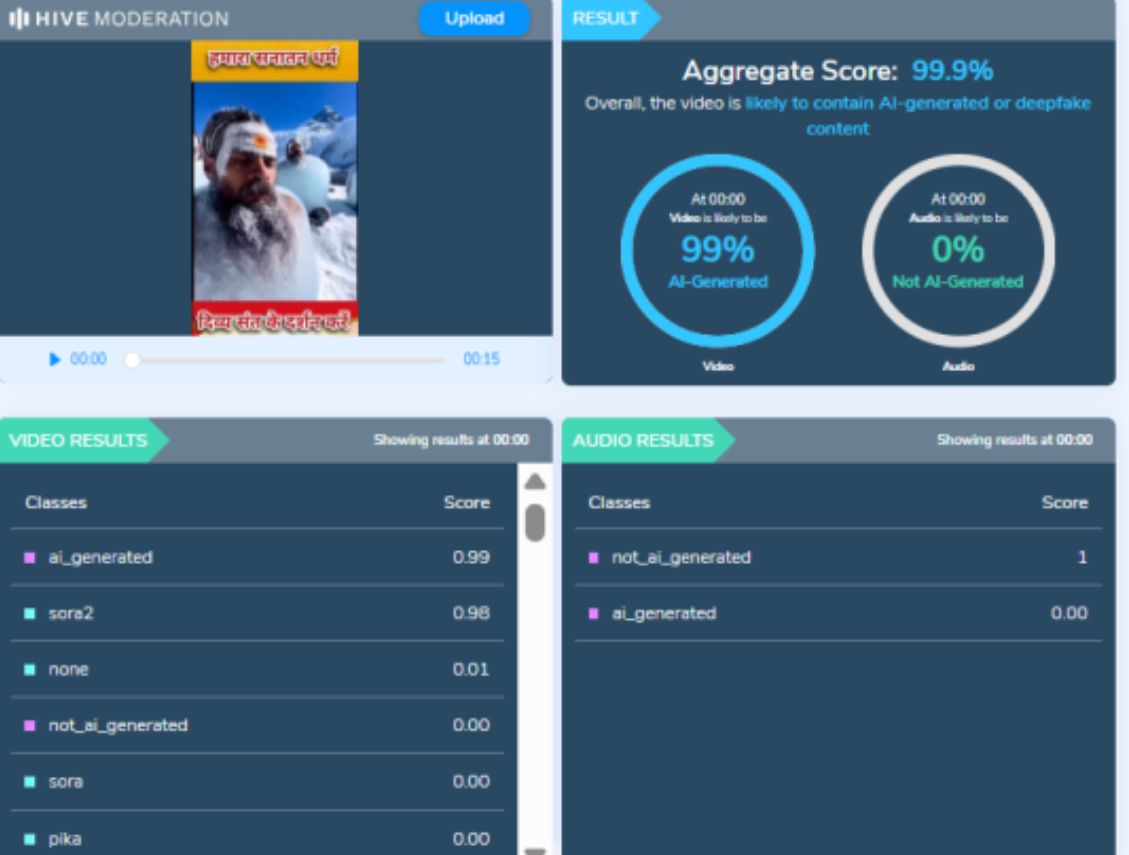
To verify the authenticity of the viral claim, CyberPeace searched relevant keywords on Google. However, no credible or reliable media reports supporting the claim were found. A close examination of the viral video raised suspicion that it may have been AI-generated. To verify this, the video was analysed using the AI detection tool Hive Moderation. According to the results, the video was found to be 99 percent AI-generated.
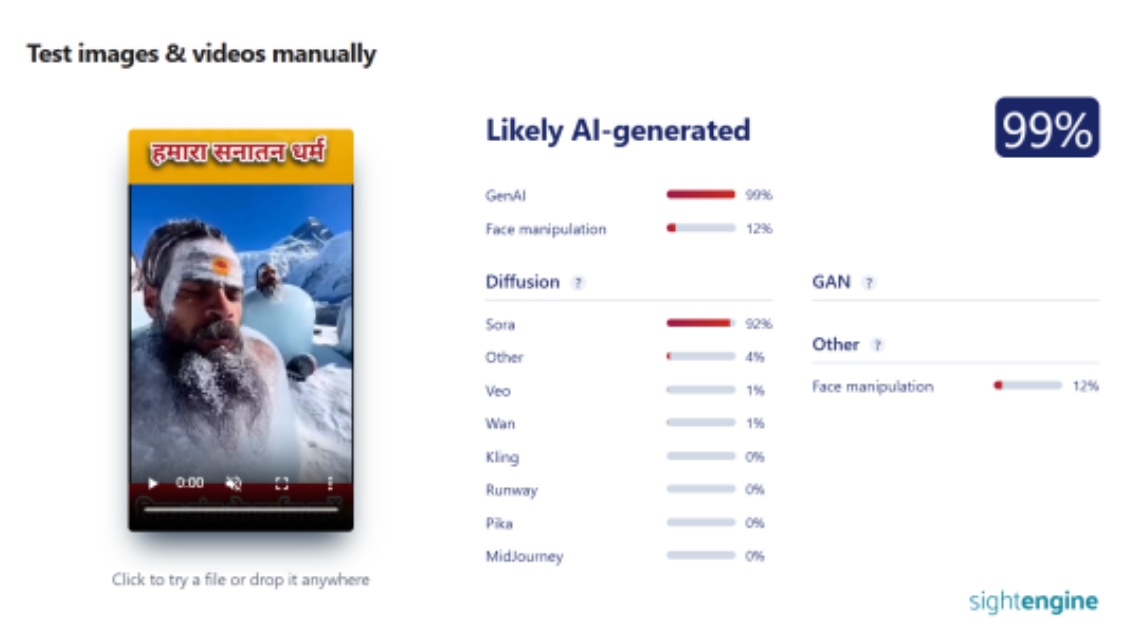
In the next step of the research, the same video was analysed using another AI detection tool, Sightengine. The results again indicated that the video was 99 percent AI-generated.
Conclusion
CyberPeace concludes that the video circulating on social media is not real. The viral video showing ascetics covered in ice was generated using artificial intelligence and does not depict an actual religious or spiritual practice.
.webp)
Introduction
In the multifaceted world of international trade and finance, cross-border transactions constitute the heart of economic relationships that span the globe. The threads that intertwine forming the fabric of global commerce are ceaselessly dynamic and exhibit an intricate pattern of complexity especially when it comes to the regulated movement of capital. It's a domain where economies connect, where businesses engage in sublime commerce, and where technology and regulation intersect at critical juncture. These guidelines will play a critical role in the regulation of capital, fortification of financial integrity, and transparency of regulatory and cross-border payments. The key highlights of this regulation include strict pre-authorization for non-bank entities, mandating specific accounts for import and export PA-CBs and a transaction ceiling of 25,00,000 Rupees.
The Vigilance of RBI
The Reserve Bank of India (RBI), ever vigilant in its shepherding role over the nation's financial stability and integrity, has taken decisive strides to dispel the haze that once clouded this critical sector. With the issuance of a revelatory circular dated October 31, 2023, the RBI has unveiled a groundbreaking framework that redefines the terrain for these pivotal financial entities, aptly christened as Payment Aggregators – Cross Border (PA-CB). In deploying this comprehensive array of regulations, the RBI demonstrates a robust commitment to harmonizing and synchronizing the oversight of payments within the country's financial fabric, extending its meticulous regulatory weave from domestic Payment Aggregators (PAs) to the PA-CBs, a sector previously undistinguished in formal oversight.
The prescriptive measures announced by the RBI are nothing short of a regulatory beacon that cuts through the fog of uncertainty, illuminating a clear path forward for entities dedicated to facilitating cross-border payment transactions pertaining to the import and export of permissible goods and services in India through online modes. Inclusiveness is a hallmark of the RBI’s directive, encompassing a diverse cadre of financial actors, ranging from Authorized Dealer (AD) banks and conventional Payment Aggregators (PAs), to the emergent breed of PA-CBs actively engaged in processing these critical international payment transactions.
Key Aspects of Regulation
One of the most striking aspects of this new regulatory regime is the RBI's insistence on pre-authorization. All non-bank entities providing PA-CB services are impelled to apply to the apex bank for authorisation by April 30, 2024. This is far from a perfunctory gesture; it represents a profound departure from the bygone era when these entities functioned under a patchwork of provisional guidelines and ad-hoc circulars. Indeed, with this resolute move, the RBI signals its intention to embrace these entities within its direct regulatory gambit, an acknowledgement of the shifting tides and progressive intricacies characteristic of cross-border payments.
The tapestry of new rules is complex, setting forth an array of prerequisites for entities aspiring for authorization. For instance, non-bank PA-CBs are obliged to register with the Financial Intelligence Unit-India (FIU-IND) as a preliminary step before commencing the application process. Moreover, the financial benchmarks set are notably rigorous. Non-banks must boast a minimum net worth of ₹15 crores at the time of the application—a figure that escalates to a robust ₹25 crores by the fiscal deadline of March 31, 2026.
Way Forward
As if these requirements weren't indicative enough of the RBI’s penchant for detail and precision, the guidelines become yet more granular when addressing specific types of PA-CBs. Import-only PA-CBs are mandatorily obliged to maintain an Import Collection Account (ICA) with an AD Category-I scheduled commercial bank, while export-only PA-CBs are instructed to maintain an Export Collection Account (ECA), which can be maintained in Indian Rupees (INR) or any permissible foreign currency. The nuance here is palpable; payments for import transactions must be received in a meticulously managed escrow account of the PA, prior to being funneled into the ICA for smooth settlement with overseas merchants.
Conversely, export-only PA-CBs' proceeds from international sales must be swiftly credited to the relevant currency ECA. This meticulous accounting ensures that the flow of funds is both transparent and traceable, adhering to the utmost standards of financial probity.
Yet, perhaps the most emphatic of the RBI's pronouncements is the establishment of a transaction ceiling. PA-CBs have their per-transaction limit capped at ₹25,00,000 for each unit of goods or services exchanged. This calculated move is transparent in its objective to mitigate risk—a crucial aspect when one considers the potential implications of these transactions on the country’s fiscal health and the integrity of its financial systems.
It is no exaggeration to declare that with these guidelines, the RBI is effectuating a seismic shift in the regulation of cross-border payment transactions. There's a fundamental transformation taking place—a metamorphosis—from a loosely defined existence of PA-CBs to one of distinct clarity, under the direct and unswerving supervisory gaze of the regulator. The compliance burden, indeed, has become heavier, yet the return is a compass that points decisively towards secure harbours.
As we embark upon the fresh horizons that these rules bring into view, it is imperative to acknowledge that the RBI's regulatory innovations represent far more than a mere codification of dos and don'ts. They embody a visionary stride towards safeguarding and fortifying the architecture of international payments, a critical component of India's burgeoning presence on the world economic stage.
Conclusion
The journey ahead, as we navigate these newly charted waters with the RBI's guidelines as our steadfast North Star, will no doubt be replete with challenges, adaptations and learning curves for the array of operational entities. But it is with confidence we can say, the path is set; the map is clear. The complex labyrinth of cross-border financial transactions is now demystified, and the RBI's clarion call beckons us towards a future marked by regulation, security, and above all else, reliability in the cosmopolitan tapestry of global trade. RBI’s guidelines provide a comprehensive framework for standardizing cross-border financial transactions in India. This decision is a monumental step towards maintaining cyber peace in cyberspace.
References:
- https://www.rbi.org.in/Scripts/NotificationUser.aspx?Id=12561&Mode=0
- https://www2.deloitte.com/in/en/pages/tax/articles/tax-alert-Regulation-of-payment-aggregator-cross-border-pa-cb.html
- https://www.jsalaw.com/newsletters-and-updates/rbis-new-guidelines-to-govern-payment-aggregators-in-cross-border-transactions/
