
Before You Post That Diwali Selfie: A Few Things Worth Thinking About
Every year, a few days before Diwali, our phone starts filling up. Rangoli photos, family reunions, new cars, sweet boxes, "we're off to Goa" stories. We enjoy all of it. We also know that somewhere, a scammer is enjoying it too, and taking notes. Festivals bring out our generosity, but also our hurry habit of sharing everything online. Fraudsters have learned to use all. So this is not a lecture about staying off the internet. It is a short guide to enjoying the festival online without handing someone the keys to your house, your bank account or your phone.
When the discount is the trap
A branded phone at half price. A timer counting down from ten minutes. “Only 8 pieces left.” None of it is new, and all of it works, because the goal is to stop the buyer from thinking. A person who pauses will compare prices, look up the seller and wonder why anyone would sell an iPhone at a loss. A person who thinks the offer vanishes in ten minutes will skip all of that.
Lucky draws and “Diwali gifts” are the same trick with a different costume. The message says a hamper has been won and a small delivery or processing fee is needed. There is no hamper. In Secunderabad, a woman reportedly lost Rs 1,40,000 to exactly this kind of festive gift offer. One small fee, then another, then a request for card details, and the money is gone.
A simple habit beats most of these: never trust the link. If a deal arrives in a message, open the brand’s own app or type the address by hand and look for the same offer. Real ones will be sitting there. Fake ones never are.
The file that looks like a greeting
Of all the festive tricks, the fake APK does the most damage. An APK is just the installer for an Android app. Apps from the Play Store get checked. A file that lands on WhatsApp or SMS gets checked by nobody, and tapping “install” hands it the run of the phone.
It arrives dressed as something harmless: a Diwali greeting app, a shopping app, a “pending challan”, a bank reward points update, a wedding invitation in file form. Once installed, it can read messages, which means the OTPs coming from the bank now reach someone else too. Some versions let the fraudster watch and control the screen.
There’s a case from Hyderabad that shows how ordinary it looks. A 69-year-old man in Azampura called a customer care number for a delivery app that turned out to be fake, was sent an installation file, and ended up losing more than Rs 1,02,000. No drama, no threats. Just a helpful voice and one tap.
A few rules cover nearly all of it. Apps come from the official store only, and even there the developer name and download count deserve a look. “Install unknown apps” should stay off in settings. Banks do not send APK files for KYC, ever. Customer care numbers belong to the official app or website, never to a search result or a comment under a post. And if a relative sends a file, a phone call to them first is cheap insurance, since their account may have been hijacked without their knowing.
If a suspicious app has already gone in, switch on airplane mode straight away, uninstall it, call the bank from a different phone and change passwords from a clean device. Speed matters more than being sure.
Fake websites that look almost right
Copying a website’s look is easy. Copying its address is impossible, so scammers settle for an address that’s close enough to pass at a glance. A swapped letter, an extra hyphen, “.shop” or “.xyz” at the end instead of “.com”. On a phone screen, in a hurry, with the kids shouting about crackers, nobody notices.
The padlock icon doesn’t settle the question either. It only says the connection is encrypted, and scam sites get padlocks as easily as real ones. What does help is a slow read of the address before typing anything in, and a bit of suspicion toward any page reached from an ad or a forwarded link. Searching for the brand and going from there takes ten seconds.
Other giveaways are boring but reliable. No cash on delivery. Only UPI or bank transfer accepted. No return policy, no working phone number, no real address. Prices lower than every other shop on earth. A page with all of those is rarely a bargain.
Holiday bookings deserve their own warning. Around Diwali, fake resort and homestay listings pop up everywhere: a smart advertisement, a “manager” chatting on WhatsApp, a convincing receipt, and then nothing after the advance is paid. Booking through the property’s official site or a known platform, and confirming on the number listed there, closes most of that door.
What the post gives away
Not every risk comes as a link. Some of it comes from the timeline itself.
“Off to Goa for a week, can’t wait!” is also a message to anyone who’d like to know when the house is empty. Holiday pictures can wait until everyone’s back. The same goes for boarding passes and train tickets, which carry a barcode and booking reference that can be used to alter or cancel a trip. They look like souvenirs. They’re closer to keys.
Photos have a habit of showing more than intended. The family standing at the front door can reveal the house number, the nameplate and the lane. A school uniform shows the school. A live location tag at the airport, then the hotel, then the restaurant, draws a neat map of where the family is and where it isn’t. Pictures of cash envelopes, jewellery and new gadgets bring likes, and also attention nobody asked for.
A useful test before hitting post: what could a stranger work out from this, and what could they do with it? If the honest answer makes the stomach drop a little, crop it, blur it or save it for later. Children’s pictures deserve extra thought, because routines are easy to piece together from a few festive posts.
Charging on the way home
Millions travel home for Diwali, and railway stations, airports and bus stands are packed. Phones are at 4%. A free USB charging point is right there, and it looks like a blessing.
It can also be a problem. A USB cable carries power and data together, so a tampered port or a planted cable can try to push malware onto a phone or pull information off it. This is called juice jacking. Modern phones usually ask whether the connected device should be trusted, but a tired traveller taps “Allow” without reading, and that tap is exactly what the attacker is hoping for.
The fix is cheap. Carry a charger and use a regular wall socket. Keep a power bank charged before leaving home. If a USB port is the only choice, use a charge-only cable or a small data blocker, and refuse any prompt asking to trust the device. A cable found lying around, or one handed over by a friendly stranger, goes nowhere near the phone. Banking and payment apps also don’t belong on public Wi-Fi, however urgent the transfer feels.
Small things worth doing this week
Two-factor authentication on email, social media and banking takes five minutes and blocks a surprising number of break-ins. A quick look at privacy settings before the festive photos go up is worth the same five minutes. And a short chat with parents and grandparents helps more than any app: show them what a fake message looks like, and tell them that no bank, courier or company will ever ask for an OTP.
If money does go missing, time is the one thing that counts. The national cybercrime helpline is 1930, and complaints can be filed at cybercrime.gov.in. Reporting within the first few hours gives the best chance of freezing the transaction before it travels further.
Light the diyas, lock the phone
None of this means a quieter Diwali. The sweets, the lights and the photographs are the point of the whole thing. It just takes the same instinct that bolts the front door at night, pointed at the phone in the hand.
Let the diyas be the only thing on display. The OTPs, the location and the travel dates can stay at home.
Wishing everyone a safe, bright and happy Diwali.

Related Blogs

Executive Summary:
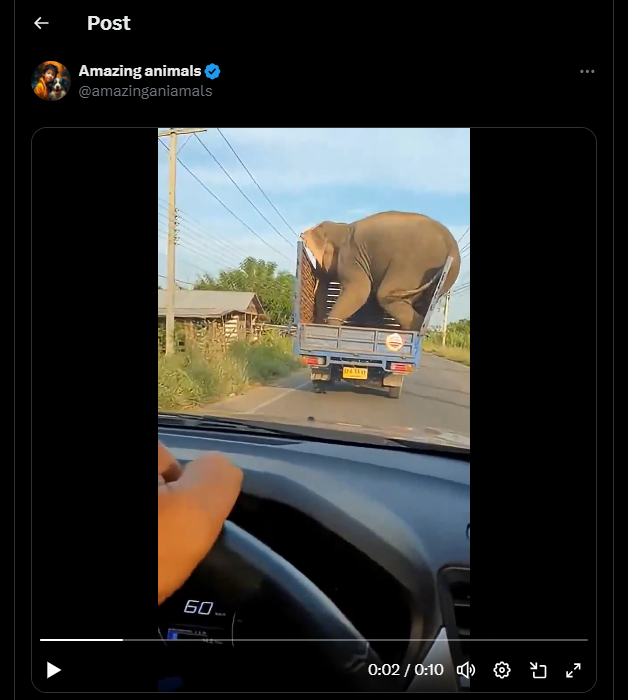
A video circulating on social media claims to show a live elephant falling from a moving truck due to improper transportation, followed by the animal quickly standing up and reacting on a public road. The content may raise concerns related to animal cruelty, public safety, and improper transport practices. A detailed examination using AI content detection tools, visual anomaly analysis indicates that the video is not authentic and is likely AI generated or digitally manipulated.
Claim:
The viral video (archive link) shows a disturbing scene where a large elephant is allegedly being transported in an open blue truck with barriers for support. As the truck moves along the road, the elephant shifts its weight and the weak side barrier breaks. This causes the elephant to fall onto the road, where it lands heavily on its side. Shortly after, the animal is seen getting back on its feet and reacting in distress, facing the vehicle that is recording the incident. The footage may raise serious concerns about safety, as elephants are normally transported in reinforced containers, and such an incident on a public road could endanger both the animal and people nearby.
Fact Check:
After receiving the video, we closely examined the visuals and noticed some inconsistencies that raised doubts about its authenticity. In particular, the elephant is seen recovering and standing up unnaturally quickly after a severe fall, which does not align with realistic animal behavior or physical response to such impact.
To further verify our observations, the video was analyzed using the Hive Moderation AI Detection tool, which indicated that the content is likely AI generated or digitally manipulated.

Additionally, no credible news reports or official sources were found to corroborate the incident, reinforcing the conclusion that the video is misleading.
Conclusion:
The claim that the video shows a real elephant transport accident is false and misleading. Based on AI detection results, observable visual anomalies, and the absence of credible reporting, the video is highly likely to be AI generated or digitally manipulated. Viewers are advised to exercise caution and verify such sensational content through trusted and authoritative sources before sharing.
- Claim: The viral video shows an elephant allegedly being transported, where a barrier breaks as it moves, causing the animal to fall onto the road before quickly getting back on its feet.
- Claimed On: X (Formally Twitter)
- Fact Check: False and Misleading

Introduction
The Chairman of Vardhman Group, Mr SP Oswal, an India-based textile manufacturer, fell victim to a cyber fraud scheme that cost him ₹7 crore. The scam unfolded on August 28 and 29, conning Mr Oswal into transferring Rs 7 crore into multiple bank accounts. As per the recent reports, the Police have managed to freeze these accounts and recover over Rs 5 crore as of now. The fraudsters convinced Mr SP Oswal that he was a suspect in a money laundering investigation and held on a “Digital Arrest”. These are sophisticated cyber frauds where cyber-criminals impersonate law enforcement officials or other authorities and target innocent individuals with manipulative tactics. The scam targets are often contacted out of the blue, on Instant messaging apps like WhatsApp and informed that their bank accounts, digital identities, or other online assets have been compromised. Criminals play into the victims' fear by threatening them with imminent arrest, legal consequences, or public humiliation if they don't cooperate with a series of urgent demands.
Posing as Officials, Fraudsters Orchestrate ₹7 Crore Scam
The investigation revealed that the fraudsters posed as members of the Central Bureau of Investigation (CBI). They had contacted Mr Oswal and claimed that his Aadhaar had been misused in a case involving fake passports and financial fraud. The imposter conducted a video call in a police uniform using a background with the CBI logo. The fraud escalated further, Mr Oswal got a fake "arrest warrant" on WhatsApp allegedly authorised by the Supreme Court. Fraudsters convinced Mr Oswal to transfer ₹7 crores to facilitate bail proceedings, claiming he was under "digital arrest". The meticulously planned scam involved fake documents, a virtual courtroom, and relentless intimidation tactics leaving Mr Oswal effectively under "digital arrest" for two days. While the police have successfully recovered over Rs 5 crore so far, this case highlights the alarming threat of digital impersonation of law enforcement authorities.
Legal Outlook on the Validity of Digital Arrests
In India, the main laws governing cyber crimes are the Information Technology Act, of 2000 and the rules made under therein, and the newly enacted Bhartiya Nyaya Sanhita, 2023. Recently enacted new criminal laws do not provide for any provision for law enforcement agencies conducting a digital arrest. The law only provides for service of the summons and the proceedings in an electronic mode. Hence, there are no provisions for conducting 'digital arrests' as per the laws of the country.
Further, It should be noted that the Indian Cyber Crime Coordination Centre (I4C), under the Ministry of Home Affairs, coordinates the activities related to combating cybercrime in the country. MHA works closely with other ministries to counter these frauds. The I4C also provides technical support to the police authorities of states/UTs for the identification and investigation of these cases.
Best Practices to Avoid Digital Arrest Scams
- To protect yourself from scams, it is crucial to verify the identity of individuals claiming to be law enforcement or government officials and use official contact channels to confirm their credentials.
- Be cautious of pressure tactics used by fraudsters, especially demands for quick payment over unverified communication platforms like WhatsApp.
- Cross-check official documents with legal advisors or relevant authorities.
- Never share sensitive personal information, such as your Aadhaar number, over phone calls, emails, or messages without verifying the request's authenticity.
- Avoid untraceable payments, such as cryptocurrency or prepaid cards, without validating the transaction's legitimacy, especially under duress.
- Stay informed on scam techniques, particularly those involving impersonation and digital threats.
- Enable Two-Factor Authentication (2FA) for sensitive online accounts to prevent misuse.
- Consult advice from legal professionals if you receive threatening communication involving digital arrest or legal actions and do not take any action on the asks of persons posing as legitimate authorities.
- In case of any cybercrime, you can file a complaint at cybercrime.gov.in or helpline number 1930. You can also seek assistance from the CyberPeace helpline at +91 9570000066.
Conclusion
The digital arrest of Vardhman Group's CEO underscores the increasing sophistication of cyber fraud schemes, which exploit fear and urgency, leading to severe financial and reputational harm. No one is immune from cybercrime, vigilance is essential at all leadership levels. While laws like the IT Act and initiatives taken by the I4C help combat cybercrime, rapidly evolving threats demand proactive safety measures. Beyond the possibility of financial loss, incidents like this jeopardise brand reputation, investor confidence, and operational stability. Be cautious of such threats and exercise due care and caution while navigating the digital landscape. Be aware of such kinds of scams and the manipulative tactics used by fraudsters to avoid them. By staying vigilant and aware we can avoid the growing scam of digital arrests.
References
- https://www.business-standard.com/companies/news/digital-arrest-and-rs-7-crore-heist-how-vardhman-group-head-was-tricked-124100100832_1.html
- https://www.hindustantimes.com/business/vardhman-group-chairman-sp-oswal-duped-of-rs-7-crore-fraudsters-posed-as-cbi-101727666912738.html
- https://www.msspalert.com/native/digital-arrests-the-new-frontier-of-cybercrime
Executive Summary
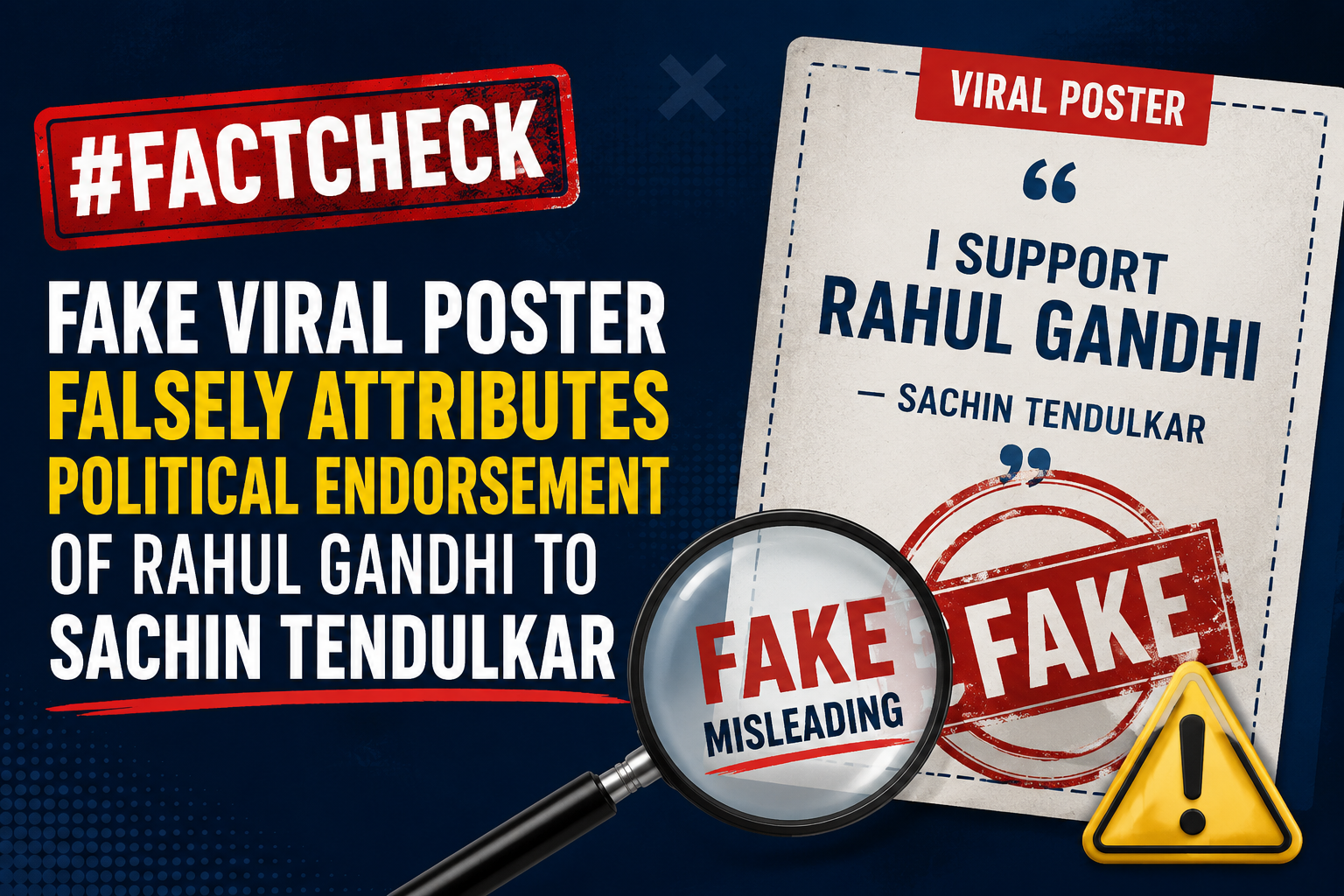
A post claiming that former Indian cricketer Sachin Tendulkar praised Congress leader Rahul Gandhi and urged people to elect him as Prime Minister is being widely circulated on social media.The viral poster falsely attributes a political statement to Sachin Tendulkar, suggesting that he has endorsed Rahul Gandhi for the post of Prime Minister. However, CyberPeace Research Wing research found the claim to be fake. Sachin Tendulkar has not made any such appeal or statement supporting Rahul Gandhi for Prime Minister.
Claim
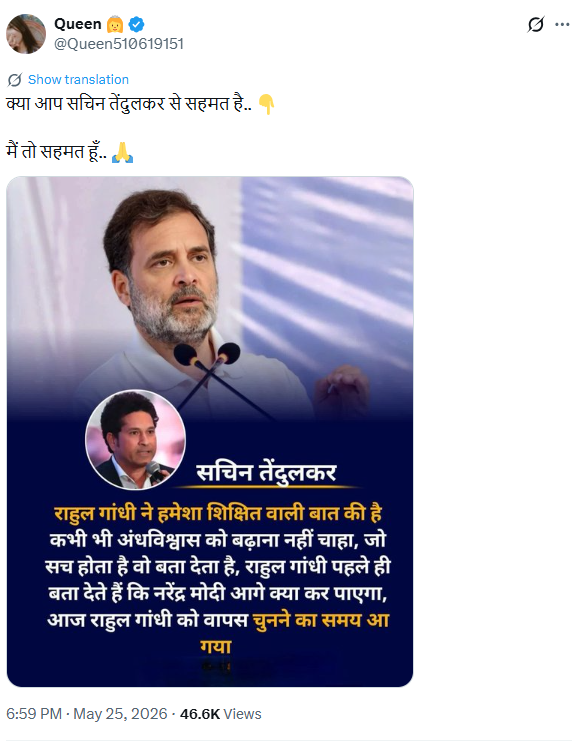
On X (formerly Twitter), a verified user “Queen” shared a viral poster claiming:“Sachin Tendulkar has always supported education and never promoted superstition. Rahul Gandhi always predicts what Narendra Modi will do next. It is time to choose Rahul Gandhi again.”
Fact Check
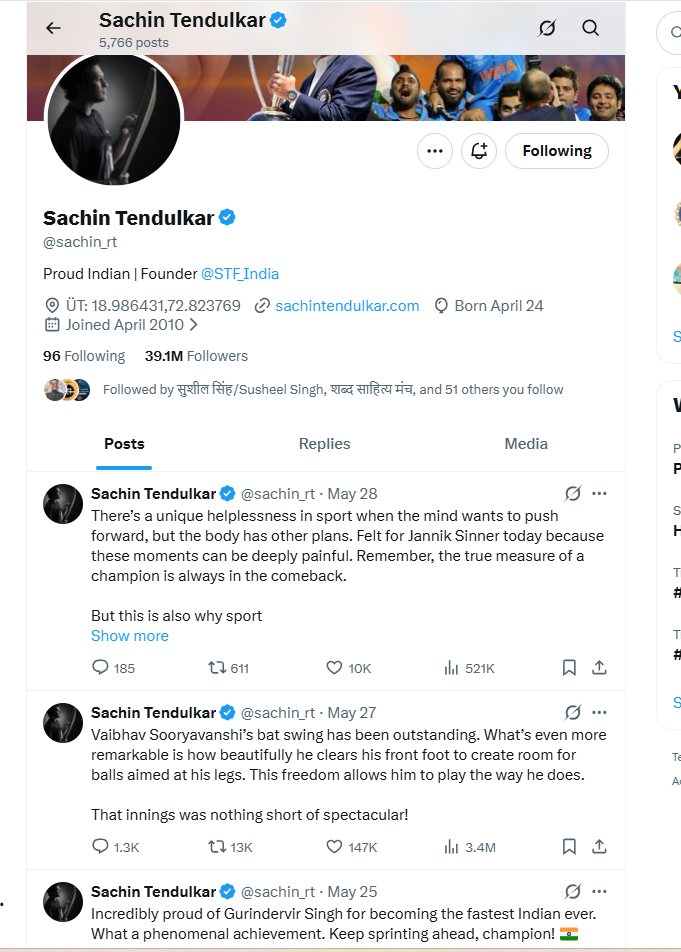
To verify the claim, we first searched for any news reports, interviews, or credible references linking Sachin Tendulkar to such a political statement. However, we found no evidence in any reliable media source or public record suggesting that he made any such remark about Rahul Gandhi or the Prime Ministership. We also reviewed Sachin Tendulkar’s official social media accounts, but found no post, video, or statement endorsing any political leader in this manner.
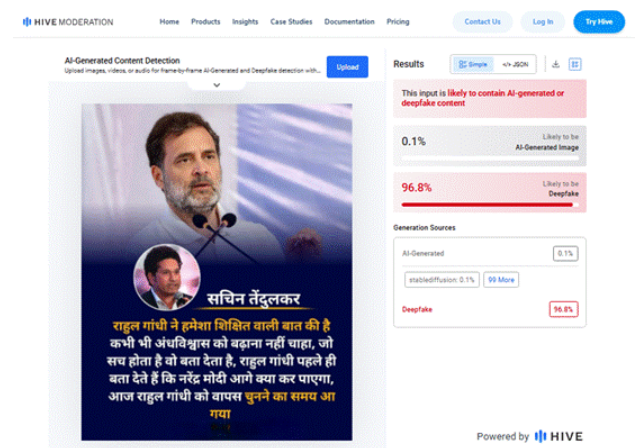
Finally, the viral poster was analysed using the AI detection tool Hive Moderation. The analysis indicated a 96.8% probability that the poster was digitally created or manipulated, suggesting possible AI-generated or edited content.
Conclusion
CyberPeace Research Wing research found the claim to be fake. Sachin Tendulkar has not made any appeal to elect Rahul Gandhi as Prime Minister. The viral poster appears to be digitally fabricated and is being shared to spread misinformation.
