
Apple's iOS 27 Can Now Tell You When You're Being Scammed, Mid-Call
Introduction
There is a particular kind of fraud that security engineers have struggled with for years, precisely because it defeats every technical safeguard by design. It is the social engineering scam, where a caller poses as your bank's department, your tax office, or a relative in trouble, and walks you, step by step, into making a payment or changing your own account details. Two-factor authentication does not stop this. Strong passwords do not stop it. The account holder is doing everything correctly, except they have been persuaded to do the wrong thing by someone skilled at sounding legitimate. With iOS 27 and iPadOS 27, released in September 2026, Apple has built a feature aimed specifically at that gap, called Impersonation Risk Detection.
What the feature actually does
The mechanism is narrower and more specific than it might first sound. Impersonation Risk Detection does not run continuously in the background scanning for scam calls the way a caller ID app might. Instead, it activates only when a supported app, not Apple's own apps necessarily, but any third party app that chooses to integrate it, requests a real time risk assessment at the exact moment a user attempts a sensitive action. Apple's own examples are specific: making a payment, changing a password, or modifying other critical account security information.
At that moment, the operating system runs an on-device analysis built on what Apple calls its Trust Insights framework. It draws on device use patterns, including the approximate number of recent phone calls and emails, Apple Account information such as app download and purchase history, and what Apple describes as interaction patterns, timing, context and basic sensor data. Crucially, Apple has been explicit that the system does not read the contents of Photos, Messages or Mail, and it does not examine the actual point of intrusion, meaning it cannot tell you whether the phone call you are currently on is itself fraudulent. What it is assessing, instead, is whether the pattern of behaviour surrounding this specific sensitive action looks statistically consistent with how a genuine user behaves, or with the pressured, rushed, coached pattern typical of someone being actively scammed.
The output is deliberately minimal. The requesting app receives only one of three labels, unknown, medium or high risk, never the underlying data that produced it. An "unknown" rating means no suspicious signs were detected, though Apple is careful to note this does not confirm the action is actually safe, only that nothing suspicious surfaced. Apple itself never sees the underlying device data used to generate the assessment either, though it does learn what type of action triggered the request in the first place. What the app then does with that risk label, whether to add a waiting period, prompt identity verification, or display an outright warning, is left entirely to the app's own design, not dictated by Apple.
Why the defaults and the fine print matter
Two details in how Apple shipped this feature are worth paying close attention to, because they reveal a lot about the threat model Apple was actually designing against. First, the feature is off by default. Users must manually navigate to Settings, then Privacy & Security, then Impersonation Risk Detection, and toggle on Share with App Developers, often requiring an Apple Account sign-in to activate. Second, and more tellingly, Apple built in a mandatory 24 hour delay before the toggle, once enabled, can actually be switched off. Apple's own guidance states plainly that if someone contacts you and insists you turn this feature off, treat that as a red flag. That is not a generic privacy disclaimer. It is Apple directly anticipating that scammers, once this feature becomes widely known, will start coaching victims to disable it mid-call, and designing a specific friction point to blunt exactly that manipulation.
Apps that have requested an assessment appear under a Recent Activity log, where users can review the specific actions that triggered each request and revoke access app by app, through a section Apple labels Reasons for Access. As of launch, Apple has not published a list of which apps actually support the feature, meaning its real world usefulness depends entirely on third party developers choosing to integrate it, something Apple cannot mandate.
How this compares to what Google has shipped earlier
Apple is not the first to market here, and the framing in early coverage of this feature, "it was just a matter of time," reflects that fairly accurately. Google began rolling out Scam Detection on Pixel phones in beta in late 2024, expanding it through 2025 using its on-device Gemini Nano model to analyse both phone calls and text messages in real time. The approaches differ in a meaningful way, though. Google's feature listens to an entire live conversation for scam-like conversational patterns, playing an audible beep at the start of a monitored call so both parties know AI analysis is active, and can interrupt mid-call with a warning. Apple's feature does not listen to anything resembling the call itself; it evaluates behavioural and account signals around a specific sensitive action a user is about to take, regardless of whether that action was prompted by a phone call, a text, or an email. Google's model is built around catching the scam as it happens in conversation; Apple's is built around catching the moment the user is about to act, irrespective of the channel that pressured them there. Both are opt-in or off by default, and both emphasise on-device processing and limited data sharing, reflecting a shared industry recognition that scam detection tools built on reading private conversations need unusually strong privacy guarantees to earn user trust.
Why this matters well beyond the US
Google has already signalled that it sees markets like India as a genuine proving ground for this category of tool, having launched Pixel-based scam detection there in November 2025 specifically citing the scale of digital fraud losses in the country, alongside partnerships with Indian financial apps including Google Pay, Paytm and Navi to warn users during risky screen-sharing sessions, a common vector in Indian banking fraud. That context matters for Apple's rollout too. Social engineering scams impersonating banks, government tax departments and law enforcement are a dominant and rapidly growing fraud category across much of Asia, and a feature that specifically targets the moment someone is being walked through a fraudulent payment, rather than relying on the victim recognising the scam themselves, addresses exactly the mechanism that most existing fraud prevention tools miss.
The honest limitation
Apple has been careful, in its own language, to frame this as a supplementary safeguard rather than a complete solution to telecom and online fraud, and that caution lines up with what the broader behavioural analytics industry has already learned the hard way. The feature depends entirely on third party app adoption that has not yet been detailed, it is switched off by default so most users will never encounter it without deliberately enabling it, and an "unknown" risk rating explicitly does not mean an action is safe, only that nothing suspicious happened to surface.
The deeper issue is one every company working on behavioural fraud detection has run into before Apple did: these systems are only as reliable as the baseline of "normal" behaviour they are measuring against, and that baseline is not stable across every type of user. Industry data on behavioural biometrics, the broader category of technology Apple's system belongs to, puts typical false positive rates for flagging new device, location, or timing combinations in the range of 15 to 25 percent before careful tuning, and practitioners in the field note that elderly users in particular tend to show higher variance in their interaction patterns, which makes them statistically harder for these models to read correctly, not easier, despite being exactly the population most targeted by impersonation scams in the first place. The risk is not hypothetical or confined to finance. In eldercare technology more broadly, a documented case from a California pilot programme saw a fall detection system switched off entirely after it generated so many false alarms that it triggered repeated, unwanted social service visits to an older adult's home, a clear illustration of what happens when a protective automated system cannot adequately account for the exact population it was built to protect.
Apple has not published performance data on how Impersonation Risk Detection behaves across these edge cases, new phones, irregular usage patterns, older users less familiar with typical app behaviour, and that silence is worth noting rather than assuming away. What Impersonation Risk Detection represents is not a solved problem, but a genuine, technically serious first attempt by a major platform to intervene at the exact moment social engineering scams succeed, the point of action, rather than relying on users to have correctly identified the deception several steps earlier. Whether it meaningfully reduces fraud losses at scale will depend less on the underlying design, which appears carefully thought through, and more on two things outside Apple's direct control: how many developers actually build it into the apps people use for banking and account security, and how well the system holds up for exactly the users who need it most.
References
- Help Net Security, "Apple's new iOS 27 feature looks for signs you're being scammed." https://www.helpnetsecurity.com/2026/09/24/apple-ios-27-impersonation-risk-detection/
- 9to5Mac, "iOS 27 adds scam-prevention feature to iPhone, here's how to enable it." https://9to5mac.com/2026/09/16/ios-27-adds-scam-prevention-feature-to-iphone-heres-how-to-enable-it/
- 9to5Mac, "Security Bite: iOS 27 now lets apps ask your iPhone if you're being scammed." https://9to5mac.com/2026/09/21/security-bite-ios-27-now-lets-apps-ask-your-iphone-if-youre-being-scammed/
- Engadget, "Apple's new iPhone and iPad security feature can protect you from scammers." https://www.engadget.com/2271157/apple-iphone-ipad-impersonator-risk-detection-new-security-feature/
- gHacks Tech News, "iOS 27 Adds Impersonation Risk Detection to Help Protect Against Social Engineering Scams." https://www.ghacks.net/2026/09/21/ios-27-adds-impersonation-risk-detection-to-help-protect-against-social-engineering-scams/
- BigGo Finance, "Apple Rolls Out On-Device Scam Detection in iOS 27 Ahead of High-Risk Transactions." https://finance.biggo.com/news/89a0ae92-1603-4ac9-aef9-b8b466e6ac40
- MacObserver, "iOS 27 Impersonation Risk Detection: How Apple's anti-scam setting works." https://www.macobserver.com/news/ios-27-impersonation-risk-detection-anti-scam-setting/
- Google Blog, "New AI-Powered Scam Detection Features to Help Protect You on Android." https://blog.google/security/new-ai-powered-scam-detection-features/
- Digital Trends, "Google Pixel 9 is getting a scam detection upgrade you'll want on your phone." https://www.digitaltrends.com/phones/google-pixel-scam-detection-gemini-nano-ai-calls-messages-safety/
- Gulf News, "Google ramps up AI scam protection in India." https://gulfnews.com/technology/media/google-ramps-up-ai-scam-protection-in-india-1.500355149

Related Blogs
Introduction
How Generative Artificial Intelligence, or GenAI, is changing the employee workday is no longer limited to writing emails or debugging code, but now also includes analysing contracts, generating reports, and much more. The use of AI tools in everyday work has become commonplace, but the speed at which companies have adopted these technologies has created a new kind of risk. Unlike threats that come from an outside attacker, Shadow AI is created inside an organisation by a legitimate employee who uses unapproved AI tools to make their work more efficient and productive. In many cases, the employee is unaware of the potential security, data privacy, and compliance risks involved in using such tools to perform their job duties.
What Is Shadow AI?
Shadow AI is when individuals use AI tools at work that aren’t provided by the company, like tools or other software programs, without the knowledge or permission of the employer. Examples of shadow AI include:
- Using personal ChatGPT or other chatbot accounts to complete tasks at the office
- Uploading business-related documents to online AI technologies for analysis or summarisation.
- Copying proprietary source code into an online AI model for debugging
- Installing browser extensions and add-ons that are not approved by IT or Security personnel.
How Shadow AI Is Harmful
1. Uncontrolled Data Exposure
When employees access or input information into their user-created AI, it becomes outside the controls of the company, such as both employee personal information and any third-party personal information, private company information (such as source code or contracts), and company internal strategies. After a user enters data into their user-created AIs, the company loses all ability to monitor how that data is stored, processed, or maintained. A data leak situation exists without a malicious cyberattack. The biggest risk of a data leak is not maliciousness but rather the loss of control and governance over sensitive data.
2. Regulatory and Legal Non-Compliance
Data protection laws like GDPR, India’s Digital Personal Data Protection (DPDP) Act, HIPAA, and other relevant sectoral laws require businesses to process data in accordance with the law, to minimise the amount of data they use, and to be accountable for their actions. Shadow AI often results in the unlawful use of personal data due to a lack of a legal basis for the processing, unauthorised cross-border data transfers, and not having appropriate contractual protections in place with their AI service providers. Regulators do not see the convenience of employees as an excuse for not complying with the law, and therefore, the organisation is ultimately responsible for any violations that occur.
3. Loss of Intellectual Property
Employees frequently use AI tools to speed up tasks involving proprietary information—debugging code, reviewing contracts, or summarising internal research. When done using unapproved AI platforms, this can expose trade secrets and intellectual property, eroding competitive advantage and creating long-term business risk.
Real-Life Example: Samsung’s ChatGPT Data Leak
In 2023, a case study exemplifying the Shadow AI risk occurred when Samsung Electronics placed a temporary ban on employee access to ChatGPT and other AI tools after reports from engineers revealed they were using ChatGPT to create debugging processes for internal source code and to summarise meeting notes. Consequently, confidential source code related to semiconductors was inadvertently uploaded onto a public AI platform. While there were no known incursions into the company’s system due to this incident, Samsung faced a significant challenge: once sensitive information is input into a public AI tool, it exists on external servers that are outside of the company’s purview or control.
As a result of this incident, Samsung restricted employee use of ChatGPT on corporate devices, issued a series of internal communications prohibiting the sharing of corporate data with public AI tools, and increased the urgency of their discussions regarding the adoption of secure, enterprise-level AI (artificial intelligence) solutions.
What Organisations Are Doing Today
Many organisations respond to Shadow AI risk by:
- Blocking access at the network level
- Circulating warning emails or policies
While these actions may reduce immediate exposure, they fail to address the root cause: employees still need AI to perform their jobs efficiently. As a result, bans often push AI usage underground, increasing Shadow AI rather than eliminating it.
Why Blocking AI Does Not Work—Governance Does
History has demonstrated that prohibition does not work - we see this when trying to block access to cloud storage, instant messaging and collaboration tools. Employees are forced to use personal devices and/or accounts when their employers block AI, which means employers do not have real-time visibility into how their employees are using these technologies, and creates friction with the security and compliance team as they try to enforce the types of tools their employees can use. Prohibiting AI adoption will not stop it from being adopted; it will just create a challenge for employers regarding how safe and responsible it is. The challenge for effective organisations is therefore to shift from denial and develop governance-first AI strategies aimed at controlling data usage, protection and security, rather than merely restricting access to a list of specific tools.
Shadow AI: A Silent Legal Liability Under the GDPR
Shadow AI isn't a problem for the Information Technology Department; it is a failure of Governance, Compliance and Law. By using AI tools that have not been approved as a result, the organisation processes personal data without a lawful basis (Article 6 of the General Data Protection Regulation (GDPR)), repurposes data for use beyond its original intent and in breach of the Purpose Limitation (Article 5(1)(b)), and routinely exceeds necessity and in breach of Data Minimisation (Article 5(1)(c)). The outcome of these actions is the use of tools that involve International Data Transfers Without Authorisation and are therefore in breach of Chapter V, and violate Article 32 because there are no enforceable safeguards in place. Most significantly, the failure to demonstrate Oversight, Logging and Control under Articles 5(2) and 24 constitutes a failure in Accountability. Therefore, from a Regulatory perspective, Shadow AI is not accidental and is not defensible.
The Right Solution: Secure and Governed AI Adoption
1. Provide Approved AI Tools
Employers have an obligation to supply business-approved AI technology for helping workers to be productive while maintaining maximum protections, like storing data separately and not using employees' data for training a model; defining how long data is kept, and the rules around deleting that data. When employees are provided with verified and secure AI options that align with their work processes, they will rely significantly less on Shadow AI.
2. Enforce Zero-Trust Data Access
The governance of AI systems must follow the principles of "zero trust," granting access to data only through the principle of "least privilege," which means that data access will only be allowed by the system user, and providing continuous verification of user-identity and context; this supports and helps establish context-aware controls to monitor and track all user activities, which will be especially important as agent-like AI systems become increasingly autonomous and are capable of operating at machine-speed where even small errors in configuration, will result in rapid and large expose to data.
3. Apply DLP and Audit Logging
It is important to have robust data loss prevention measures in place to protect sensitive data that is sent outside an organisation. The first end user or machine that accesses the data should be detailed in a comprehensive audit log that indicates when and how the data is accessed. In combination with other controls, these measures create accountability, comply with regulations, and assist with appropriately detecting and responding to incidents.
4. Maintain Visibility Across AI, Cloud, and SaaS
Security teams need unified visibility across AI tools, personal cloud applications, and SaaS platforms. Risks move across systems, and controls must follow the data wherever it flows.
Conclusion
This new threat exposes an organisation to the risk of data loss through leaks, regulatory fines, liability for the loss of intellectual property, and reputational damage, all of which can occur without any intent to cause harm. The way forward is not to block AI, but to adopt a clear framework built on governance, visibility, and secure enablement. This approach allows organisations to use AI with confidence, while ensuring trust, accountability, and effective oversight to protect data and support AI in reaching its full transformative potential. AI use is encouraged, but it must be done responsibly, ethically, and securely.
References
- https://bronson.ai/resources/shadow-ai/
- https://www.varonis.com/blog/shadow-ai
- https://www.waymakeros.com/learn/gdpr-hipaa-shadow-ai-compliance-nightmare
- https://www.forbes.com/sites/siladityaray/2023/05/02/samsung-bans-chatgpt-and-other-chatbots-for-employees-after-sensitive-code-leak/
- https://www.usatoday.com/story/special/contributor-content/2025/05/23/shadow-ai-the-hidden-risk-in-todays-workplace/83822081007
Executive Summary
A video of US Secretary of State Marco Rubio is rapidly going viral on social media, in which he can allegedly be heard making a statement regarding the 2025 India-Pakistan conflict. Along with the video, it is being claimed that the US played a crucial role in ending the conflict between the two countries, but India was the first to initiate a ceasefire with Pakistan. Users are sharing this video believing it to be true.
Research by the CyberPeace Research Wing revealed that the video has been digitally manipulated. Rubio did state that the United States played a role in ending the conflict, but he never said that India was the first to request a ceasefire from Pakistan. This alleged statement was not part of the original video and was added later to alter the clip.
Claim
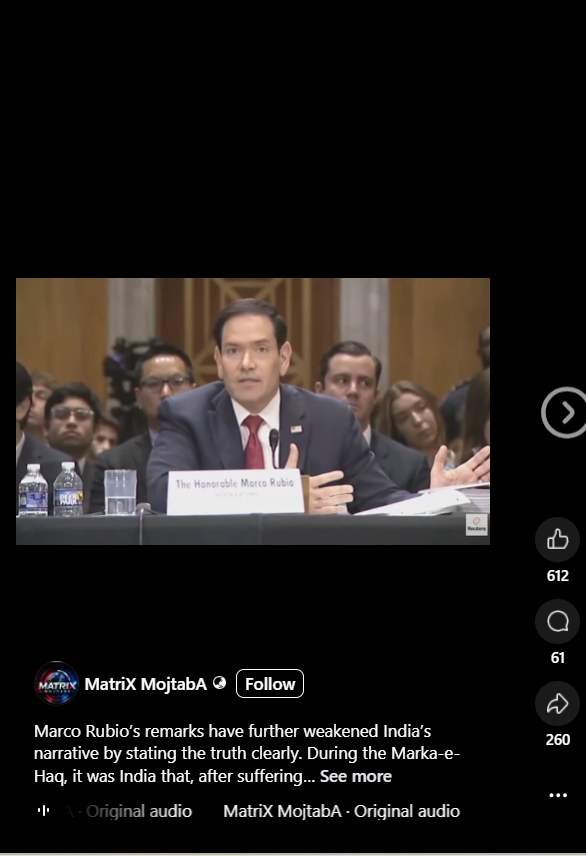
A user on a Facebook page shared the viral video and wrote, "Marco Rubio's statement has clearly brought out the truth, weakening India's claim. During 'Maarka-e-Haq', after suffering heavy losses, India was the first party to request a ceasefire from Pakistan. This highlights the gap between India's public claims and the ground reality, where the military..." The post link, archive link, and screenshot can be seen below. https://www.facebook.com/reel/1015648544746728
https://www.facebook.com/reel/1015648544746728
Fact Check
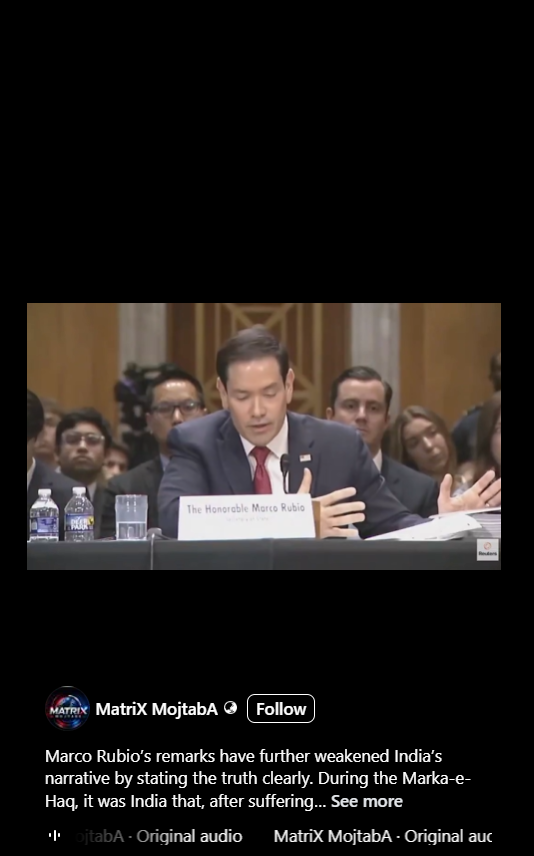
We investigated the viral video using the InVid tool and extracted several of its keyframes. These keyframes were then subjected to a reverse image search via Google Lens. The investigation revealed that the exact same video had been shared on social media previously, showing the same background and setting. The post link and screenshot can be seen below.
https://www.facebook.com/reel/1015648544746728
In the next step of our investigation, we found a video published on Reuters' official YouTube channel on June 2, 2026, whose background matches the viral video. However, nowhere in this original video is Marco Rubio heard saying that India was the first to request a ceasefire from Pakistan. The post link and screenshot can be seen below.
https://www.youtube.com/watch?v=qSpp5IYO6Cs

At the 2-hour 8-minute 55-second mark of the Reuters video, Rubio only states that the US played a role in ending the India-Pakistan conflict. Following this, he discusses the Thailand-Cambodia conflict. This makes it clear that the alleged statement in the viral video was digitally added or edited in, and is not part of the original footage.
Taking the investigation further, we scanned the suspicious audio portion of the viral video using the AI detection tool 'Resemble AI'. According to the analysis results, clear signs of audio manipulation were detected.
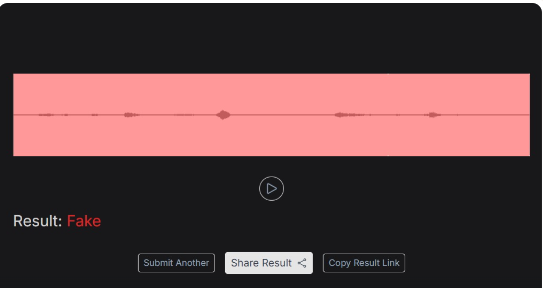
Conclusion:
Our investigation revealed that the video has been digitally manipulated. Rubio did state that the United States played a role in ending the conflict, but he never said that India was the first to request a ceasefire from Pakistan. This alleged statement was not part of the original video and was altered by adding it later.

Introduction
In an era when misinformation spreads like wildfire across the digital landscape, the need for effective strategies to counteract these challenges has grown exponentially in a very short period. Prebunking and Debunking are two approaches for countering the growing spread of misinformation online. Prebunking empowers individuals by teaching them to discern between true and false information and acts as a protective layer that comes into play even before people encounter malicious content. Debunking is the correction of false or misleading claims after exposure, aiming to undo or reverse the effects of a particular piece of misinformation. Debunking includes methods such as fact-checking, algorithmic correction on a platform, social correction by an individual or group of online peers, or fact-checking reports by expert organisations or journalists. An integrated approach which involves both strategies can be effective in countering the rapid spread of misinformation online.
Brief Analysis of Prebunking
Prebunking is a proactive practice that seeks to rebut erroneous information before it spreads. The goal is to train people to critically analyse information and develop ‘cognitive immunity’ so that they are less likely to be misled when they do encounter misinformation.
The Prebunking approach, grounded in Inoculation theory, teaches people to recognise, analyse and avoid manipulation and misleading content so that they build resilience against the same. Inoculation theory, a social psychology framework, suggests that pre-emptively conferring psychological resistance against malicious persuasion attempts can reduce susceptibility to misinformation across cultures. As the term suggests, the MO is to help the mind in the present develop resistance to influence that it may encounter in the future. Just as medical vaccines or inoculations help the body build resistance to future infections by administering weakened doses of the harm agent, inoculation theory seeks to teach people fact from fiction through exposure to examples of weak, dichotomous arguments, manipulation tactics like emotionally charged language, case studies that draw parallels between truths and distortions, and so on. In showing people the difference, inoculation theory teaches them to be on the lookout for misinformation and manipulation even, or especially, when they least expect it.
The core difference between Prebunking and Debunking is that while the former is preventative and seeks to provide a broad-spectrum cover against misinformation, the latter is reactive and focuses on specific instances of misinformation. While Debunking is closely tied to fact-checking, Prebunking is tied to a wider range of specific interventions, some of which increase motivation to be vigilant against misinformation and others increase the ability to engage in vigilance with success.
There is much to be said in favour of the Prebunking approach because these interventions build the capacity to identify misinformation and recognise red flags However, their success in practice may vary. It might be difficult to scale up Prebunking efforts and ensure their reach to a larger audience. Sustainability is critical in ensuring that Prebunking measures maintain their impact over time. Continuous reinforcement and reminders may be required to ensure that individuals retain the skills and information they gained from the Prebunking training activities. Misinformation tactics and strategies are always evolving, so it is critical that Prebunking interventions are also flexible and agile and respond promptly to developing challenges. This may be easier said than done, but with new misinformation and cyber threats developing frequently, it is a challenge that has to be addressed for Prebunking to be a successful long-term solution.
Encouraging people to be actively cautious while interacting with information, acquire critical thinking abilities, and reject the effect of misinformation requires a significant behavioural change over a relatively short period of time. Overcoming ingrained habits and prejudices, and countering a natural reluctance to change is no mean feat. Developing a widespread culture of information literacy requires years of social conditioning and unlearning and may pose a significant challenge to the effectiveness of Prebunking interventions.
Brief Analysis of Debunking
Debunking is a technique for identifying and informing people that certain news items or information are incorrect or misleading. It seeks to lessen the impact of misinformation that has already spread. The most popular kind of Debunking occurs through collaboration between fact-checking organisations and social media businesses. Journalists or other fact-checkers discover inaccurate or misleading material, and social media platforms flag or label it. Debunking is an important strategy for curtailing the spread of misinformation and promoting accuracy in the digital information ecosystem.
Debunking interventions are crucial in combating misinformation. However, there are certain challenges associated with the same. Debunking misinformation entails critically verifying facts and promoting corrected information. However, this is difficult owing to the rising complexity of modern tools used to generate narratives that combine truth and untruth, views and facts. These advanced approaches, which include emotional spectrum elements, deepfakes, audiovisual material, and pervasive trolling, necessitate a sophisticated reaction at all levels: technological, organisational, and cultural.
Furthermore, It is impossible to debunk all misinformation at any given time, which effectively means that it is impossible to protect everyone at all times, which means that at least some innocent netizens will fall victim to manipulation despite our best efforts. Debunking is inherently reactive in nature, addressing misinformation after it has grown extensively. This reactionary method may be less successful than proactive strategies such as Prebunking from the perspective of total harm done. Misinformation producers operate swiftly and unexpectedly, making it difficult for fact-checkers to keep up with the rapid dissemination of erroneous or misleading information. Debunking may need continuous exposure to fact-check to prevent erroneous beliefs from forming, implying that a single Debunking may not be enough to rectify misinformation. Debunking requires time and resources, and it is not possible to disprove every piece of misinformation that circulates at any particular moment. This constraint may cause certain misinformation to go unchecked, perhaps leading to unexpected effects. The misinformation on social media can be quickly spread and may become viral faster than Debunking pieces or articles. This leads to a situation in which misinformation spreads like a virus, while the antidote to debunked facts struggles to catch up.
Prebunking vs Debunking: Comparative Analysis
Prebunking interventions seek to educate people to recognise and reject misinformation before they are exposed to actual manipulation. Prebunking offers tactics for critical examination, lessening the individuals' susceptibility to misinformation in a variety of contexts. On the other hand, Debunking interventions involve correcting specific false claims after they have been circulated. While Debunking can address individual instances of misinformation, its impact on reducing overall reliance on misinformation may be limited by the reactive nature of the approach.
.png)
CyberPeace Policy Recommendations for Tech/Social Media Platforms
With the rising threat of online misinformation, tech/social media platforms can adopt an integrated strategy that includes both Prebunking and Debunking initiatives to be deployed and supported on all platforms to empower users to recognise the manipulative messaging through Prebunking and be aware of the accuracy of misinformation through Debunking interventions.
- Gamified Inoculation: Tech/social media companies can encourage gamified inoculation campaigns, which is a competence-oriented approach to Prebunking misinformation. This can be effective in helping people immunise the receiver against subsequent exposures. It can empower people to build competencies to detect misinformation through gamified interventions.
- Promotion of Prebunking and Debunking Campaigns through Algorithm Mechanisms: Tech/social media platforms may promote and guarantee that algorithms prioritise the distribution of Prebunking materials to users, boosting educational content that strengthens resistance to misinformation. Platform operators should incorporate algorithms that prioritise the visibility of Debunking content in order to combat the spread of erroneous information and deliver proper corrections; this can eventually address and aid in Prebunking and Debunking methods to reach a bigger or targeted audience.
- User Empowerment to Counter Misinformation: Tech/social media platforms can design user-friendly interfaces that allow people to access Prebunking materials, quizzes, and instructional information to help them improve their critical thinking abilities. Furthermore, they can incorporate simple reporting tools for flagging misinformation, as well as links to fact-checking resources and corrections.
- Partnership with Fact-Checking/Expert Organizations: Tech/social media platforms can facilitate Prebunking and Debunking initiatives/campaigns by collaborating with fact-checking/expert organisations and promoting such initiatives at a larger scale and ultimately fighting misinformation with joint hands initiatives.
Conclusion
The threat of online misinformation is only growing with every passing day and so, deploying effective countermeasures is essential. Prebunking and Debunking are the two such interventions. To sum up: Prebunking interventions try to increase resilience to misinformation, proactively lowering susceptibility to erroneous or misleading information and addressing broader patterns of misinformation consumption, while Debunking is effective in correcting a particular piece of misinformation and having a targeted impact on belief in individual false claims. An integrated approach involving both the methods and joint initiatives by tech/social media platforms and expert organizations can ultimately help in fighting the rising tide of online misinformation and establishing a resilient online information landscape.
References
- https://mark-hurlstone.github.io/THKE.22.BJP.pdf
- https://futurefreespeech.org/wp-content/uploads/2024/01/Empowering-Audiences-Through-%E2%80%98Prebunking-Michael-Bang-Petersen-Background-Report_formatted.pdf
- https://newsreel.pte.hu/news/unprecedented_challenges_Debunking_disinformation
- https://misinforeview.hks.harvard.edu/article/global-vaccination-badnews/
